Grades, report cards and transcripts, on your own grading scheme.
Mark the way your institution marks: numbers, descriptors or both. Classter works out the final mark, sends report cards in one run and issues transcripts from the record.
| Student | Test 1 | Lab | Test 2 | Average |
|---|---|---|---|---|
| Anna T. | 17 | 18 | 16 | 17.0 |
| Daniel K. | 11 | 9 | 12 | 10.7 |
| Leo P. | 14 | 15 | 13 | 14.0 |
| Sofia M. | 15 | 13 | 12 | 13.3 |
Show the real screen
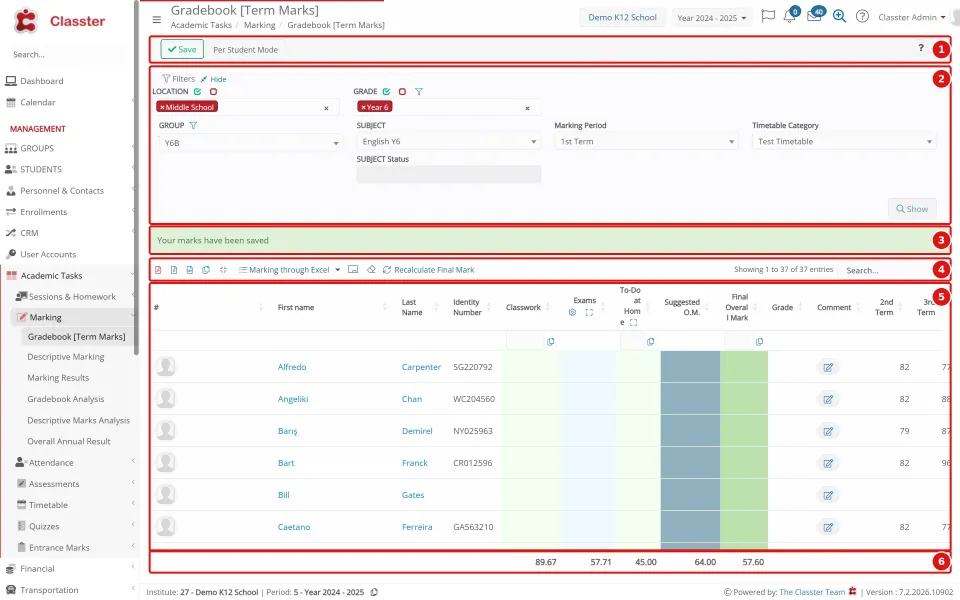
Grades and transcripts in Classter, in four answers.
Can Classter handle our grading system?
Very likely. In Classter, grading scales, descriptors and how coursework, exams and homework combine are all settings. Teachers enter marks once and Classter works out the final mark by your rules, with a second reviewer where you need one. Bring an old report card to the demo and we will set it up live.
Last checked Nov 2026How does Classter produce report cards?
Choose the term and the year groups, and Classter builds every report card in the background from your own template, logo and languages. It then emails each report card to the family or saves it to a shared folder, and publishes it to the parent app only when you say so.
Last checked Nov 2026Does Classter issue transcripts with credits and GPA?
Yes. Credits, grades and GPA already sit on the Classter student record, so a transcript with every course and term is issued in a click. Certificates and letters use your own templates, digital diplomas go out through EDiploma, and the history stays on the record for alumni requests.
Last checked Nov 2026How does AI exam scheduling work in Classter?
Classter's AI exam scheduler, New since Oct 2026, builds a first draft of the exam timetable from your period, rooms and rules. It finds a day, a slot and a room for every exam it can, keeps teachers free to invigilate, and lists any exam it cannot place with the reason. Nothing is saved until you click Save.
Last checked Nov 2026Your grading scheme, not ours.
Set your scales, your descriptors and how marks combine. Teachers enter marks once, and Classter calculates the final mark the way your rules say.
- Numeric and descriptive marking, or both
- Marking scenarios: how coursework, exams and homework combine
- A second reviewer where your rules need one
- Outcomes and annual results per student
| Student | Test 1 | Lab | Test 2 | Average |
|---|---|---|---|---|
| Anna T. | 17 | 18 | 16 | 17.0 |
| Daniel K. | 11 | 9 | 12 | 10.7 |
| Leo P. | 14 | 15 | 13 | 14.0 |
| Sofia M. | 15 | 13 | 12 | 13.3 |
Show the real screen
Report cards for the whole school, in one run.
Choose the term and the year groups. Classter builds every report card in the background and emails it to the family, or saves it to a shared folder.
- Your template, your logo, your languages
- Hundreds of report cards generated in the background
- Delivered by email or to a file share
- Published to the parent app when you say so
| Group | Template | Delivery |
|---|---|---|
| Year 7 | Report card · EN | Emailed to parents |
| Year 8 | Report card · EN | Emailed to parents |
| Year 9 | Report card · EN | Generating |
Transcripts and certificates, from the record.
Credits, grades and GPA are already on the record, so a transcript is a click. Certificates use your own templates, and digital diplomas go out through EDiploma.
- Transcripts with credits and GPA
- Certificates and letters from your templates
- Digital diplomas through EDiploma
- History kept for alumni requests
| Course | Credits | Grade | Term |
|---|---|---|---|
| Marketing Analytics | 6 | A | Autumn 2026 |
| Corporate Finance | 6 | B+ | Autumn 2026 |
| Business Law | 6 | A- | Spring 2026 |
| Data for Managers | 6 | A | Spring 2026 |
Nobody forgets to mark.
Classter reminds teachers about marks that are late, tells heads of year when marks are ready to publish, and alerts tutors when a student falls under a score.
- Reminders for late marking and publication
- Mark-review reminders for second reviewers
- Alerts when a student is over or under a score you set
- Upcoming assessment reminders for students
| Alert | Sent to | When |
|---|---|---|
| Term marks not entered: Physics 10A | Teacher | Daily until done |
| Marks ready to publish: Year 9 | Head of year | Mon 08:00 |
| Second review pending: 6 scripts | Second reviewer | Today |
| Student under 10 in 2 subjects | Tutor | When it happens |
Every exam placed, or a reason why not.
Choose the period, the rooms and the rules. A constraint solver finds a day, a slot and a room for every exam, and keeps teachers free to invigilate. Add wishes in plain words. Anything it cannot place is listed with the reason, and nothing is saved until you click Save.
Marks in from where they are set. Diplomas out to where they are checked.
Turnitin for originality, your LMS for coursework, EDiploma for digital diplomas.
Questions buyers ask about grades & transcripts.
Can Classter handle our grading system?
We are a college. Credits, GPA and transcripts?
Do you produce ministry or exam-board formats?
Do marks come across from Moodle or Canvas?
Can parents see marks before we are ready?
How long does a report-card run take for a large school?
Bring your hardest question. We'll start there.
A 30-minute call on Teams with a Classter specialist for your country. Price first, then the parts you care about.