School timetable and attendance software. Build the week once, take attendance once.
Plan lessons, rooms and teachers with clashes caught as you go. Every lesson becomes a register, and parents hear about an absence the same morning.
| Mon | Tue | Wed | Thu | Fri | |
|---|---|---|---|---|---|
| 08:30 | Maths | English | Physics | History | Maths |
| 09:20 | Greek | Chemistry | PE | English | Music |
| 10:20 | Biology | Maths | Art | Physics | English |
| 11:10 | History | Greek | Maths | IT | Biology |
| 12:10 | Chemistry | Music | English | Maths | PE |
Show the real screen
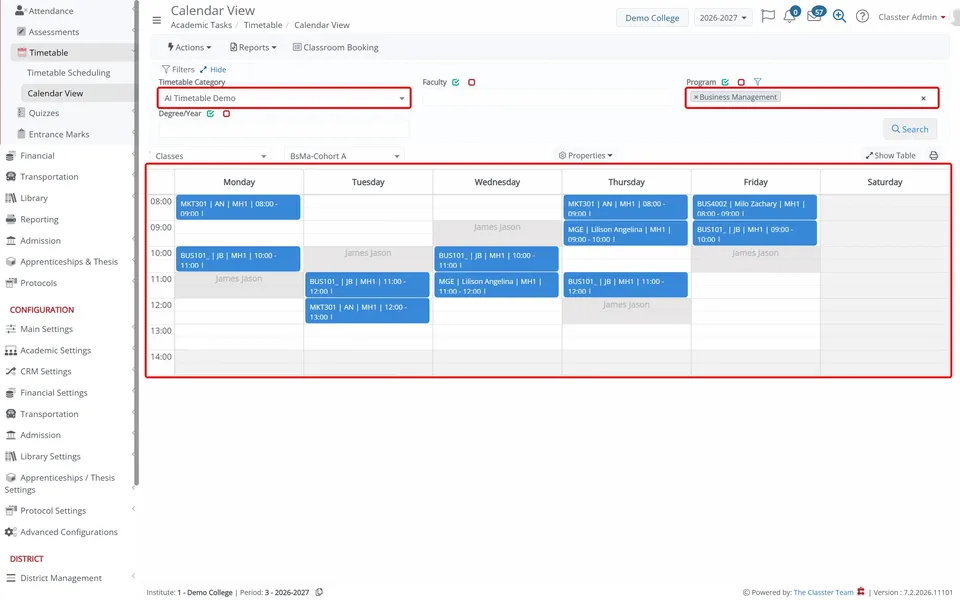
Timetables and attendance in Classter, in four answers.
How does Classter build a school timetable?
In Classter you set your constraints, place lessons and book rooms and teachers, and clashes show while you plan. Each lesson then becomes a session for the whole term in one step. You can also import a timetable from Untis or aSc Timetables, or ask AI timetable scheduling (New, Nov 2026) for a first draft.
Last checked Nov 2026How do teachers take attendance in Classter?
Teachers take the register from the lesson in the Classter app or the portal, on a phone or a laptop. Per-lesson, daily and service registers, such as the bus, all feed the same student record, and QR codes or cards work for check-in. Each register is taken once and feeds every report that needs it.
Last checked Nov 2026Can parents be told about an absence automatically?
Yes. When a teacher marks a student absent, Classter sends the family a message the same morning by app, SMS, Viber or email, in the channels you switch on. Rules also alert tutors about unjustified absences or students close to a limit you set, before the pattern becomes a problem.
Last checked Nov 2026Does Classter cope with large timetables and many campuses?
Classter books rooms and teachers live across the whole institution, so two classes never take the same room, and each campus can keep its own periods. For large colleges and groups, Classter tests the timetable with your real data during implementation, before go-live, rather than promising a size it has not checked.
Last checked Nov 2026A week with no clashes.
Set your constraints, place lessons and book rooms and teachers. Clashes show while you plan, not on Monday morning. Each lesson then becomes a session for the whole term.
- Rooms and teachers booked live, so two people never take the same room
- Lessons turned into sessions for the term in one step
- Import from Untis or aSc Timetables if you plan there
- Room and resource booking for events
| Mon | Tue | Wed | Thu | Fri | |
|---|---|---|---|---|---|
| 08:30 | Maths | English | Physics | History | Maths |
| 09:20 | Greek | Chemistry | PE | English | Music |
| 10:20 | Biology | Maths | Art | Physics | English |
| 11:10 | History | Greek | Maths | IT | Biology |
| 12:10 | Chemistry | Music | English | Maths | PE |
Show the real screen
One register per lesson, taken once.
Teachers take the register from the lesson, on a laptop or a phone. Daily, per-lesson and service registers, such as the bus, all feed the same record.
- Per-lesson, daily and service attendance
- QR code and card check-in
- Fast entry and a weekly grid for the office
- Limits per student, with the count kept for you
| Anna T. | Present |
| Daniel K. | Absent · parents notified 08:16 |
| Leo P. | Late 10 min |
| Sofia M. | Present |
Show the real screen
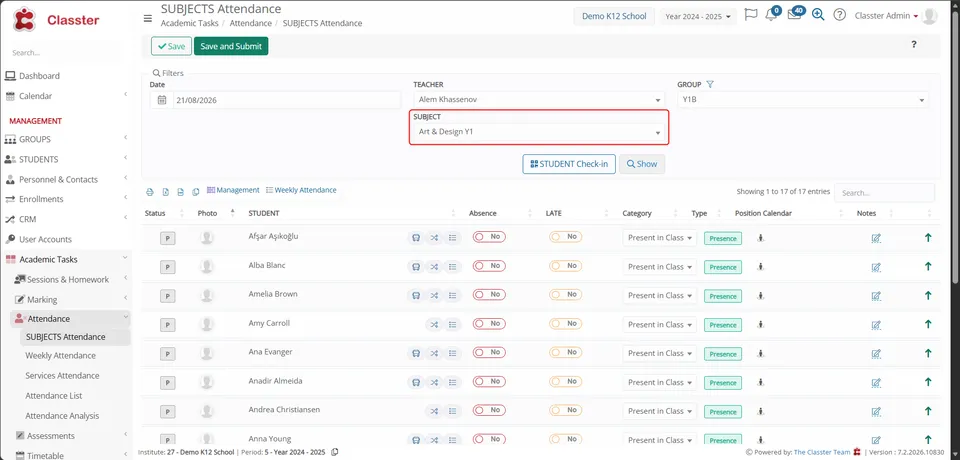
Does a parent know their child is absent before break?
When a teacher saves an absence, Classter tells the family by app, SMS, email or Viber. You choose which statuses send a message and whether a family gets one message a day. Patterns reach the tutor before they become a problem.
- Automatic absence alerts to parents the same morning
- Alerts on unjustified absences and limits you set
- Parents report a planned absence in advance, in the app
- Attendance counts as one signal in the Early Warning System
- Tell families about absences
Where do you record incidents and rewards, and who gets to see them?
Teachers record remarks and incidents on the student record, with a category, an approval step and the people to notify. Positive and negative points add up over the term, and families can hear the good news too.
- Remarks and incidents with categories and visibility rules
- Bullying recorded as an incident type, seen only by the staff you choose
- Positive and negative points, with badges
- Time-limited notes for teachers, such as "no PE for two weeks"
- Behaviour sits next to attendance and marks for the tutor
- +5 points: helped run the science fair
- +2 points: homework on time all month
- Remark: late to registration three times
- Incident: playground, seen by head of year only
Illustrative data.
A first draft of the week, built around your rules.
Choose the groups and lock the lessons you want to keep. A constraint solver places subjects, teachers and rooms, and you add wishes in plain words, such as "keep Friday afternoons free". You adjust the draft, then save. Attendance insights writes a short read on one student's attendance, set against their group.
Plan where you plan. Alert where families read.
Bring the timetable in from Untis or aSc. Alerts go out by app, SMS, Viber or email.
Questions buyers ask about timetable & attendance.
We plan in Untis or aSc. Do we have to stop?
Can teachers take attendance on their phone?
Does the AI build our whole timetable?
We have hundreds of teachers and rooms. Will it cope?
Can we report attendance to the ministry?
Do parents need the app to get absence alerts?
Can we record behaviour incidents and rewards?
Bring your hardest question. We'll start there.
A 30-minute call on Teams with a Classter specialist for your country. Price first, then the parts you care about.