Classter product tour: five real flows in five minutes.
Click through how Classter handles the moments that matter, on simplified screens with illustrative data. No form, no sign-up.
Five flows, one step at a time.
Enquiry to enrolled, absence to parent alert, an AI exam schedule, term fee to parent payment, and asking Epicurus. Pick one and click through.
01 Enquiry to enrolled
- Enquiry to enrolled · Step 1 of 5
A parent applies online.
Your online form, in your words and your languages. Documents, consents and an application fee can be part of it. Where it applies, identity is checked with eIDAS.
Apply for September 2027Step 2 of 4StudentNikos PapadakisDate of birth14/03/2013ProgrammeYear 9ParentMaria PapadakiDocumentsBirth certificate.pdf · School report.pdfConsentPhotos for school use: yesContinueSimplified view of the Classter portal. Illustrative data. - Enquiry to enrolled · Step 2 of 5
The application lands in your pipeline.
Each intake has its own pipeline, from enquiry to enrolled. The source of the enquiry is kept, so you know which campaign worked.
Intake September 2027Share application formEnquiry14M. ByrneL. WalshApplied9K. DoyleS. NolanInterview4R. KellyOffer3A. BurkeEnrolled21J. RyanShow the real screen
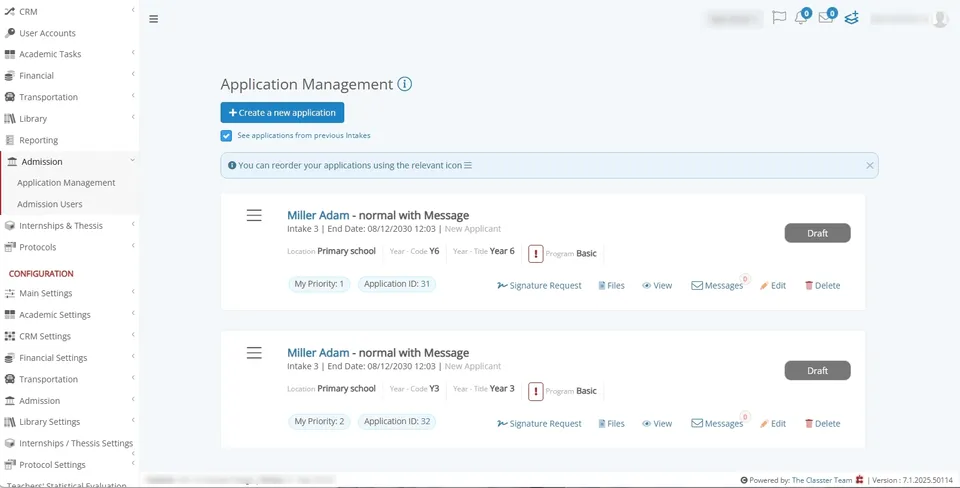
Screenshot from the Classter manual, 2024. Simplified view of the Classter portal. Illustrative data. - Enquiry to enrolled · Step 3 of 5
Interview, assessment, offer.
Applicants book their own interview slot. You record entrance assessments and points, then send the offer. The parent accepts online.
Intake September 2027Share application formEnquiry14M. ByrneL. WalshApplied9K. DoyleS. NolanInterview4R. KellyOffer3A. BurkeEnrolled21J. RyanShow the real screen
Screenshot from the Classter manual, 2024. Simplified view of the Classter portal. Illustrative data. - Enquiry to enrolled · Step 4 of 5
Accepted: the record is ready.
Accepting the offer creates the student record with the family attached, and the fee arrangement from your price list. Nobody retypes a thing.
Nikos Papadakis · Year 9 · Payer: Maria PapadakiDifference check 0.00Instalment Starting Final Pay date Paid September 633.33 633.00 01/09/2026 633.00 October 633.33 634.00 01/10/2026 634.00 November 633.33 633.00 01/11/2026 633.00 December 633.33 633.00 01/12/2026 0.00 January 633.33 633.00 01/01/2027 0.00 RecalculateSave arrangementShow the real screen
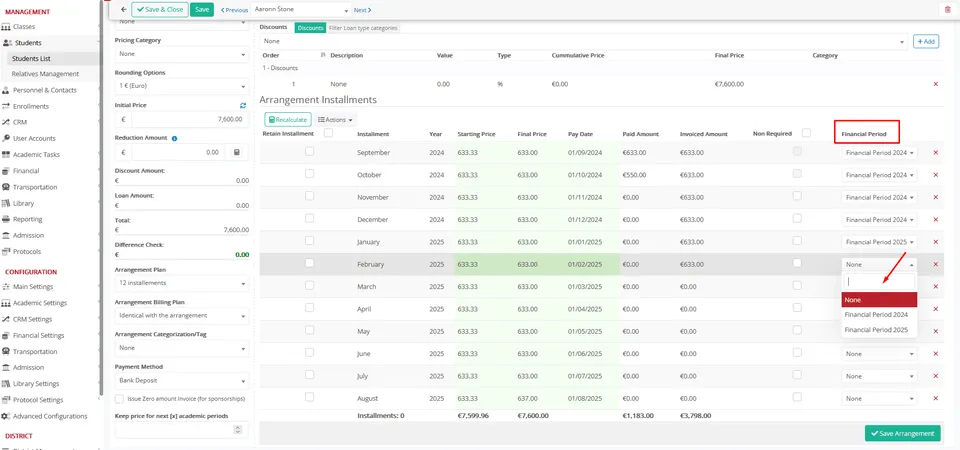
Screenshot from the Classter manual, 2025. Simplified view of the Classter portal. Illustrative data. - Enquiry to enrolled · Step 5 of 5
The family is in the app.
Parents get the Classter app for messages, grades, attendance and payments, from day one.
Good morning, MariaNikos · Year 9ABSENCE · 08:16Nikos was marked absent in Period 1, Maths.NEXT PAYMENT€725.00 · 12 JanPayNEW GRADEPhysics, Test 2: 16 / 20MESSAGE FROM SCHOOLParents' evening is on 21 Jan. Book a slot.
02 Absence to parent alert
- Absence to parent alert · Step 1 of 4
The teacher takes the register once.
One tap per student, from the timetable. QR codes and fast entry work too.
9B · Maths · 08:30Save registerAnna T. Present Daniel K. Absent · parents notified 08:16 Leo P. Late 10 min Sofia M. Present Show the real screen
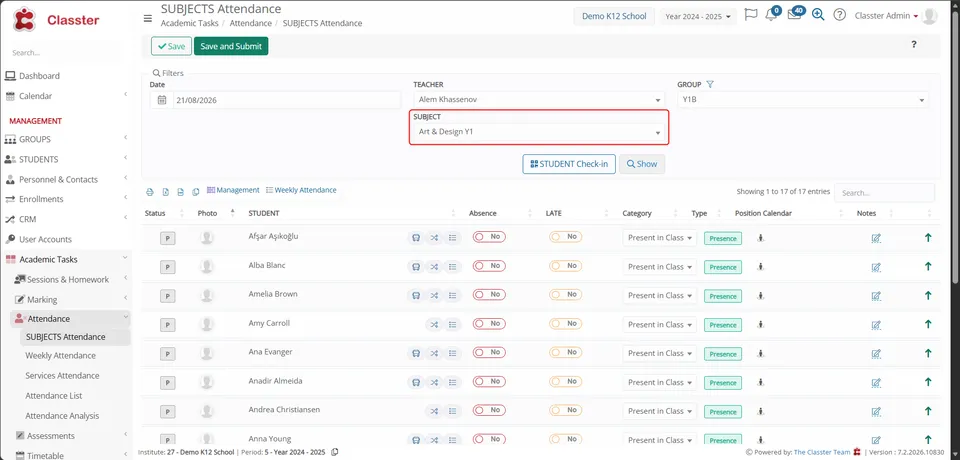
Screenshot from the Classter manual, 2026. Simplified view of the Classter portal. Illustrative data. - Absence to parent alert · Step 2 of 4
A rule sends the alert.
Unjustified absences, absence limits, overdue fees: 20+ alert types you switch on once. Each uses your template and your language.
Alert: unjustified absenceOn- When
- A student is marked absent without a reason
- Who
- The student's parents
- How
- App, email and SMS
- Send
- At 08:15, after the first period
- Template
- Absence notice (EN, EL)
Simplified view of the Classter portal. Illustrative data. - Absence to parent alert · Step 3 of 4
The parent knows by 08:16.
The alert reaches the parent the same morning, in the app or by SMS.
Good morning, MariaNikos · Year 9ABSENCE · 08:16Nikos was marked absent in Period 1, Maths.NEXT PAYMENT€725.00 · 12 JanPayNEW GRADEPhysics, Test 2: 16 / 20MESSAGE FROM SCHOOLParents' evening is on 21 Jan. Book a slot. - Absence to parent alert · Step 4 of 4
A pattern becomes a flag.
LiveIf absences keep coming, attendance feeds the Early Warning System. Your rules set the weight. AI explains the score; a person decides what to do.
Students who may need helpUpdated today, 06:00Student Class Risk Main factors Daniel K. 10A 82 Attendance, 3 missed assessments Sofia M. 11B 67 Grades falling in 2 subjects Leo P. 10C 54 Unjustified absences Anna T. 9A 21 Stable Show the real screen
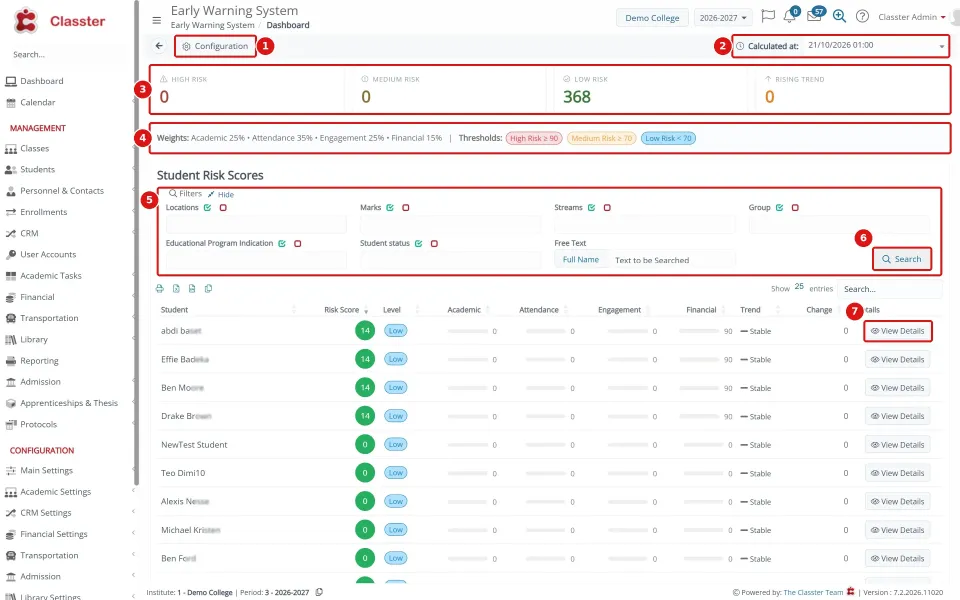
Screenshot from the Classter manual, Oct 2026. Simplified view of the Classter portal. Illustrative data.
03 AI exam schedule
- AI exam schedule · Step 1 of 4
Set the period, the rooms and the rules.
New · Oct 2026Choose the marking period, the rooms and the hard rules. Add wishes in plain words. The assistant turns each wish into a rule you confirm.
Spring exams 2027AI module- Period
- 11 to 15 May 2027
- Rooms
- 6 rooms, 30 to 120 seats
- Rules
- Max 2 exams a day per class
- Invigilation
- Teachers free to invigilate
- Wish
- "Keep Tuesdays lighter" · Proposal: medium preference
Generate scheduleSimplified view of the Classter portal. Illustrative data. - AI exam schedule · Step 2 of 4
Watch the draft.
A constraint solver gives every exam a day, a slot and a room, and keeps teachers free to invigilate. Press play, or step through one move at a time.
AI exam schedulingNew · Oct 2026Spring exams 20276 roomsMax 2 exams a day per classTeachers free to invigilateProposal: keep Tuesdays lighter (medium preference)- Placed Maths 10A, Mon 11 May, 09:00.
- Placed English 10B, Tue 12 May, 09:00.
- Placed Physics 11A, Fri 15 May, 09:00.
- Placed History 10A, Wed 13 May, 09:00.
- Placed Chemistry 11B, Tue 12 May, 13:00.
- Placed Greek 10B, Mon 11 May, 13:00.
- Placed Biology 11A, Thu 14 May, 13:00.
- Clash: Teacher K. Doyle invigilates twice. Moved to the next free slot.
- Placed Economics 12A, Fri 15 May, 13:00.
- Placed French 10A, Mon 11 May, 09:00.
- Clash: 10A already sits Maths on Monday. Moved to the next free slot.
- Placed Maths 11B, Tue 12 May, 13:00.
- Placed Computing 12A, Fri 15 May, 13:00.
- Couldn't place Physics 12B. The reason is below.
Draft done: 11 exams placed, 1 not placed. Tuesday is the lightest day.
Illustrative data. Works like the real feature: a solver places, you approve. - AI exam schedule · Step 3 of 4
See what it couldn't place, and why.
Anything the solver cannot place is listed with the reason. Drag an exam to another slot, or change a rule and run it again.
Not placed (1)Needs youExam Reason Physics · 12B No room with 120 seats on 14 May - Try
- Split across two rooms, or drag to Friday
Simplified view of the Classter portal. Illustrative data. - AI exam schedule · Step 4 of 4
Save when you are happy.
Nothing changes until a person clicks Save schedule. Then it becomes the exam timetable in Classter.
Draft ready11 of 12 placedNothing is saved until you click Save schedule.
AdjustSave scheduleSimplified view of the Classter portal. Illustrative data.
04 Term fee to parent payment
- Term fee to parent payment · Step 1 of 5
Set the fee once.
Build each family's arrangement from your price list: instalments, sibling discounts, scholarships. Mass billing does a whole intake at once.
Nikos Papadakis · Year 9 · Payer: Maria PapadakiDifference check 0.00Instalment Starting Final Pay date Paid September 633.33 633.00 01/09/2026 633.00 October 633.33 634.00 01/10/2026 634.00 November 633.33 633.00 01/11/2026 633.00 December 633.33 633.00 01/12/2026 0.00 January 633.33 633.00 01/01/2027 0.00 RecalculateSave arrangementShow the real screen
Screenshot from the Classter manual, 2025. Simplified view of the Classter portal. Illustrative data. - Term fee to parent payment · Step 2 of 5
The parent gets a payment link.
A link goes out by email or in the app before the due date. Reminders follow on their own.
Good morning, MariaNikos · Year 9ABSENCE · 08:16Nikos was marked absent in Period 1, Maths.NEXT PAYMENT€725.00 · 12 JanPayNEW GRADEPhysics, Test 2: 16 / 20MESSAGE FROM SCHOOLParents' evening is on 21 Jan. Book a slot. - Term fee to parent payment · Step 3 of 5
They pay by card.
The family pays through your payment provider. Card details go straight to the provider, never to Classter.
Sligo Academy of MusicSpring term, instalment 3Amount€725.00Bank transferCardPay €725.00Card details go straight to the payment provider.Simplified view of the Classter portal. Illustrative data. - Term fee to parent payment · Step 4 of 5
The receipt goes to the tax office.
The payment lands on the right instalment and the receipt is issued. In Greece it goes to myDATA with its MARK number.
Invoices to AADE myDATAConnectedDocument Payer EUR myDATA ΤΠΥ 1043 Papadaki M. 725.00 Sent · MARK 4001… ΤΠΥ 1044 Georgiou K. 1,450.00 Sent · MARK 4001… ΤΠΥ 1045 Ioannou E. 725.00 Queued Show the real screen
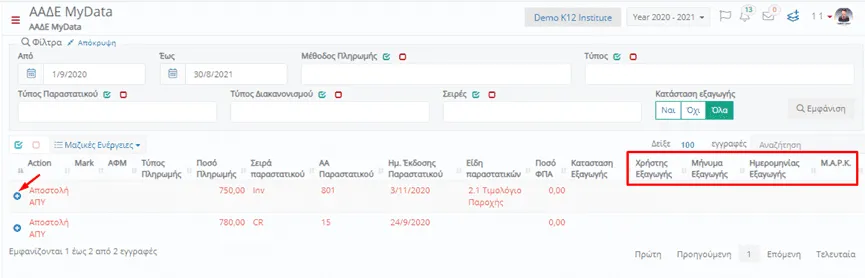
Screenshot from the Classter manual, 2021. Simplified view of the Classter portal. Illustrative data. - Term fee to parent payment · Step 5 of 5
Finance sees who still owes.
A balance per family, across all their children. Assign collectors, track promises to pay, and let overdue fees feed the Early Warning System.
Family balances · Term 22 overdueFamily Children Due Status Papadakis 2 €0.00 Paid Georgiou 1 €725.00 Reminder sent Ioannou 3 €1,450.00 Promise to pay 20 Jan Simplified view of the Classter portal. Illustrative data.
05 Asking Epicurus
- Asking Epicurus · Step 1 of 4
Ask from any screen.
LiveEpicurus sits inside Classter for every admin and owner. It is included; no AI module needed.
Good morning, EleniDemo College · 2026-2027Applications this week14Overdue fees€3,180.00Absent today9Exams this month12Ask EpicurusSimplified view of the Classter portal. Illustrative data. - Asking Epicurus · Step 2 of 4
Ask in your language.
Ask how to do something in your language, Greek included. Epicurus answers from our documentation, with links, in your school's own terms.
EpicurusHow do I re-enrol a whole class for next year?
- Open Trainees and filter by cohort Spring 2026.
- Select all, then choose Actions, Year-to-year transfer.
- Pick the new period and cohort. Fees follow your price list.
- Check the preview, then confirm.
Answers use your own terms: this school says "trainees" and "cohort".
Ask how to do something in Classter.
- Asking Epicurus · Step 3 of 4
Answers you can check.
Each answer links to the manual page and shows only what your role may see. Answers are reviewed overnight, so weak ones lead to better documentation.
EpicurusYour role: FinanceTo add a sibling discount, open the family's arrangement and choose Discounts. It applies from the next instalment.
- Source
- Billing manual · Discounts and vouchers
- Was this useful?
- Yes · No
Simplified view of the Classter portal. Illustrative data. - Asking Epicurus · Step 4 of 4
Epicurus+ makes the change, after you say yes.
New · Oct 2026With the AI module, ask Epicurus+ to change a setting or a list. It asks before every change and never touches payments, passwords or student records. Off until you turn it on.
Epicurus+ wants to make a changeAsks first- Setting
- Absence alert time
- From
- 09:00
- To
- 08:15
CancelConfirmSimplified view of the Classter portal. Illustrative data.
See these flows on your own data, with a person who knows schools.
Use the Back and Next buttons, or the left and right arrow keys.
Go deeper where it matters to you.
Seen enough? Talk to a person.
30 minutes on Teams. We show you these flows with your terms, your fees and your timetable.