School reporting software: reports for the board, the ministry and finance, from the record.
Standard reports, your own layouts, dashboards and governed data for Power BI. Every figure comes from the same record, so the board pack and the ministry return agree.
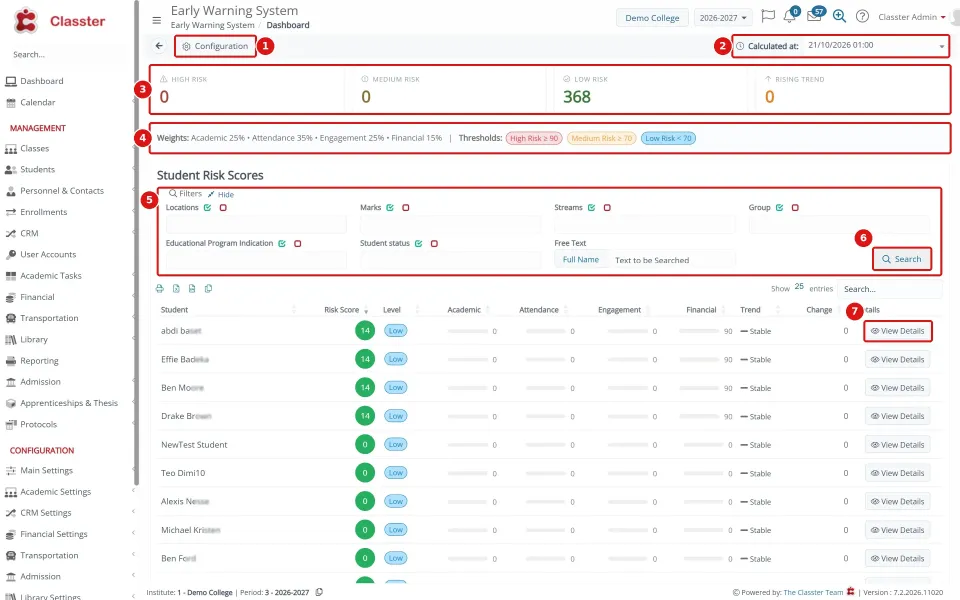
| Student | Class | Risk | Main factors |
|---|---|---|---|
| Daniel K. | 10A | 82 | Attendance, 3 missed assessments |
| Sofia M. | 11B | 67 | Grades falling in 2 subjects |
| Leo P. | 10C | 54 | Unjustified absences |
| Anna T. | 9A | 21 | Stable |
Show the real screen
Reporting in Classter, in four answers.
What reports does Classter include?
Classter includes standard reports for attendance, grades, enrolment and finance, a report designer for your own layouts, and custom queries for one-off questions. Reports export to PDF and Excel, or arrive by email on a daily, weekly or monthly schedule. Every figure comes from the same student record, so the numbers agree.
Last checked Nov 2026Can Classter produce ministry and regulator returns?
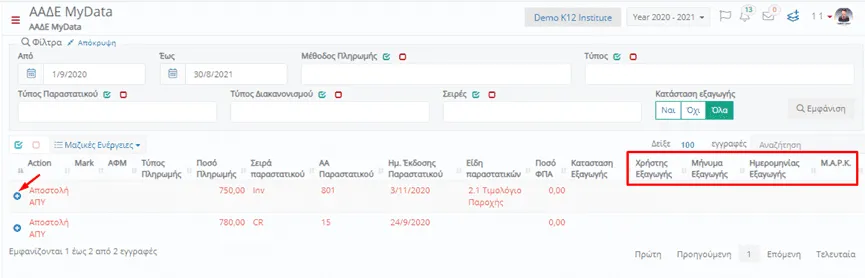
Some are built in: AADE myDATA and PEPPOL e-invoicing in Greece, and the Lithuanian ministry export. For other countries, Classter sets up your returns from the student record during implementation. Classter does not support UK HESA returns today, so ask about your country's formats before you commit to anything.
Last checked Nov 2026Can we use Power BI with Classter?
Yes, through the Classter SQL Connector. Your analysts get read-only SQL access through a catalogue of saved queries, each application has its own credentials, and every query is logged. The SQL Connector is a licensed module and runs on a dedicated database for your institution (Single DB), also a licensed option.
Last checked Nov 2026What is the Early Warning System in Classter?
The Early Warning System, New since Jun 2026, gives each student a daily 0 to 100 risk score from attendance, results, engagement and unpaid fees, using weights and thresholds your school sets. AI explains a score and suggests a next step, but it does not change the score. A person decides what happens next.
Last checked Nov 2026The report the board asks for, from the record.
Run standard reports for attendance, grades, enrolment and finance, or design your own layout. Nobody rebuilds the figures in a separate file.
- Standard reports across every area
- A report designer for your own layouts
- Custom queries for one-off questions
- Export to PDF and Excel, or send by email on a schedule with the Job Scheduler
| Report | Owner | Format |
|---|---|---|
| Attendance by group, this term | Registrar | PDF · Excel |
| Fees due by family and campus | Finance | Excel |
| Enrolments by programme | Leadership | Dashboard |
| Ministry return, autumn | Registrar | Export file |
Dashboards for every office, and every campus.
Leadership sees enrolment, attendance and cash in one view. Finance sees what is collected and what is due. Groups see each campus side by side.
- Role dashboards for leadership, finance and registry
- Financial overviews: collected, due and overdue
- One view across campuses, each school with its own setup
- Analysis screens with filters by programme and group
| Campus | Students | Attendance | Collected |
|---|---|---|---|
| Main campus | 512 | 95% | 78% |
| North campus | 388 | 93% | 74% |
| Online academy | 304 | 92% | 81% |
Ministry, regulator and tax returns.
Some returns are built in: Greek myDATA and PEPPOL e-invoicing, and the Lithuanian ministry export. For other countries, we set up your returns from the record during implementation.
- AADE myDATA and PEPPOL e-invoicing in Greece
- Lithuania ministry export
- EU VAT number checks for company payers
- Your country's formats mapped during implementation
| Document | Payer | EUR | myDATA |
|---|---|---|---|
| ΤΠΥ 1043 | Papadaki M. | 725.00 | Sent · MARK 4001… |
| ΤΠΥ 1044 | Georgiou K. | 1,450.00 | Sent · MARK 4001… |
| ΤΠΥ 1045 | Ioannou E. | 725.00 | Queued |
Show the real screen
Power BI and your own tools, on governed data.
The SQL Connector gives your analysts read-only access through saved queries. Every query is logged, and each application has its own credentials.
- Read-only SQL for Power BI and other BI tools
- A catalogue of saved queries
- An audit log of every query
- Runs on a dedicated database for your institution (Single DB), a licensed option
| Query | Used by | Last run |
|---|---|---|
| Enrolments by programme | Power BI · Finance | Today 06:00 |
| Attendance by week | Power BI · Registry | Today 06:00 |
| Outstanding balances | Power BI · Finance | Yesterday |
Spot the students who need you, before they fall behind.
Your rules give each student a daily 0 to 100 risk score from attendance, results, engagement and unpaid fees. You set the weights and thresholds. AI explains a score and suggests a next step; it does not change the score. Attendance insights writes a short read on one student's attendance.
Figures where they are needed.
Power BI through the SQL Connector, tax and ministry exports, and OneRoster for the systems that read your rosters.
Questions buyers ask about reports & insight.
Can we build our own reports?
Do you support HESA or UK statutory returns?
Can we use Power BI?
Can reports arrive by email on a schedule?
We are a group. Can we compare campuses?
Does the Early Warning System decide anything about students?
Bring your hardest question. We'll start there.
A 30-minute call on Teams with a Classter specialist for your country. Price first, then the parts you care about.