Student records software: one record per student, from first day to alumni.
Students, families, programmes and groups live on one record that every office trusts. Bring your data across on day one, and keep the history.
Show the real screen
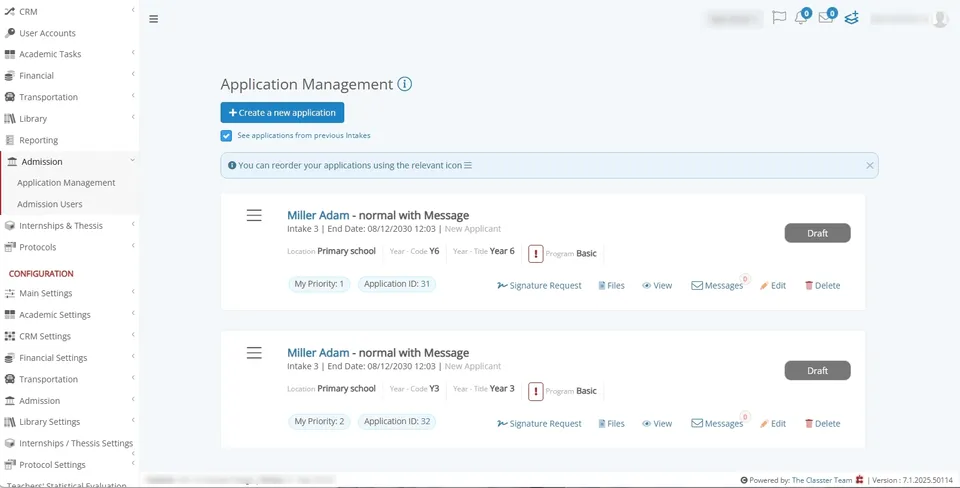
Student records in Classter, in four answers.
What is a student record in Classter?
A Classter student record holds one student's details, family, programme, attendance, marks, fees and documents on tabs of the same screen. Every office works on that record, and each role sees only the tabs and fields you allow. Siblings, parents and payers are linked, and alumni stay on the record after they leave.
Last checked Nov 2026How do we move student data from spreadsheets or an old system?
Classter imports students, families and programmes from Excel or CSV files and checks each row before anything is saved. From another SIS or a system you built, data is mapped field by field from its exports, with past years, marks and payments kept. There is no direct connector to Banner, PowerSchool or iSAMS.
Last checked Nov 2026Can Classter manage programmes, credits and course selection?
Yes. Colleges set up programmes with years, semesters, course categories, credits and minimum GPA rules once in Classter. Students then choose their courses online, within the places and limits you set. The same setup also works for an academy, such as a 12-week course with its own fees and attendance.
Last checked Nov 2026Who can see sensitive student data in Classter?
Only the roles you allow. In Classter you build your own roles and decide which screens and fields each one can see, down to a single field. Sensitive fields can be masked, and every change leaves an audit trail. Student data is hosted on Microsoft Azure.
Last checked Nov 2026The whole student, on one screen.
Details, family, programme, attendance, marks, fees and documents sit on tabs of the same record. Each office sees the tabs its role allows.
- Siblings, parents and payers linked, and merged when two records meet
- Programmes, groups, streams and locations
- Custom fields for anything that is yours alone
- Medical notes and consents, shown only to the roles you allow
- Roles decide who sees which field. Changes leave an audit trail
- Graduates move to alumni and keep access to their transcripts
| Relative | Relation | Role |
|---|---|---|
| Maria Papadaki | Mother | Payer |
| Giorgos Papadakis | Father | App access |
| Eleni Papadaki | Sister · Year 5 | Sibling linked |
Bring your data across, history included.
Students, families and programmes come in from your files or your old system, checked row by row. At year end, move every student to the new period in one step.
- Mass import from Excel or CSV, with checks before anything is saved
- Field-by-field mapping from a system you built or another SIS
- History kept: past years, marks and payments
- Move a whole year group to the next period in one step
Spreadsheets and chat groups
- 1What we takeYour Excel or Google Sheets files: students, families, classes and fees owed.
- 2How we map itYour terms and your year, set in settings. No code.
- 3How you go liveRecords and fees first, then attendance and the parent app.
A system we built ourselves
- 1What we takeExports from your database (CSV, Excel or SQL): records, history and custom fields.
- 2How we map itYour custom fields become Classter custom fields. Your rules become settings.
- 3How you go liveModule by module, with your old system read-only alongside.
Another SIS
- 1What we takeYour vendor's exports: students, programmes, results history and balances. We map field by field.
- 2How we map itYour codes, grading and periods mapped to Classter's, checked with your registrar.
- 3How you go liveModule by module, with a parallel run for the first term if you need one.
We import from your exports. We don't run a certified connector to your old system.
You check the imported data before go-live.
See the switching planProgrammes, credits and course choices.
Colleges set up complex curricula once: course categories, credits, minimum GPA and how many places each course has. Students choose online, within your limits.
- Programmes with years, semesters and course categories
- Credits and minimum GPA rules
- Online course selection with places and limits
- The same setup works for a 12-week course at an academy
| Course | Category | Credits | Places |
|---|---|---|---|
| Marketing Analytics | Core | 6 | 12 left |
| Corporate Finance | Core | 6 | 8 left |
| Business Law | Elective | 6 | 2 left |
| Data for Managers | Elective | 6 | Full |
Do you issue official documents that need a registry number and every version kept?
The Protocol module is a digital registry book. Each certificate, letter or contract you issue or receive gets its own registry number and date, and keeps every version and appendix. Signed documents and reports from Classter are numbered on their own.
- Your own number format per register, such as 2026/0418, reset yearly, monthly or never
- Incoming, outgoing or both, with or without a file attached
- Every version and appendix kept; entries can lock on save
- Certificates, student cards and letters from your own templates
- E-signature with DocuSign, Legalesign, signature pads or Classter's own signing
- Keep an official document register
| Document | Template | Status |
|---|---|---|
| Certificate of enrolment | School letterhead | Signed |
| Student card | Card with QR code | Printed |
| Transfer letter | Protocol No. 2026/418 | Awaiting signature |
The record, shared with the systems around it.
Accounts, classes and rosters flow from the record to Microsoft 365, Google and Apple School Manager.
Questions buyers ask about student records.
We run everything on spreadsheets today. How do we start?
We are leaving another SIS. Do we lose our history?
Who can see sensitive data?
Can Classter replace our paper protocol book?
We are a group of schools. One record or one per school?
Does the record feed ministry and regulator reports?
Bring your hardest question. We'll start there.
A 30-minute call on Teams with a Classter specialist for your country. Price first, then the parts you care about.