



The relationship between a school and the families it serves is built on communication. When parents feel informed about their child’s progress, they are better equipped to support learning at home, more likely to engage constructively when issues arise, and more confident in the school’s ability to manage effectively. When they feel uninformed, they call the office.
A school parent portal is the most practical tool available for closing the information gap between schools and families. Done well, it gives parents real-time access to grades, attendance, upcoming events, fee statements, and direct communication with teachers, all without requiring any staff intervention. Done poorly, it creates a portal that nobody uses and an information gap that remains exactly as wide as before.
This guide covers what a parent portal should actually do, which features matter most, what distinguishes a good portal from a token one, and how the portal fits into a school’s broader technology infrastructure.
What a School Parent Portal Actually Is
A parent portal is a secure, role-based online environment where parents can log in to access information about their child’s academic and administrative status. It is not a messaging app. Neither is it a newsletter system. Nor a self-service platform that puts the information parents most frequently need in one place, accessible on demand without requiring school staff to retrieve and send it.
The distinction between a parent portal and a parent communication tool matters. A communication tool pushes information to parents: newsletters, announcements, and reminders. A portal pulls information to parents: they can access what they need, when they need it, without waiting for the school to send it. Both have value, but only the portal reduces the administrative burden of reactive, inbound communication.
The most effective parent portals are native to the school’s student information system, which means the data parents see reflects the same live information that teachers and administrators are working from. A portal that draws from a separate or delayed data source creates the frustrating experience of a parent calling to query a grade that the portal shows correctly, but the teacher has since updated.
Why Parent Portals Matter for Schools
The value of a parent portal runs in two directions simultaneously: it improves the experience for families, and it reduces the operational workload for school staff.
For families
Parents today expect the same self-service access from their school that they get from every other service they interact with. Banks, healthcare providers, utility companies, and retailers all offer online account access that is available around the clock without requiring a phone call. Schools that still require parents to contact the office for routine information are creating an experience that feels out of step with how families expect to interact with organizations.
A parent portal that provides real-time grades, attendance records, upcoming assessment dates, and fee statements gives parents the transparency they need to stay meaningfully involved in their child’s education. When parents can see that a grade has slipped or an assignment is overdue, they can have a timely conversation at home. When they cannot see this, they find out at the end of the term, when the window for early intervention has closed.
For school staff
Every question a parent can answer themselves in the portal is a question that does not reach the school office. The volume of routine inbound queries that schools manage, balance enquiries, attendance queries, grade requests, and document requests is significant. Redirecting this to a self-service portal does not eliminate parent communication. It filters it, so that the conversations that do reach staff are the ones that actually require their expertise and judgment.
The secondary benefit for staff is data quality. When parents update their own contact information, emergency contacts, and relevant family details through the portal, that information flows directly into the student record. No manual re-entry. No out-of-date records sitting in a file from three years ago.
The Difference a Portal Makes: A Practical View
The table below shows how a parent portal changes the experience on both sides of common school-family interactions.
| Situation | Without a Parent Portal | With a Parent Portal |
|---|---|---|
| Parent wants to check grades | Calls or emails school, waits for staff response | Logs in and sees real-time grades instantly |
| The student misses two days | Parent may not find out for days | Automated alert sent same day |
| Tuition payment due | Parent receives a paper notice or email | Visible in portal with direct payment option |
| Parent has a concern about a teacher | Phone call to the school office | Direct message sent within the portal |
| Parent misses a school event notice | Finds out from another parent or too late | Push notification sent to their phone |
| Parent needs a copy of the report card | Requests it from admin, waits for it to be sent | Downloads it directly from the portal |
The pattern across every row is the same: without a portal, the interaction requires staff time and creates a delay. With a portal, the parent is served immediately and staff attention is freed for higher-value work.
Key Features of a School Parent Portal
Not all parent portals are built to the same standard. The table below outlines the features that matter most and what a well-built portal should deliver in each area.
| Feature | What It Should Do |
|---|---|
| Grade and assessment access | Real-time grades, not just end-of-term reports. Includes individual assessment results and grade trends over time. |
| Attendance visibility | Live attendance records with automated alerts when a student reaches a configurable absence threshold. |
| School calendar and events | Upcoming assessments, school events, holidays, and parent-teacher meeting scheduling in one view. |
| Direct messaging | Secure two-way messaging with teachers and administrators. Communication history stored within the platform. |
| Billing and payment access | Current balance, payment history, upcoming installments, and the ability to pay directly from the portal. |
| Document access | Report cards, consent forms, school policies, and relevant documents accessible and downloadable without contacting the office. |
| Push notifications | Mobile alerts for attendance events, grade updates, messages, and deadlines. Configurable by the parent. |
| Multi-child support | Parents with more than one child can switch between profiles from a single login without separate accounts. |
Real-time data, not periodic snapshots
The single most important quality of a parent portal is that its data is live. A portal that shows last week’s grades or runs attendance updates once a day creates confusion and erodes trust. When parents check the portal and then call to query information that has already changed, the portal is not serving them. It is working against them.
Real-time data requires the portal to be natively connected to the system of record, not drawing from a separate copy. This is one of the strongest arguments for choosing a platform where the parent portal is built into the same environment as the SIS, rather than a third-party portal that syncs with it.
Mobile-first design
Most parents will access the portal on a mobile device, not a desktop. A portal that is technically accessible on mobile but was designed for a large screen, with small text, complex navigation, and features that do not work on touch interfaces, will see significantly lower adoption than one that was built mobile-first.
Test any portal you are evaluating on a phone before shortlisting it. The experience should be immediate: log in, see the most relevant information, navigate intuitively. If you find yourself zooming in or hunting through menus, the parents you are trying to reach will give up faster.
Attendance alerts that do not require manual triggering
Automated attendance alerts are one of the most operationally valuable features in a parent portal. When a student is absent and a notification is sent to the parent the same day, the school is fulfilling its safeguarding and communication responsibilities without any staff member having to manually contact each family. When a student reaches a configurable absence threshold, a further alert prompts a more formal conversation.
The alerts only work as intended if they are automated. A system that requires a staff member to manually send notifications after checking attendance records has not solved the problem; it has just moved it.
Billing access that supports self-service payment
Parents who can see their current balance, upcoming payment dates, and full payment history in the portal, and who can pay directly from that same interface, are significantly more likely to pay on time than those who receive a paper invoice or a generic email with a bank transfer reference. The convenience of one-click payment from within a trusted, authenticated environment reduces friction and improves collection rates.
Multi-payment method support, including credit card, debit card, and bank transfer, accommodates the range of preferences families have. Auto-pay options for recurring fees are particularly valued by parents who manage multiple financial commitments and prefer not to think about each payment individually.
What Makes a Parent Portal Adoption Actually Work
A well-built portal that nobody uses delivers no value. Adoption is not automatic, and it requires active effort from the school at launch and ongoing reinforcement to become habitual for families.
The most effective onboarding approaches include:
- A clear, simple activation process. Parents should be able to set up their portal access in under five minutes. Any friction in the activation process, complex passwords, unclear instructions, or multiple verification steps, will reduce the proportion of families who complete it.
- A direct demonstration at parent induction events. Showing parents the portal in person, with time to log in and explore during the session, is far more effective than sending a PDF guide.
- Early, high-value notifications. The first few automated alerts a parent receives, typically attendance notifications, teach them that the portal is useful and worth checking. That early positive experience drives ongoing adoption.
- Consistent reinforcement by teachers. When teachers reference the portal in their communication with families, grades are updated there, and messages are sent through it rather than via separate email; the portal becomes the central channel rather than an additional one.
How the Parent Portal Fits Into a School’s Broader Platform
A parent portal should not be an isolated tool. Its value is directly proportional to the quality and currency of the data it surfaces, which means it needs to be connected to the systems that generate that data.
A portal connected to a live student information system reflects real-time grades and attendance. When it is connected to the billing module shows current balances and payment history. A portal connected to the LMS surfaces upcoming assignment deadlines and course resources.
When the portal, the SIS, the LMS, and the billing system are all separate tools, maintaining data consistency across them requires manual synchronization that introduces delays and discrepancies. When they are modules within the same platform, the portal inherits the accuracy and currency of the full system automatically.
How Classter’s Parent Portal Works
Classter includes a dedicated parent portal as a native component of its integrated platform, alongside portals for students, teachers, administrators, alumni, employers, and agents. The parent portal draws from the same live data as the rest of the Classter system, which means there is no sync delay and no discrepancy between what staff see and what parents see. Grades updated by a teacher appear in the parent portal immediately. Attendance marked in the morning is visible to parents the same day. Payments made in the portal update the billing record in real time. See an overview of what Classter’s School Management System covers across all portals and modules.
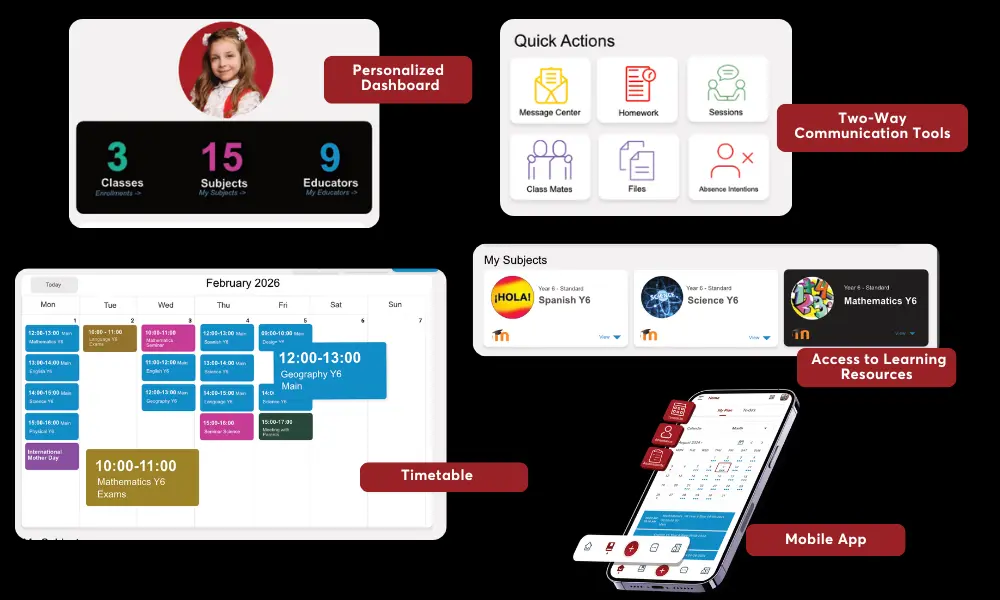
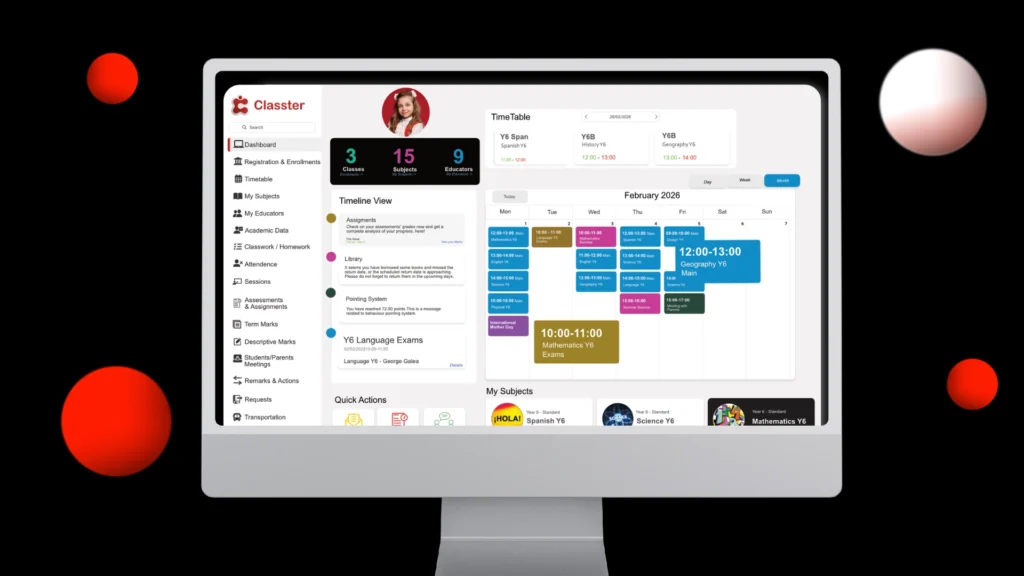
Parents can access grades, attendance records, the school calendar, upcoming events, fee statements, payment history, direct messaging with teachers, and document downloads from one login. Multi-child support allows parents with more than one child enrolled to switch between profiles without separate accounts.
Push notifications are configurable by the school, with alerts for attendance events, grade updates, messages, and payment due dates sent directly to the parents’ mobile devices. The portal is mobile-responsive and built for the way parents actually access information. Classter’s LMS module also connects assignment visibility and academic resources to the parent view, giving families insight into the learning environment as well as the administrative record.
Classter’s parent portal is used by institutions in 35+ countries, serving K-12 schools, academies, higher education providers, and training centers whose family engagement needs vary significantly. The modular architecture means schools can activate the portal features that are most relevant to their institution type and expand them as needs evolve.
FAQ’s
A school parent portal is a secure, online platform that gives parents access to their child’s academic and administrative information. This includes grades, attendance records, school calendars, fee statements, and direct messaging with teachers, all in one place without needing to contact the school office.
At minimum: real-time grades, attendance records with automated alerts, school calendar and events, direct messaging with teachers, and billing and payment access. Strong portals also include document downloads, push notifications, and multi-child support from a single login.
Classter’s parent portal is built into the platform alongside the student, teacher, and administrator portals. Parents log in to see real-time grades, attendance records, upcoming events, fee statements, and communications, all drawing from the same live data that staff use. They can pay fees, message teachers, and download documents without contacting the school office.