




School fee management is one of the most administratively intensive tasks a school runs. Done manually, it involves generating invoices for every student, tracking who has paid and who has not, sending follow-up reminders to families, applying discounts and payment plans correctly, and compiling financial reports that are often out of date the moment they are printed.
The cost of that manual workload is not just time. It is accuracy. Every step that requires human input is a step where errors can enter the system. A discount was applied to the wrong student. An overdue invoice that was not flagged. A payment received but not reconciled in the spreadsheet. These errors create billing disputes that damage the school-family relationship and, in some cases, create real revenue gaps.
School billing and tuition management software solves this by automating the cycle from enrollment to payment. This guide explains what the software should do, which features matter most, how it connects to the rest of your school’s administration, and what to look for when evaluating platforms.
What School Billing Software Actually Covers
School billing software is not general accounting software applied to an educational context. General tools like Xero or QuickBooks can record transactions and generate invoices, but they are not built for the specific structures of school finance: tuition installment plans, sibling discounts, per-program fee schedules, scholarship deductions, deposit management, and the parent communication workflows that run alongside all of it.
Purpose-built school billing software is designed around the way educational institutions actually charge families. It understands that a student’s fees depend on their program, year group, and enrollment status. The software can analyse that some families pay annually, while others pay monthly. It manages the difference between a registration deposit, a term fee, and an incidental charge. And it connects all of that to the student record so that finance and admissions are always working from the same information.
The Problem With Manual Tuition Billing
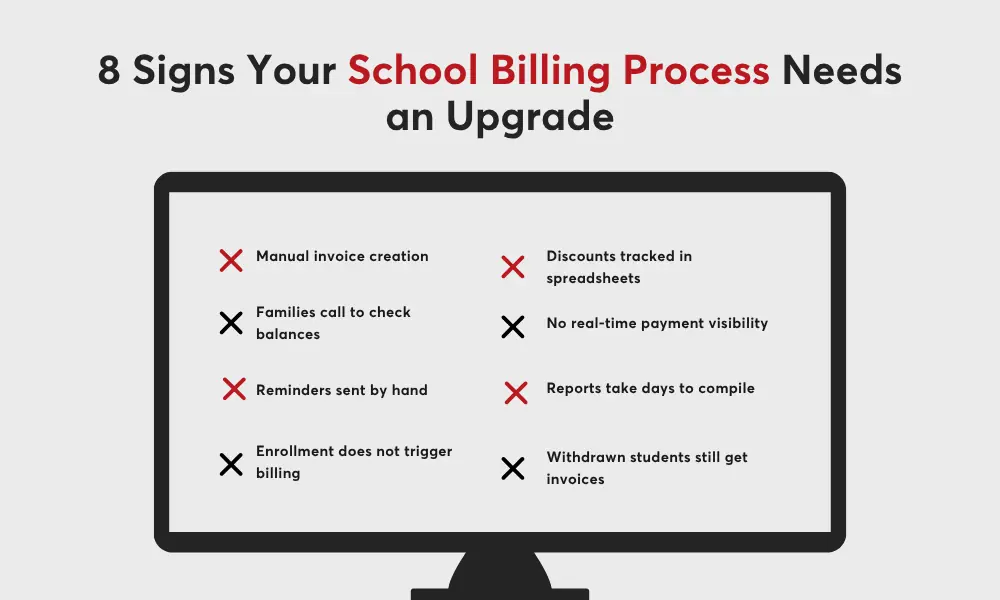
Most schools that have not yet adopted dedicated billing software are managing their finances across a combination of spreadsheets, email, and generic accounting tools. This works at small scale but creates compounding problems as the student population grows.
Invoice generation is slow and error-prone
Creating invoices manually for every student, every billing period, is time-consuming and dependent on the finance team having accurate, up-to-date enrollment information. When admissions and finance use separate systems, the data is always slightly out of sync. New students do not appear in the billing system until someone manually adds them. Withdrawals do not stop billing until someone catches the discrepancy.
Following up on overdue accounts is reactive
Manual billing processes tend to follow up on late payments reactively, after the due date, rather than proactively with reminders before it arrives. Families who forget or who would pay immediately if prompted do not receive that prompt. The finance team chases the same families repeatedly, rather than the system handling routine reminders automatically.
Reporting requires manual compilation
When billing data lives in a spreadsheet and payment data lives in an accounting tool, generating a complete picture of the school’s financial position requires manual data aggregation. That takes time, introduces errors, and means that the reports leadership relies on for decisions are always slightly behind the current reality.
Parent experience is poor
Families who want to check their current balance, view their payment history, or understand what they owe next term have to contact the school to get that information. That creates inbound queries that the finance team has to handle manually, and it creates frustration for families who expect the same self-service access they get from every other service they use.
Manual vs Automated: What Billing Software Changes
The table below shows how school billing software transforms each stage of the fee management cycle.
| Task | Manual Process | With Billing Software |
|---|---|---|
| Invoice generation | Created manually per student | Auto-generated based on enrollment |
| Payment reminders | Staff emails families individually | Automated by schedule or overdue trigger |
| Payment tracking | Spreadsheet updated manually | Real-time dashboard, auto-reconciled |
| Outstanding balance follow-up | Finance team contacts families reactively | Automated escalation workflow |
| Discount and scholarship application | Calculated manually, prone to error | Rules-based, applied automatically |
| Financial reporting | Compiled from multiple sources manually | Generated on demand from live data |
| Parent payment access | Family contacts school for balance info | Self-service portal with full payment history |
The cumulative time saving across these tasks is significant. Schools that implement automated billing consistently report reductions in staff time per billing cycle, faster payment collection, fewer billing disputes, and improved cash flow visibility. The finance team’s role shifts from manual administration to exception management and strategic oversight.
Key Features of School Tuition Management Software
The table below outlines the features that matter most and what to look for in each.
| Feature | What to Look For |
|---|---|
| Flexible fee structures | Support for tuition, deposits, activity fees, installment plans, and custom fee types per program or student |
| Automated invoicing | Invoice generation triggered by enrollment status, with configurable billing cycles |
| Online payment portal | Rules-based discount application, sibling discounts, and financial aid integration |
| Automated reminders | Scheduled and overdue-triggered notifications to families, configurable by school |
| Discounts and scholarships | Rules-based discount application, sibling discounts, financial aid integration |
| Real-time financial reporting | Outstanding balances, collection rates, revenue forecasting, exportable for audit |
| SIS integration | Enrollment triggers billing automatically; no duplicate data entry between systems |
| Split billing | Divide tuition responsibility between multiple payers, each with their own schedule and portal access |
Flexible fee structures
No two schools charge families in exactly the same way. A good billing platform needs to support the full range of fee types a school uses: tuition by term or year, registration deposits, activity and trip fees, sibling discounts, scholarship deductions, and installment plans with varying schedules.
The ability to set fees at the program level, the year group level, and the individual student level is important for schools that serve diverse populations or run multiple programs with different pricing. A platform that forces every student onto the same fee template will require workarounds that create the same kind of manual overhead the software was supposed to eliminate.
Automated invoicing tied to enrollment
The most consequential billing automation is the direct connection between enrollment and invoice generation. When a student’s enrollment is confirmed in the admissions module, the billing system should automatically create the appropriate invoice based on their program and fee schedule, without any manual step required from the finance team.
This connection eliminates the most common source of billing errors: the gap between when admissions confirms a student and when finance creates their invoice. It also ensures that withdrawals stop billing automatically, rather than continuing to generate invoices for students who are no longer enrolled.
Online payment portal for families
Parents in 2026 expect to be able to pay fees online. A parent payment portal that shows current balances, payment history, upcoming installments, and receipts, and that accepts credit cards, debit cards, and bank transfers, reduces inbound queries to the finance team and accelerates payment collection.
Mobile responsiveness is not optional. Most parents will access the portal on a phone, not a desktop. A portal that works well on mobile, with a clear payment flow and instant confirmation, produces significantly better adoption rates than one that is technically functional but designed for desktop use.
PCI-DSS compliance is a baseline requirement for any platform handling payment card data. Ask vendors for their compliance certification and how cardholder data is handled and stored.
Reporting and financial visibility
Finance teams need to know, at any given moment, how much is outstanding, how much has been collected this term, which families are behind on their payment plans, and what the school’s projected revenue looks like for the next quarter. Manual reporting cannot provide this in real time. Dedicated billing software can.
Reports should be available on demand, filterable by student, program, year group, or date range, and exportable in formats that work with your accounting system. Audit-ready financial summaries and term-end reconciliation reports significantly reduce the workload around financial reporting periods.
Billing Management Across Different Institution Types
K-12 private schools
Private K-12 schools tend to have more complex fee structures than public institutions: variable tuition by year group, sibling discounts, financial aid integration, activity fees, uniform costs, and trip charges that arise throughout the year. Billing software that can handle all of these within the same system, without requiring separate tools for different fee types, is essential.
Re-enrollment billing is particularly important for private schools. Annual re-enrollment should trigger the next year’s fee schedule automatically, with updated amounts reflecting any tuition increases, without requiring the finance team to manually recreate invoices for every returning student.
Academies and training centers
Training programs often involve cohort-based billing, corporate sponsorship arrangements where an employer pays a portion of fees, and installment plans tied to module completion rather than calendar dates. Billing software for these institutions needs to support multiple payers per student, program-specific pricing, and flexible installment triggers.
Revenue forecasting is particularly valuable for training centers that run multiple intake cohorts simultaneously. A billing platform that shows projected income by cohort helps operations teams plan staffing and resources based on confirmed enrollment and expected payments.
Multi-campus institutions
Institutions managing billing across multiple campuses need consolidated financial reporting alongside campus-level operations. A school management system with centralized billing oversight allows finance leadership to see the institution’s total financial position without requesting reports from each site, while each campus retains the ability to manage its own billing workflows.
How Classter Handles School Billing and Payments
Classter’s Billing and Payments module is a native component of the Classter platform, which means it operates from the same data foundation as the SIS, admissions, and enrollment modules. Enrollment status automatically triggers invoice generation. Payment data is visible alongside the student record. There is no manual handoff between systems and no risk of billing data falling out of sync with enrollment reality.
The module supports multiple fee types, installment plans, sibling discounts, scholarship deductions, and custom billing rules configurable to each institution’s specific pricing structure. Families access their invoices, payment history, and outstanding balances through the parent portal, with online payment options including credit card, debit card, and bank transfer.
Automated payment reminders are triggered by schedule and by overdue status, reducing the volume of manual follow-up the finance team needs to handle. Reporting tools generate outstanding balance summaries, collection rate analysis, and revenue forecasts on demand without manual data compilation.
Because Classter combines billing, SIS, admissions, LMS, and school management in one platform, the billing module benefits from the same integration advantages that make every other Classter module more effective. Student data does not need to travel between systems. Financial information and academic information live in the same place, giving administrators a complete view of each student’s status without switching platforms.
Classter supports billing management for institutions across 35+ countries, including K-12 private schools, higher education providers, academies, and multi-campus organizations managing complex fee structures across multiple programs and sites.
FAQ’s
School tuition management software is a platform that automates the billing, invoicing, payment collection, and financial reporting processes involved in managing student fees. It replaces manual invoicing and spreadsheet tracking with automated workflows that connect enrollment data to billing, give parents self-service payment access, and give finance teams real-time visibility into the school’s financial position.
General accounting software is designed for business finance: invoicing clients, tracking expenses, and managing payroll. School billing software is purpose-built for educational fee structures, including tuition installments, sibling discounts, scholarship deductions, activity fees, and the parent communication workflows that accompany them. General tools can be adapted, but they lack the enrollment-to-billing connection that purpose-built school software provides.
Yes. Classter’s Billing and Payments module is native to the Classter platform, which means it shares the same data foundation as the SIS, admissions, and enrollment modules. Enrollment automatically triggers invoice generation. Payment status is visible alongside student records. There is no manual data transfer between systems.