


Running a school today feels very different from even a few years ago. Between managing student records, communicating with families, tracking attendance, handling finances, and supporting teachers, the day-to-day rhythm of school life has become increasingly fast-paced. Many schools find themselves juggling multiple tools, spreadsheets, and systems just to keep everything moving.
That is where school management software starts to make a difference. Instead of switching between disconnected platforms, schools can bring their operations into one connected space that supports both administration and the wider school community. A modern school management system helps simplify routine tasks so educators and administrators can focus more on people and less on processes.
If you have been asking what school management software is, and how does it work, you are part of a growing group of schools exploring smarter ways to manage everyday operations. From improving communication to streamlining workflows, today’s school administration software is designed to support how schools actually function.
In this guide, we will break down what schools should know, what features matter most, and how to evaluate the best school management software 2026 options available today.
Why Schools Are Moving Away From Traditional Administrative Systems
Many schools built their administrative processes over time, using separate tools for attendance, grading, communication, and finance. While this worked in the past, managing multiple systems often leads to duplicated work, scattered data, and slower decision making.
As schools grow, these challenges become more noticeable. Staff spend more time searching for information or updating records across platforms instead of focusing on students and daily operations. This is why many institutions are moving toward school management software, which brings everything into one connected space.
A modern school management system helps schools simplify workflows, improve visibility, and reduce manual tasks. By replacing disconnected tools with integrated school administration software, schools can create smoother, more efficient experiences for both staff and families.
How School Management Software Works Behind the Scenes
Behind the scenes, school management software integrates multiple school operations into a single central platform, allowing information to flow automatically rather than being managed separately.
A modern school management system typically works through:
- Centralised data storage: Student records, attendance, grades, and communication live in one secure system.
- Real-time updates: Information entered once updates across departments automatically, reducing duplication.
- Integrated modules: Admissions, academics, finance, scheduling, and reporting operate within the same platform.
- Role-based access: Administrators, teachers, parents, and students see only the information relevant to them.
- Automation of routine tasks: Attendance tracking, report generation, notifications, and reminders happen automatically.
- Cloud access: Many platforms include cloud-based school management software features, allowing secure access from any device while maintaining data protection.
Together, these functions help schools streamline administration while keeping daily operations running smoothly.
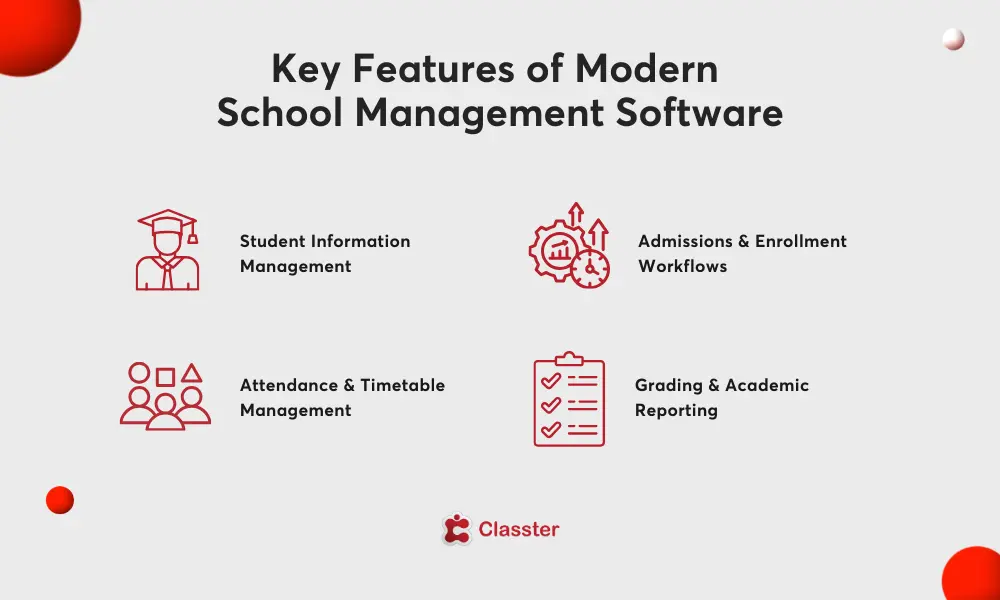
Key Features of Modern School Management Software
Modern school management software is designed to support the full rhythm of school life, not just administrative tasks. Today’s platforms bring together academic, operational, and communication tools so schools can manage everything from one connected environment.
Common features found in a modern school management system include:
- Student information management: Centralised profiles that store academic records, attendance, behaviour history, and important documentation.
- Admissions and enrollment workflows: Digital applications, automated approvals, and simplified onboarding for new students.
- Attendance and timetable management: Easy tracking of daily attendance alongside structured scheduling for classes and staff.
- Grading and academic reporting: Digital gradebooks, progress tracking, and report generation that support consistent evaluation.
- Communication tools: Built in messaging and notifications that keep teachers, administrators, and families connected.
- Finance and billing management: Fee tracking, invoicing, and payment monitoring integrated into everyday administration.
- Reporting and analytics: Real time dashboards that help leadership teams make informed decisions.
- Integration capabilities: Connection with learning platforms, finance tools, and other systems through flexible cloud-based school management software features.
Together, these features allow school administration software to reduce manual work while creating a more organised and transparent experience for the entire school community.
Common Challenges Schools Face Without a Centralised System
When schools rely on multiple disconnected tools, everyday tasks can quickly become more complicated than they need to be. Information lives in different places, processes take longer, and teams often work without a clear, shared view of what is happening across the school.
Common challenges schools experience:
| Challenge | What It Looks Like in Daily School Life | Impact on Schools |
| Scattered student data | Records stored across spreadsheetsEmailsSeparate platforms instead of one system | Difficult to access a complete student overview quickly |
| Repetitive manual work | Staff re-enter the same information into multiple tools | Increased workload and higher risk of human error |
| Limited visibility for leadership | Reports must be compiled manually from different sources | Slower decision-making and reduced operational insight |
| Communication gaps | Messages shared across various channels with no central hub | Missed updates and inconsistent communication with families |
| Administrative bottlenecks | Admissions, scheduling, and reporting handled through disconnected processes | Delays that affect daily workflows and staff productivity |
| Lack of collaboration | Departments operate in silos without shared data | Harder for teams to stay aligned and coordinated |
Who Uses School Management Software in a School Environment
School management software is designed to support the entire school community, not just administrators. Modern platforms give different users access to the tools and information they need, creating a more connected and organised environment across the school.
Here is how different groups typically use a school management system:
- School administrators and leadership: Administrators use the platform to manage admissions, attendance, reporting, finance, and overall operations. Centralised dashboards provide a clear view of school performance, helping leadership make faster, more informed decisions.
- Teachers and academic staff: Teachers rely on school administration software to record attendance, manage grades, track student progress, and communicate with families. Having everything in one place reduces paperwork and simplifies daily classroom management.
- Students: They can access schedules, assignments, grades, and announcements through dedicated portals, helping them stay organised and more engaged with their learning.
- Parents and guardians: Parent access allows families to follow academic progress, receive updates, and communicate directly with the school, creating stronger home-school collaboration.
- Administrative and support teams: Admissions, finance, and operations teams use the system to manage enrollment, billing, documentation, and internal coordination more efficiently.
Benefits of School Management Software for Administrators, Teachers, and Families
A well-implemented school management software platform does more than organise information. It helps schools create smoother daily experiences for everyone involved, from leadership teams to classrooms and families at home. By bringing processes into one connected environment, a modern school management system reduces friction and supports better collaboration across the school community.
For Administrators
Administrators gain clearer oversight of operations without relying on manual reporting. Centralised data makes it easier to monitor attendance, performance, finance, and compliance while reducing administrative workload. This allows leadership teams to focus more on planning and growth rather than routine coordination.
For Teachers
Teachers benefit from simplified classroom management. school administration software helps streamline attendance tracking, grading, and communication, giving educators more time to focus on teaching and student support instead of paperwork.
For Families
Parents and guardians experience greater transparency and connection with the school. Real-time updates, shared announcements, and easier communication help families stay informed and engaged in their child’s learning journey.
Ultimately, school management software supports a more connected school environment where information flows easily, responsibilities are clearer, and daily operations feel more manageable for everyone involved.
Cloud-Based vs Traditional School Management Systems
As schools explore new technology, one of the most common decisions is choosing between cloud-based platforms and traditional, locally installed systems. While both aim to support administration, the way they operate and scale can feel very different in everyday school life.
A traditional school management system is usually installed on onsite servers and managed internally. While this approach offers control over infrastructure, it often requires ongoing maintenance, manual updates, and dedicated IT support. Access is also typically limited to school networks, making remote work or collaboration more difficult.
In contrast, modern school management software is increasingly cloud based. This means the platform is hosted online and accessible securely from any device with an internet connection. Updates happen automatically, data is backed up regularly, and schools can scale features as their needs grow. These cloud-based school management software features make it easier for staff, students, and families to stay connected whether they are on campus or working remotely.
For many institutions, the shift to cloud based school administration software is less about technology trends and more about flexibility. Schools gain faster implementation, reduced infrastructure demands, and a system that adapts as operations evolve over time.
What to Look for When Choosing School Management Software in 2026
Choosing the right school management software in 2026 is less about finding the platform with the longest feature list and more about finding a system that fits how your school actually operates. As schools become more connected and expectations around communication, data, and flexibility grow, the right choice should support both daily workflows and long term development.
Here are the key areas schools should focus on when evaluating a school management system:
- Ease of use and adoption: The platform should feel intuitive for administrators, teachers, and families. When systems are easy to navigate, staff adoption improves and daily tasks become faster and less stressful.
- Centralised data management: A strong system brings attendance, grades, communication, and student records into one place. Centralised information reduces duplication, improves accuracy, and gives leadership clearer visibility.
- Cloud flexibility and accessibility: Modern schools increasingly prioritise platforms with strong cloud-based school management software features, allowing secure access from anywhere, automatic updates, and easier scalability without heavy IT maintenance.
- Integration with existing tools: Effective school administration software should connect smoothly with learning platforms, finance tools, and admissions systems to avoid disconnected workflows.
- Security and data protection: Schools manage sensitive information, so role based permissions, secure storage, and reliable backups are essential for protecting student and institutional data.
- Scalability for future growth: The best school management software 2026 options are designed to grow alongside the institution, supporting expansion without requiring a full system change later.
- Ongoing support and development: A strong provider offers onboarding support, training resources, and continuous product improvements so schools can adapt as needs evolve.
How Classter Simplifies School Operations in One Platform
As a unified school management software solution, Classter connects admissions, student information, academic management, finance, and communication within a single school management system. This reduces manual work, improves data visibility, and allows teams to collaborate more easily across departments.
By combining essential school administration software capabilities with flexible, cloud based access, Classter helps schools simplify daily operations while creating a more connected experience for staff, students, and families.
FAQs
- What is school management software used for?
School management software helps schools manage daily operations such as attendance, grading, communication, admissions, and reporting within one connected platform.
- Can school management software integrate with other education tools?
Most modern systems integrate with learning platforms, finance systems, and communication tools to reduce data silos and improve workflows.
- How long does it take to implement a school management system?
Implementation timelines vary depending on school size and data migration needs, but cloud platforms often allow faster setup compared to traditional systems.
- Does school management software reduce administrative workload?
Yes. By automating routine processes and centralising data, school management software helps staff spend less time on manual tasks and more time supporting students.
- How is Classter different from other school management systems?
Unlike standalone tools, Classter brings together SIS, LMS, CRM, ERP, and school management functionality in one modular platform, reducing the need for multiple disconnected systems.