

Not all Student Information Systems (SIS) are built the same. Some are essentially digital filing cabinets. Others are full-featured platforms that manage the entire student lifecycle, connect to learning tools, and give administrators real-time visibility across the institution.
If you are evaluating SIS software right now, knowing which features actually matter, versus which ones look impressive in a demo but rarely get used, is what separates a good decision from an expensive mistake.
This guide covers the 10 features that should be non-negotiable in any SIS you consider in 2026. It also explains why the best modern platforms no longer stop at traditional SIS functionality, and what that means for institutions looking to reduce their tech stack.
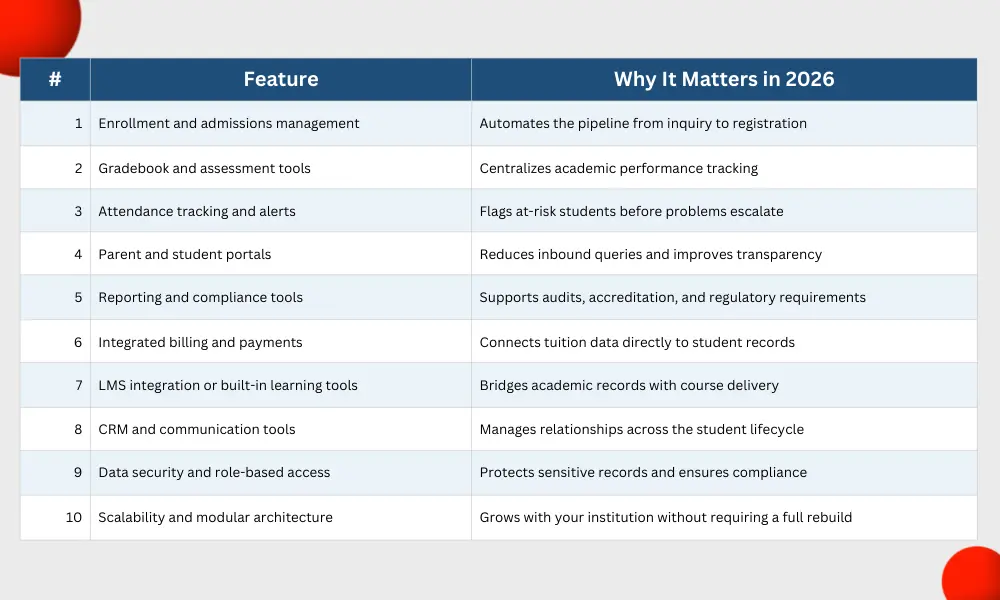
10 Must-Have SIS Features
1. Enrollment and Admissions Management
The admissions pipeline is where the student lifecycle begins, and a SIS that handles it poorly creates downstream problems that never fully resolve. Enrollment management functionality should cover the full journey from initial inquiry through application, review, acceptance, and registration.
In 2026, this means more than a digital form. Look for automated workflows that move applicants through stages without manual intervention, customizable online application portals, and real-time enrollment dashboards that show exactly where your pipeline stands.
For K12 schools and academies, the ability to handle sibling applications, returning student re-enrollment, and document upload requirements in one place is a significant time saver. For multi-site institutions, centralized visibility into enrollment across locations is essential.
Classter’s Admissions Module handles the full pipeline with configurable workflows, applicant portals, and integrated communication tools that keep prospects informed at every stage.
2. Gradebook and Assessment Tools
Grades are the core academic record, and your SIS needs to handle them with precision and flexibility. A strong gradebook feature goes beyond storing scores. It should support multiple grading scales, weighted categories, rubric-based assessments, and automatic GPA calculations.
Teachers should be able to update grades directly in the platform, not in a spreadsheet that someone imports later. Administrators should be able to pull transcript-ready reports at any time without manual formatting.
Assessment tools that connect directly to the gradebook, allowing teachers to create, assign, and auto-grade quizzes and tests, add significant efficiency for institutions that have moved toward digital learning. The more seamlessly assessment and record-keeping connect, the less time staff spend reconciling data.
3. Attendance Tracking and Automated Alerts
Attendance data is one of the most operationally useful datasets a school collects, and most institutions under-utilize it. A modern SIS should do more than record who showed up. It should flag patterns, trigger automated alerts to parents when a student crosses an absence threshold, and feed attendance data into broader student performance views.
For K12 schools, parent notifications tied directly to attendance records reduce the volume of manual calls and emails staff have to make. For higher education and training providers, attendance data connected to compliance requirements can be the difference between meeting accreditation standards and scrambling during an audit.
Mobile attendance input, so teachers can take attendance from a device rather than paper or a separate app, is increasingly standard. QR code and biometric attendance options are worth evaluating for institutions managing large cohorts.
4. Parent and Student Portals
Self-service portals reduce the volume of inbound administrative requests while giving students and parents the transparency they increasingly expect. A well-built portal puts grades, attendance records, schedules, fee statements, and announcements in one accessible place without requiring staff to pull and send reports on demand.
The quality of the portal experience matters. A portal that is technically functional but poorly designed will see low adoption, which defeats the purpose. Look for mobile-responsive design, clear navigation, and role-appropriate views that show each user exactly what they need without overwhelming them.
Parent portals should also support direct communication with teachers and administrators, schedule parent-teacher meetings, and surface payment options for outstanding fees. Student portals should connect to academic calendars, assignment submissions, and progression requirements.
5. Reporting and Compliance Tools
A SIS that cannot produce reliable reports quickly is a liability during audits, accreditation reviews, and board meetings. Reporting functionality should cover student demographics, enrollment trends, academic performance, attendance summaries, and financial data, with the ability to filter, segment, and export in multiple formats.
Compliance reporting is particularly important for institutions operating in regulated environments. Whether you are meeting FERPA requirements in the United States, GDPR obligations in Europe, or national education authority reporting standards elsewhere, your SIS needs to generate the right data in the right format without custom development.
Scheduled automated reports that go directly to relevant stakeholders reduce the manual reporting burden significantly. Dashboards that give leadership a real-time overview of institutional health, without requiring them to run queries, are increasingly expected at the administrative level.
6. Integrated Billing and Payments
Tuition management that sits in a separate system from student records is one of the most common sources of administrative friction in schools. When billing and enrollment data do not sync automatically, staff end up manually cross-referencing spreadsheets, errors accumulate, and collections slow down.
A SIS with integrated billing connects enrollment status directly to invoice generation. New student registrations trigger tuition invoices. Withdrawals stop billing. Payment plans, sibling discounts, and scholarship deductions apply automatically based on rules set in the system.
Payment processing integrations that support online payments, bank transfers, and installment plans give families flexibility and reduce the volume of in-person payment handling. Real-time financial dashboards let finance teams track outstanding balances without running manual reports.
7. LMS Integration or Built-In Learning Tools
The line between a student information system and a learning management system has been blurring for several years. In 2026, institutions increasingly expect their SIS and LMS to operate as a single connected experience, even if the underlying architecture separates them.
At minimum, your SIS should integrate cleanly with major LMS platforms: Moodle, Canvas, Google Classroom, Microsoft Teams, and similar tools. That integration should be bidirectional, meaning course enrollments created in the SIS flow automatically into the LMS, and learning activity data flows back.
Platforms that include built-in LMS functionality eliminate the integration requirement entirely. For institutions that want to reduce their vendor count and avoid the complexity of maintaining a separate learning environment, a SIS with native LMS capabilities is worth prioritizing.
Classter’s Academics and LMS module handles course planning, assignment management, and learning content delivery within the same platform that manages student records, which means there is no data gap between academic management and course delivery.
8. CRM and Communication Tools
A student information system that only manages enrolled students is leaving a significant portion of the relationship lifecycle unmanaged. Modern SIS platforms increasingly incorporate CRM functionality that covers prospective students, current students, alumni, and even employer or partner relationships.
On the prospective side, CRM tools support lead tracking, automated follow-up sequences, and conversion analytics that help admissions teams understand where inquiries are dropping off. On the current student side, communication tools should support targeted messaging by cohort, grade level, or program without requiring a separate email platform.
Alumni engagement features, including alumni portals and networking tools, are valuable for institutions that want to build long-term community relationships and support fundraising or referral programs.
The key question to ask when evaluating CRM functionality in a SIS is whether communication history is connected to the student record. If it is, your team has full visibility into every touchpoint across the lifecycle. If it is not, you are back to reconciling data across systems.
9. Data Security and Role-Based Access
Student data is sensitive by definition. A SIS holds personally identifiable information, financial records, academic performance data, and in some cases behavioral or health information. Security is not a nice-to-have. It is a baseline requirement.
Role-based access controls ensure that each user sees only the information they need for their role. A teacher should not have access to billing records. A finance officer should not be able to edit academic transcripts. An IT administrator should be able to audit who accessed what and when.
Cloud-based SIS platforms should host on enterprise-grade infrastructure with encryption at rest and in transit, multi-factor authentication, regular security audits, and documented disaster recovery procedures. Ask vendors directly about their security certifications and data residency options, particularly if your institution operates across multiple countries with different data protection requirements.
Classter runs on Microsoft Azure infrastructure, providing enterprise-level security, regular backups, and the data residency options that institutions in multiple regulatory environments require.
10. Scalability and Modular Architecture
Institutions grow. Programs expand. New campuses open. Student populations shift. A SIS that works well for 200 students but struggles at 2,000 is not a long-term investment. Scalability should be part of your evaluation criteria from the start.
Modular architecture is the approach that makes scalability practical. Rather than purchasing a monolithic system with features you do not need and paying for them anyway, a modular SIS lets you activate the capabilities your institution requires now and add others as needs change.
This matters particularly for institutions that are growing or diversifying. A K-12 school that plans to add a higher education division, or a training center that wants to expand into corporate learning, needs a platform that can accommodate those changes without a full system migration.
Multi-campus support is closely related. If your institution manages more than one site, your SIS should provide centralized administration with location-level visibility, not a separate database for each campus.
What Separates a Good SIS from a Great One in 2026
The 10 features above represent the baseline. Institutions that are evaluating SIS platforms in 2026 should also be asking a second set of questions that go beyond feature lists:
- How does data flow between modules? A system where each module is technically connected but requires manual sync is not truly integrated.
- What does the implementation process look like? Features mean nothing if onboarding is poorly managed and your team never fully adopts the system.
- How often is the platform updated? EdTech moves quickly. A vendor that releases updates regularly is investing in keeping the product relevant.
- What does customer support look like after go-live? Ongoing support quality is often a stronger predictor of satisfaction than the initial demo.
- Is the platform designed for your institution type? A system built for US higher education will have different assumptions built in than one designed for international K-12 or mixed institutions.
The SIS market has grown significantly, reaching over $17 billion in 2025 and projected to continue expanding as institutions invest in digital infrastructure. That growth has brought more options, but also more noise. Evaluating platforms against a clear feature and fit criteria is the most reliable way to cut through it.
How Classter Delivers Everything You Need
Classter is designed to cover all 10 of these features within a single platform, with the SIS, SMS, LMS, CRM, and ERP functions working from a shared data foundation. There is no middleware to configure and no manual sync between systems.
For institutions that have been managing multiple point solutions, such as one tool for enrollment, another for billing, and a third for learning management, Classter consolidates those into a single environment with one login, one support relationship, and one source of truth for all student and operational data.
The modular architecture means institutions can start with the core SIS functionality and activate additional modules as their needs evolve. Classter currently serves institutions across 35+ countries, from single-site K-12 schools to multi-campus higher education providers, and is built to scale across all of those contexts.
FAQ’s
At minimum: enrollment management, gradebook, attendance tracking, parent and student portals, reporting, and billing. In 2026, strong platforms also include LMS integration, CRM tools, and built-in data security.
A SIS focuses on student data. School management software covers broader institutional operations like billing, staffing, and scheduling. The best platforms combine both.
Yes. Classter covers all 10 within a single platform, including enrollment, gradebook, attendance, portals, billing, LMS, CRM, reporting, security, and modular scalability.