



Choosing a Learning Management System (LMS) for your school is one of those decisions that looks simpler than it is. The demo is smooth. The feature list is long. The sales team is helpful. Then you implement it, and three months later, your teachers have gone back to emailing assignments as PDF attachments.
The LMS market in 2026 is worth over $300 billion globally and is growing rapidly. That scale has brought genuine innovation, but it has also produced a crowded field, making it easy to choose a platform that works well in theory but poorly in practice for your specific institution.
This guide walks through every stage of the LMS selection process: how to define what you actually need, which features matter most for schools, the critical question of whether to use a standalone LMS or an integrated platform, and a practical evaluation checklist you can use when talking to vendors.
What Is a Learning Management System for Schools?
A Learning Management System is a platform that centralizes the creation, delivery, and management of educational content. For schools, that means teachers can build course materials, set and receive assignments, run assessments, track student progress, and communicate with students, all in one place.
In 2026, the definition has expanded. Modern school LMS platforms also connect to student information systems, support hybrid and blended learning, enable live and asynchronous instruction, and provide analytics that help administrators identify students who are falling behind before problems escalate.
The most important shift in recent years has been the move away from treating the LMS as a standalone tool toward treating it as a core component of a school’s broader technology infrastructure. How the LMS connects to your student records, your parent communication tools, and your billing system matters as much as what it does on its own.
Before You Start Comparing Platforms
The most common LMS buying mistake is jumping straight to demos without first getting clear on what your institution actually needs. Features look impressive in every demo. Your job is to evaluate whether those features solve your specific problems.
Start by answering three questions:
1. What is broken in your current setup?
Is your problem that teachers are using too many disconnected tools? Is student progress data hard to access in one place? Is parent communication manual and inconsistent? That attendance and learning activity are not connected? The answer to this question should drive your evaluation criteria, not the vendor’s feature list.
2. Who will use it every day?
An LMS that administrators love but teachers find clunky will fail. An LMS that students cannot navigate on a mobile device will see low engagement. Map out every user type: teachers, students, parents, administrators, and support staff. Each one has different needs, and you should test the platform with real users from each group before committing.
3. What does your technical environment look like?
Do you already have a student information system? If so, does the LMS you are considering integrate with it? What tools are teachers already using, such as Google Workspace, Microsoft 365, Zoom, or Teams? An LMS that plays well with your existing environment is far easier to adopt than one that requires staff to change every tool they use.
Key Features to Look for in a School LMS
Not all features are equally important. The following are the ones that genuinely differentiate platforms for school use:
Course creation and content management
Teachers should be able to build, organize, and update course content without IT support. Look for intuitive course builders, support for multiple content types (video, documents, quizzes, and external links), and the ability to reuse or duplicate course materials across terms or classes.
Assessment and gradebook tools
The LMS should support a range of assessment types: auto-graded quizzes, assignment submissions, rubric-based grading, and peer reviews. Gradebook functionality should calculate grades automatically, support weighted categories, and sync with the student record system so that transcripts are always current.
Attendance tracking
Attendance that lives in a separate system from learning activity creates a fragmented picture of student engagement. An LMS with built-in attendance tracking, or tight integration with an SIS that manages attendance, means teachers mark registers in one place and that data feeds directly into parent alerts and compliance reports.
Student and parent portals
Students should be able to access all course materials, assignments, grades, and schedules from a single login. Parents should have visibility into their child’s progress, upcoming deadlines, and attendance without having to call the school. The quality of the portal experience directly affects adoption, so evaluate it with real users, not just screenshots.
Communication tools
Announcements, direct messaging, and discussion tools should be built into the platform. Teachers need to communicate with individual students, whole classes, or specific groups without switching to a separate email tool. Automated notifications for assignment due dates, grade updates, and attendance alerts reduce the manual communication burden significantly.
Mobile accessibility
In most school contexts, students and parents will primarily access the platform on a mobile device. Mobile accessibility a baseline requirement. Test the mobile experience yourself before shortlisting a platform. A responsive web design that works on a small screen is meaningfully different from a purpose-built mobile app.
Reporting and analytics
At the teacher level, reporting should show who has submitted work, who is falling behind, and how the class is performing on assessments. At the administrator level, reporting should aggregate data across classes, year groups, and programs to give leadership visibility into institutional performance. Compliance-ready exports and scheduled automated reports reduce the manual workload during audits and board reviews.
Standalone LMS vs Integrated LMS and SIS: The Decision That Changes Everything
This is the most consequential choice in your LMS evaluation, and it is one that most buying guides skip over.
A standalone LMS is a purpose-built learning platform that operates independently of your student records system. You manage enrollment in your Student Information System (SIS), then replicate that data in the LMS. Grades recorded in the LMS need to be pulled back into the SIS for transcripts. Attendance managed in one system does not automatically appear in the other.
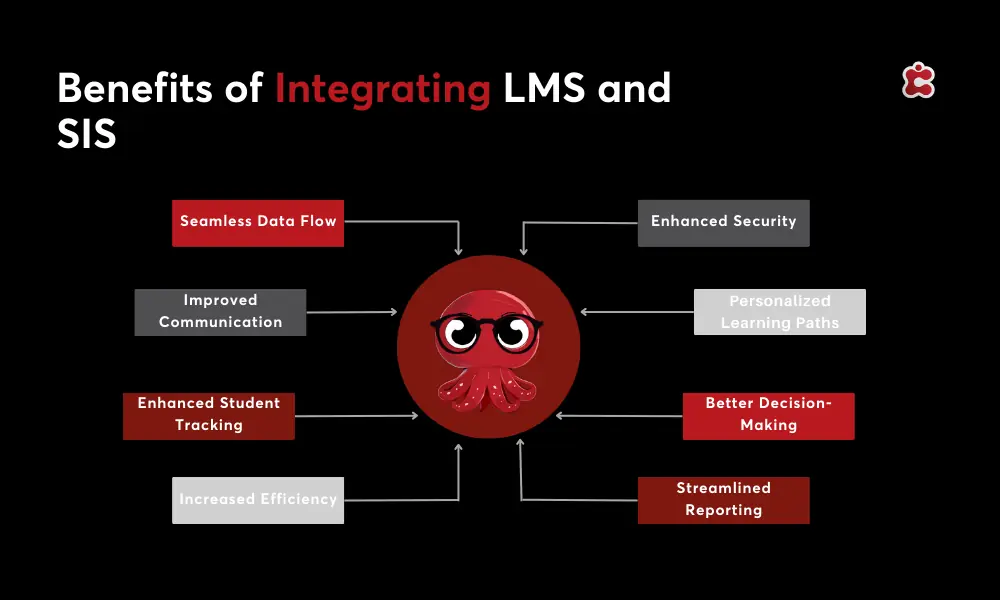
An integrated LMS works from the same data foundation as your SIS. A student enrolled in a course appears in the LMS automatically. Grades update the academic record in real time. Attendance data connects to parent notifications without any manual export.
The table below summarizes the practical differences:
| Factor | Standalone LMS | Integrated LMS + SIS |
|---|---|---|
| Setup complexity | Moderate | Lower (one system) |
| Data sync | Manual or via integration | Automatic |
| Vendor relationships | Multiple | One |
| Gradebook accuracy | Depends on sync quality | Always current |
| Reporting | Siloed by system | Cross-functional |
| Cost over time | Higher (two licenses) | Lower (one platform) |
| Best for | Institutions with existing SIS investment | Institutions consolidating or starting fresh |
For institutions that already have a significant investment in a standalone SIS, adding a well-integrated LMS is a viable path. But for institutions that are evaluating their entire technology stack or are starting from scratch, an integrated platform that handles both SIS and LMS functions eliminates an entire category of operational friction.
The hidden cost of a standalone LMS is not the licensing fee. It is the staff time spent reconciling data between systems, the errors that accumulate when sync fails, and the reporting limitations that come from data living in two places.
Choosing an LMS by Institution Type
K-12 schools
K12 schools need an LMS that is accessible for younger learners, manageable for teachers who are not tech specialists, and transparent for parents. Parent portals with real-time grade and attendance visibility are particularly valuable. Look for platforms with strong mobile apps, simple course builders, and tight integration with your student records.
For smaller private K12 schools, a modular platform that covers LMS and SIS together is often the most practical choice. It reduces the vendor count, simplifies support, and keeps costs manageable without sacrificing functionality.
Higher education and mixed institutions
Higher education institutions and academies tend to have more complex academic structures: multiple programs, varied assessment formats, cohort management, and compliance reporting that spans multiple regulatory frameworks. An LMS for these institutions needs to handle that complexity without becoming unusable for teaching staff.
Integration with existing tools such as Microsoft Teams, Zoom, and library systems is often more critical at this level. Look for open API support and a track record of integrations with the tools your institution already uses.
Multi-campus and international institutions
If your institution operates across multiple sites or countries, centralized reporting and access control become critical. The LMS should allow each campus to operate its own learning environment while giving central administrators a consolidated view across all sites. Data residency requirements vary by country, so ask vendors directly where data is hosted and whether they can accommodate regional requirements.
LMS Evaluation Checklist
Use the table below when running demos and talking to vendors. It covers the criteria that matter most for school-context buying decisions.
| Evaluation Criteria | Questions to Ask the Vendor |
|---|---|
| Ease of use for teachers and students | Can we trial it with real users before buying? |
| SIS integration or built-in SIS | Is enrollment sync automatic or manual? |
| Gradebook and assessment tools | Does it support weighted grades and rubrics? |
| Attendance tracking | Does attendance connect to parent alerts? |
| Mobile accessibility | Is the mobile experience full-featured or limited? |
| Reporting and analytics | Can we generate compliance reports automatically? |
| Data security and hosting | Where is data hosted? What certifications do you hold? |
| Scalability | How does pricing change as we grow? |
| Vendor support | What does post-implementation support look like? |
| Integration with third-party tools | Do you support Zoom, Teams, Google Classroom? |
One additional step most institutions skip: run a structured pilot with real teachers and students before making a final decision. A pilot of four to six weeks on a single class or program will surface usability issues that no demo ever will. The vendor that welcomes a pilot is usually more confident in their product than one that pushes for a quick signature.
Why More Schools Are Looking for LMS and SIS in One Platform
The trend toward consolidation is clear. Schools that have managed separate systems for student records and learning delivery are increasingly asking whether one platform can handle both, and the answer from the market is increasingly yes.
The driver is not just cost, although consolidating two vendor licenses into one does reduce spend. The bigger driver is data quality. When the same platform manages enrollment, learning activity, grades, attendance, and communication, every stakeholder is working from the same information. There is no lag between a grade being entered and a transcript being updated. There is no manual step between a student enrolling and appearing in the LMS.
For institutions that have been managing this kind of fragmentation for years, the move to an integrated platform often produces faster and more significant efficiency gains than any individual feature upgrade would.
How Classter Approaches LMS for Schools
Classter is built as an integrated platform that covers SIS, SMS, LMS, CRM, and ERP functionality within a single system. The Academics and LMS module manages course planning, content delivery, assignment management, assessments, and gradebook functionality from the same data foundation that handles enrollment, attendance, billing, and compliance reporting.
For teachers, this means one login to plan lessons, set assignments, track submissions, update grades, and communicate with students. For administrators, it means real-time dashboards that show academic performance, attendance, and financial data without needing to pull reports from multiple systems. For parents and students, it means a single portal that reflects everything happening in their school in real time.
Classter integrates with 40+ third-party tools, including Microsoft 365, Google Workspace, Moodle, Zoom, Microsoft Teams, and Webex, so institutions with existing tool investments can connect rather than replace them. The open API also supports custom integrations for institutions with specific needs.
The modular architecture means institutions can start with the LMS and core SIS functionality and activate additional modules, such as billing, HR, transportation, or CRM, as their needs evolve.
FAQ’s
Course creation tools, gradebook and assessments, attendance tracking, parent and student portals, mobile accessibility, communication tools, reporting and analytics, and either built-in SIS functionality or clean integration with your existing student records system.
An LMS manages learning delivery, including courses, assignments, and assessments. A SIS manages student data, including enrollment, attendance, grades, and compliance records. They serve different functions but work best when integrated or built into the same platform.
Yes. Classter’s Academics and LMS module covers course planning, content delivery, assignments, assessments, and gradebook functionality, all within the same platform that manages student records and school operations.