



Every summer, admissions teams across schools and higher education institutions face the same exhausting ritual: printed application packs stacked on desks, spreadsheets tracking who submitted what, inboxes drowning in scanned passports and transcript PDFs, and staff manually chasing applicants for missing documents. The rush is real. But here’s the thing it doesn’t have to be this way.
A fully paperless admissions process is no longer a luxury reserved for well-resourced universities. With the right student enrollment software, institutions of any size can move the entire journey online from the moment a prospective student finds your application form to the moment they e-sign their enrollment contract. The result is fewer errors, faster decisions, and a summer that doesn’t break your team.
This guide walks you through exactly how to build that process, step by step.
The Real Cost of Paper-Based Admissions
Before you can fix something, it helps to understand what it’s actually costing you. Paper-based admissions looks manageable on the surface until you add up the hours.
Time Lost to Manual Work
Think about every touchpoint in a traditional admissions cycle: printing forms, scanning returns, manually entering data into systems, emailing applicants for corrections, physically filing documents, and then trying to find them again when an offer needs to be issued. Research consistently shows that admissions staff in paper-heavy environments spend a significant portion of their working week on administrative tasks that contribute no real value to the decision-making process.
During summer peaks, when application volumes spike and deadlines compress, that time cost becomes a staffing problem. Teams either work overtime or applicants wait longer than they should and in a competitive environment, slow responses cost you enrolments.
Errors That Compound
Manual data entry introduces errors. Names misspelled at intake appear on offer letters. Wrong programme codes get attached to applicant records. Documents get filed under the wrong student. Each error requires correction, which requires time, which requires someone to stop what they’re doing.
In regulated environments particularly in higher education errors in admissions records can have downstream consequences for student registration, financial aid eligibility, and compliance reporting.
Lost and Misplaced Documents
Paper gets lost. PDFs attached to emails get buried. Shared drives fill up with unlabeled scans. When an applicant calls to check their status and a staff member can’t locate their transcript, it reflects poorly on the institution and erodes trust before the student has even enrolled.
The solution isn’t better filing systems. It’s eliminating the problem entirely by moving to a digital admissions process where every document is structured, searchable, and attached to the right record automatically.
What a Fully Digital Admissions Flow Looks Like
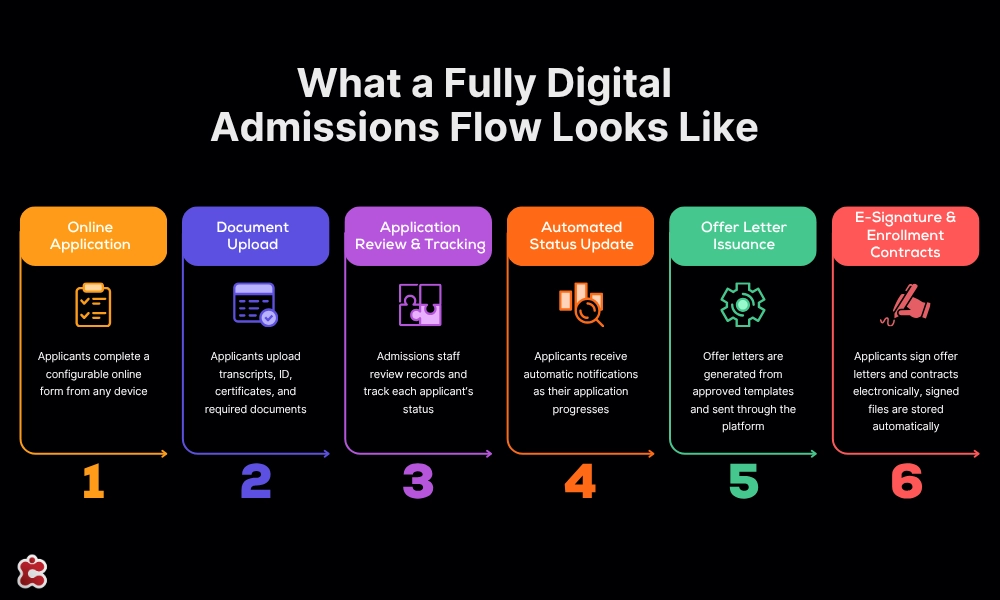
A well-designed digital admissions process follows a clear sequence of stages. Each stage should produce a structured record, trigger the next action automatically where possible, and give both the admissions team and the applicant clear visibility of where things stand.
Here is what that flow looks like in practice, built around the capabilities of a platform like Classter.
Step 1: Online Application
The process starts with a configurable online application form, accessible from any device. Applicants complete personal details, programme preferences, and any intake-specific questions directly in the portal. No paper. No email attachments. No PDF forms that need to be printed, signed, and scanned back.
With Classter’s Admissions module, institutions can build custom application forms tailored to each programme or intake period. Conditional logic means applicants only see the fields relevant to them, keeping the process clean and reducing abandonment rates.
Step 2: Document Upload
Once the application form is submitted, applicants are prompted to upload supporting documents: transcripts, identity documents, language certificates, reference letters, or whatever your intake requires. Each upload is attached directly to the applicant’s record and stored securely within the platform.
The document checklist is configurable per programme, so applicants know exactly what is required and the system flags incomplete submissions automatically. Admissions staff no longer need to chase documents by email the platform handles it.
Step 3: Application Review and Applicant Tracking
With all materials in one place, the review stage becomes genuinely manageable. Admissions staff can view each applicant’s complete record, annotate it, assign a status, and escalate to decision-makers where needed all within the platform.
Classter’s applicant tracking tools give the team a real-time dashboard of where every applicant sits in the pipeline. Filter by programme, status, submission date, or outstanding documents. No more manually updating spreadsheets to track who is at what stage.
Step 4: Automated Status Updates
One of the biggest time-savers in a digital admissions process is removing the need to manually communicate status changes. When an application moves from submitted to under review, or from reviewed to offer pending, the system triggers an automatic notification to the applicant.
This alone eliminates a significant volume of inbound enquiries. Applicants stop emailing to ask where they stand because they already know. Staff stop drafting status update emails because the platform handles it.
Step 5: Offer Letter Issuance
When a decision is made, offer letters are generated directly from the platform using pre-approved templates. Personalisation fields pull through the applicant’s name, programme, start date, and any conditions attached to the offer. The letter goes out through the system, not through someone’s email inbox.
This standardises what applicants receive, reduces the risk of errors in offer communications, and creates an auditable record of what was sent and when.
Step 6: E-Signature for Offer Acceptance and Enrollment Contracts
The final and perhaps most impactful step in eliminating paper is replacing wet signatures with electronic ones. Classter’s Signatures module enables institutions to send offer letters and enrollment contracts for e-signature directly through the platform.
Applicants receive a secure link, review the document, and sign electronically from any device. The signed document is stored automatically against their record. No printing. No scanning. No waiting for post.
For admissions teams, this removes one of the last manual bottlenecks in the process. For applicants, especially those applying from abroad, it removes a genuine barrier to completion.
How Academic CRM Keeps Prospective Students Engaged
A digital admissions flow handles the mechanics of processing applications. But summer admissions also involves a significant amount of relationship management: following up with enquirers who haven’t yet applied, nudging applicants who started a form but didn’t submit, and keeping offer holders engaged while they decide.
This is where a dedicated Academic CRM makes the difference.
Classter’s Academic CRM module connects your prospective student pipeline directly to your admissions workflow. Automated follow-up sequences can be configured to trigger based on behaviour: a prospective student who downloaded a prospectus but hasn’t started an application receives a reminder after five days; an applicant who submitted documents but hasn’t accepted their offer receives a check-in message after a week.
The result is a joined-up experience where no prospective student falls through the cracks, without requiring a member of staff to manually monitor and action every touchpoint. During the summer rush, when volumes are high and capacity is stretched, this kind of automation is not a nice-to-have. It is how you protect your yield.
Handling Edge Cases
A well-designed digital admissions process accounts for the full range of applicants, not just the straightforward domestic ones. Two groups in particular require additional thought.
International Students
International applicants bring additional document complexity: translated transcripts, certified copies, visa-related declarations, and language proficiency certificates. A paper-based process struggles to manage this cleanly. Documents arrive in different formats, at different times, through different channels.
In a digital admissions process, the document checklist for international applicants can be configured separately to reflect these requirements. Applicants upload all materials in one place. The admissions team reviews them in one place. Status updates are sent automatically. The e-signature flow for offer acceptance works identically regardless of where in the world the applicant is sitting which is exactly the point.
Late Applicants
Late applications are a reality in every admissions cycle. Managing them in a paper-based system means ad hoc processes, emails that bypass the usual workflow, and records that don’t always end up where they should.
In a digital system, late applicants simply enter the same workflow as everyone else, with a flag or tag indicating their late status. The admissions team can apply different review criteria or expedited timelines without losing the structure and auditability that the system provides. No special handling required. No records going astray.
Going Live Before the Rush
The most common mistake institutions make when moving to a digital admissions process is leaving implementation too late. If you are hoping to run a paperless summer admissions cycle, the time to act is before applications open not after.
Here is a realistic timeline for institutions planning to go live before peak season:
- Eight to ten weeks out: Platform configuration. Set up application forms, document checklists, programme-specific workflows, and offer letter templates.
- Six to eight weeks out: Staff training. Admissions teams need time to become comfortable with the platform before volume picks up.
- Four to six weeks out: Pilot testing. Run a small cohort of applications through the full digital flow. Identify any gaps in configuration or process.
- Two to four weeks out: Go live. Open applications via the new digital process with enough runway to address issues before peak volume hits.
Classter’s implementation team works with institutions to configure the platform to their specific workflows. The Admissions, Signatures, and Academic CRM modules are designed to integrate with each other and with existing student information infrastructure, reducing the technical lift of going live.
If you are unsure where your current process has the biggest gaps, Classter’s enrollment management resources are a useful starting point for understanding what a fully optimised digital flow looks like for institutions of different types and sizes.
Ready to Run a Paperless Summer Admissions Cycle?
Summer admissions does not have to mean chaos. With the right paperless school admissions software in place, your team spends less time on administration and more time on the decisions that actually matter.
Classter’s Admissions, Signatures, and Academic CRM modules give you everything you need to run a fully digital process from application to enrolled student with the automation, tracking, and e-signature capabilities to handle peak volumes without adding headcount.
Book a demo today and see how Classter can transform your summer admissions process before the rush begins.
FAQ’s
Absolutely. A digital admissions workflow scales to the size of the institution, not the other way around. Whether you are managing 50 applications or 5,000, the core process online form, document upload, review, offer, e-signature works identically. Classter’s Admissions module is used by institutions of all sizes, from single-site schools to multi-campus higher education providers.
Yes, in the vast majority of jurisdictions. Electronic signatures are legally recognised under eIDAS in the EU, ESIGN in the US, and equivalent frameworks in most countries. Classter’s Signatures module produces a compliant e-signature with a full audit trail who signed, when, and from which device so the record is both legally valid and operationally clean.
Staff can complete or submit on behalf of an applicant where needed, maintaining the digital record without requiring full self-service. The platform flags incomplete submissions automatically, so the team always knows who needs support without manually checking every application.
A realistic timeline is eight to ten weeks from initial configuration to go-live covering form setup, document checklists, staff training, and a pilot run before full intake opens. Institutions that start this process before summer applications open tend to run a clean digital cycle. Those that start during peak season often end up with a hybrid process that carries the disadvantages of both.
The document upload stage accepts scanned or photographed versions of physical documents. Where originals must be verified in person, this requirement can be set as a condition of the offer directly within the platform so applicants know what is expected and the admissions team has a clear record of what has and hasn’t been confirmed. Everything else stays fully digital.