



If you’ve been tasked with evaluating a new Student Information System for your institution, you’ve probably already discovered that getting a straight answer on pricing is surprisingly difficult. Vendors are happy to book a demo. They’re less eager to hand over a line-by-line cost breakdown before the first call.
That’s not entirely cynical SIS migration costs genuinely vary depending on institutional size, data complexity, and how many legacy systems are involved. But there’s also a pattern worth naming: a lot of what makes enterprise SIS migrations expensive doesn’t show up in the initial proposal. It shows up six months in, when your IT team is buried in data mapping work they weren’t expecting, or when a “standard” integration turns out to require custom development at an hourly rate.
This post breaks down what the major platforms typically cost, where the hidden expenses tend to appear, and what a more transparent SIS migration cost structure actually looks like. If you’re mid-evaluation, our SIS migration guide walks through the process stage by stage.
Why Migration Costs Are Hard to Compare
The honest answer is that most enterprise SIS vendors don’t publish pricing at all. Ellucian Banner, Jenzabar, Oracle PeopleSoft these are negotiated, multi-year contracts tailored to each institution. The same is broadly true of Workday Student and Anthology Student, which became part of Ellucian’s portfolio in late 2025.
What you can work with are ranges reported by institutions that have gone through the process. According to EDUCAUSE research, a large university with 20,000 or more students could spend between $30 million and $100 million in the first five years of a new enterprise SIS. For mid-sized institutions, the figure is more typically in the hundreds of thousands per year but that’s still a substantial multi-year commitment before you factor in migration services.
The reason the ranges are so wide: licensing fees are just one part of the equation.
The Real Cost Buckets
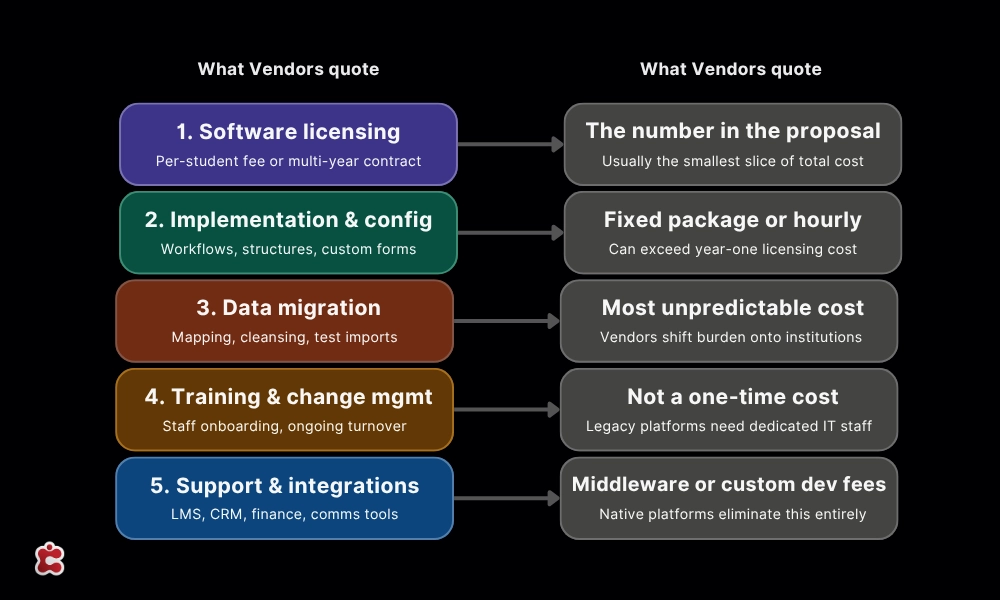
When comparing SIS platforms, costs tend to fall into roughly five categories. Most proposals lead with the first one and bury the rest.
1. Software licensing / subscription fees: This is the number vendors quote upfront. For cloud-based platforms, it’s usually an annual per-student or per-enrollment fee. For legacy enterprise systems, it’s often a multi-year contract with annual maintenance costs on top.
2. Implementation and configuration: Getting the system to actually work for your institution configuring workflows, setting up academic structures, customizing forms takes time. Vendors usually bill for this either as a fixed implementation package or as professional services hours. It’s not uncommon for implementation fees to exceed the first year’s software cost for larger institutions.
3. Data migration: This is where costs become unpredictable. Migrating student records, enrollment histories, financial data, academic transcripts, and archived communications from a legacy system requires cleaning the data first, mapping it to the new system’s structure, running test imports, and validating the results. See how Classter handles data migration differently from most enterprise vendors.
Modern ERP and SIS vendors are increasingly shifting the burden of data migration onto institutions even when those institutions have little to no internal experience with it. That’s a cost that doesn’t show up on any proposal.
4. Training and change management: Staff turnover means training isn’t a one-time cost it’s ongoing. Heavily customized legacy platforms can require dedicated IT staff just to keep them running, let alone train new users. For smaller institutions, that overhead can be substantial.
5. Ongoing support and integrations: Third-party integrations connecting your SIS to your LMS, finance systems, CRM, or communication tools often require additional middleware, custom development, or per-integration fees. Classter’s native integrations cover most common tools without custom development, which is a meaningfully different cost proposition.is not a stripped-down enterprise platform. It is a platform designed for that scale from the beginning.
How the Major Platforms Stack Up
Here’s a rough sense of where the main players land, based on publicly available information and institutional reporting. Migration cost ranges reflect total first-year implementation costs where reported, licensing-only figures are noted where that’s all that’s available.
| Platform | Best For | Migration Cost Range |
| Ellucian Banner | Large universities (~24% market share) | Millions multi-year implementations requiring dedicated IT staff |
| Workday Student | Institutions modernizing away from legacy ERP | 18–36month implementations, high upfront, lower long-term TCO |
| Oracle PeopleSoft | Large institutions with existing Oracle infrastructure | Substantial cloud migration costs frequently underestimated |
| Jenzabar | Smaller colleges (~11% market share) | Lower than Banner, some roadmap uncertainty worth evaluating |
| PowerSchool (K-12) | Districts needing compliance and scale | Licensing migration costs vary significantly by district size |
| Infinite Campus (K-12) | Mid-sized districts | Licensing implementation varies |
| Classter | Institutions consolidating SIS, LMS, CRM, and billing | Transparent per-student pricing: 8–16week typical go-live, migration included in onboarding |
The pattern across all of them: the license fee is the easy part. It’s everything else implementation, data work, training, integrations that determines what you actually spend.
The Costs Nobody Mentions Upfront
A few places where migrations reliably go over budget:
- Post-migration corrections are real even in well-run projects. A vendor who stays involved after go-live makes a real difference to total cost one who hands off the moment data is imported does not. 5,000-student university that has been absorbing the cost and complexity of an enterprise platform it was never designed for, it is worth an honest evaluation. See a customer case study to understand what Classter’s post-migration support looks like in practice.
- Internal staff time is the invisible line item. A full SIS migration pulls your registrar, IT, financial aid, and admissions teams away from their normal work for months. That doesn’t show up on any vendor proposal.
- Data quality remediation catches almost everyone off guard. Most institutions discover mid-migration that years of inconsistent data entry means significant cleanup before anything can be imported cleanly.
- Parallel running costs hit when go-lives slip and they frequently do. Running two systems at once is expensive in both licensing and staff effort.
What a More Transparent Migration Looks Like
Classter’s dedicated migration service covers data audit, field mapping, phased import, test runs, and post-migration validation included in onboarding, not billed separately at hourly rates. Most institutions are live within 8–16 weeks, with the timeline driven primarily by the condition of source data rather than platform complexity.
Because Classter combines SIS, SMS, LMS, CRM, and billing in one platform, you’re consolidating multiple legacy systems in a single migration rather than running separate ones for each tool you’re replacing. For institutions managing disconnected systems across student records, learning delivery, and finance, that consolidation often represents as much savings as the platform itself.
All data is hosted on Microsoft Azure infrastructure. For details on encrypted storage, role-based access controls, and disaster recovery, see Classter’s security and hosting overview.
Questions Worth Asking Every Vendor
Before you sign anything, these questions will surface what the proposal doesn’t show:
The answers tell you quickly whether a vendor has real migration experience or is describing a process they expect you to manage.
The Bottom Line
The sticker price is rarely the whole story. For institutions with complex legacy environments, the real question isn’t just what the new SIS costs it’s what keeping the current setup costs, and what it would be worth to stop managing it.
Ready to see it in action? Book a demo and we’ll walk through what migration looks like for your institution specifically.
FAQ’s
Most institutions are live within a few months. The biggest variable is data quality on your end the cleaner your historical records, the faster the migration moves. Classter’s team helps with data cleanup as part of the process, so you’re not expected to arrive with perfectly formatted exports.
Yes. Classter’s migration team has experience importing from a wide range of source formats, including CSV and Excel exports from legacy systems and direct database transfers where applicable. If you’re moving from a well-known platform like PowerSchool, Jenzabar, or a homegrown system, the mapping work is familiar territory for the team.
No and this is one of the more meaningful differences from legacy enterprise platforms. Classter is a cloud-based SaaS solution built to be managed by administrators, not IT departments. Updates, backups, and infrastructure are handled on Classter’s side, running on Microsoft Azure.
All data is hosted on Microsoft Azure infrastructure with encrypted storage and role-based access controls. Classter also uses Azure Backup for disaster recovery. Your institution retains ownership of its data throughout.
Not necessarily. Classter supports phased rollouts, so institutions can bring modules live incrementally rather than flipping everything over in one go. That said, because Classter combines SIS, LMS, SMS, CRM, and billing in a single platform, most institutions find that consolidating into one migration is simpler than managing several parallel transitions.