



It’s week three of the fall semester. A student walks into the finance office frustrated, confused, holding a bill that doesn’t reflect the scholarship she was awarded in July. Your finance admin pulls up her record. The scholarship is there, in the financial aid system. But it never made it to the billing module. So, the invoice went out wrong, the payment plan is off, and now someone has to spend two hours manually reconciling what should have been an automatic sync.
Sound familiar?
This scenario plays out at colleges every September. Not because finance teams don’t know what to do, they do. But during term time, there’s simply no room to fix the underlying problem. Every week brings new enrolments, new aid adjustments, new late payments, new disputes. The root causes of the chaos disconnected systems, manual fee entry, no automated payment schedules sit there untouched, accumulating interest.
Summer is different. The phones quiet down. The enrolment rush hasn’t started. For most finance and admin teams in higher education, June through August is the only window in the year to go upstream and actually fix things.
Here’s how to use it.
Why the Billing Mess Keeps Happening (and Why You Can’t Fix It in September)
The core problem isn’t effort, it’s architecture. Most colleges run their student fee management across at least two or three systems that don’t talk to each other properly: an SIS for student records, a separate billing or ERP module, and sometimes a standalone financial aid platform. Data has to move between them manually, or through brittle integrations that break when fields change.
The result is a predictable set of failures every semester:
- Invoices generated before financial aid awards are posted, so students receive incorrect bills
- Payment instalment plans set up on spreadsheets rather than automatically triggered by enrolment status
- Late fees applied to students who did pay but whose payments weren’t reconciled in time
- Finance staff spending the first two weeks of term fixing errors instead of supporting new students
According to EDUCAUSE research on higher education ERP systems, manual data reconciliation and lack of integration between financial systems remain among the top operational pain points for college finance teams and among the highest drivers of staff burnout in administrative departments.
None of this gets fixed during term time. There’s too much live activity in the system. Summer gives you the controlled environment you need.
Step 1: Audit Your Billing Pain Points Before You Change Anything
The worst thing you can do in June is immediately start reconfiguring things. Start by documenting what’s actually broken.
Run a post-mortem on the past academic year. Pull data on:
Billing accuracy
- How many invoices had to be manually corrected after the initial send?
- How many students raised billing disputes in the first four weeks of each semester?
- Were there patterns by student cohort, programme, or aid type?
Payment collection
- What percentage of students missed the first instalment deadline?
- Were late payment reminders sent automatically, or did someone have to chase manually?
- How many payment plans had to be restructured mid-semester?
Financial aid reconciliation
- How long did it take, on average, for a confirmed aid award to appear on a student’s invoice?
- Were there students whose bills were never updated to reflect aid changes?
- Did your billing system and your financial aid management system ever show different balances for the same student?
This audit gives you a prioritised list of what to fix. Without it, you risk spending the summer reconfiguring things that weren’t actually causing problems, while the real issues stay in place.
Summer audit checklist:
- Export billing dispute log for both semesters
- Identify top 5 recurring error types
- Map which errors were caused by manual data entry vs. system sync failures
- Interview at least two finance staff members about their biggest time sinks
Document which processes still rely on spreadsheets or email
Step 2: Automate Your Tuition Schedules and Payment Plans
Once you know where the pain is, the next priority is replacing manual processes with automated ones particularly around tuition payment automation and instalment plans.
Manual payment plan management is one of the biggest time drains in college finance offices. A student agrees to pay in three instalments. Someone sets up a spreadsheet entry. A reminder is sent manually before each due date. If the student misses a payment, someone notices eventually and sends a follow-up. None of this is tracked centrally or linked to the student’s account in real time.
Automated payment scheduling changes this entirely. When configured correctly, the system:
- Triggers a payment schedule automatically when a student enrolls (based on their programme, fee structure, and any applied discounts or waivers)
- Sends payment reminders at predefined intervals without staff involvement
- Flags missed payments immediately and applies late fees based on institution policy
- Updates the student’s balance in real time as payments are received
Summer is the time to build and test these schedules not September, when live student accounts are at stake.
What to configure before September:
- Define fee structures for each programme and intake cohort
- Build instalment plan templates (3-payment, semester-based, annual, etc.)
- Set automated reminder sequences (7 days before, day of, 3 days after)
- Configure late fee rules and grace period settings
- Test with a sample cohort before go-live
Classter’s Billing & Payments module handles this end-to-end automated invoicing, configurable instalment plans, and real-time payment tracking so the manual scheduling spreadsheet becomes unnecessary. Finance admins set the rules once; the system executes them for every student, every semester.
Step 3: Sync Financial Aid Data with Student Records
This is where most college billing workflow problems actually originate. Financial aid lives in one place. Student billing lives in another. When they’re not synchronised automatically and in real time the gap between them creates exactly the kind of errors we described at the top of this article.
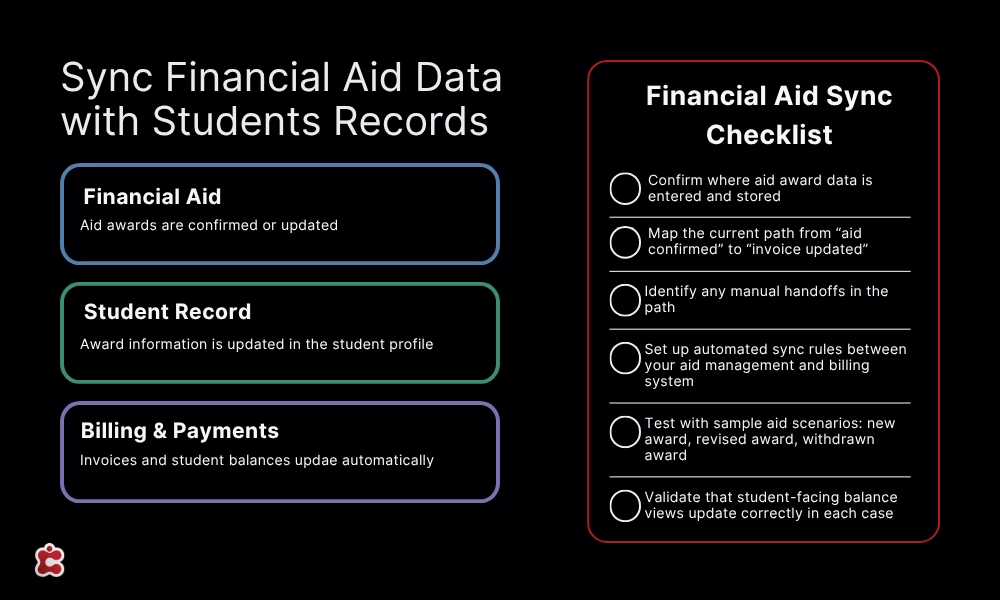
Getting this sync right requires working at the data architecture level, not just the process level. The key questions to answer before September:
Where does financial aid data currently live?
Is it in your SIS, a standalone aid management system, or a spreadsheet? If it’s not in your core student record system, any award change requires a manual update to billing a guaranteed source of errors.
What triggers a billing update when an aid award is posted or changed?
If the answer is “someone manually updates the invoice,” that’s your problem. The trigger should be automatic and immediate.
Are student financial profiles centralised?
Every student should have a single financial record that includes their fee liability, applied discounts, scholarships, aid awards, and payment history accessible in one view, updated in real time.
Classter’s Core module maintains centralised student profiles that link directly to the Billing & Payments module. When a financial aid award is updated in the student record, it’s immediately reflected in the billing ledger no manual reconciliation required. For institutions running a school ERP finance module, this kind of tight integration between records and finance is foundational.
Financial aid sync checklist:
- Confirm where aid award data is entered and stored
- Map the current path from “aid confirmed” to “invoice updated”
- Identify any manual handoffs in that path
- Set up automated sync rules between your aid management and billing system
- Test with sample aid scenarios: new award, revised award, withdrawn award
Validate that student-facing balance views update correctly in each case
Step 4: Test Everything Before September
Even well-configured systems fail if they haven’t been tested under realistic conditions. The final stage of your summer window should be a structured test phase not an assumption that the configuration is correct.
What to test:
Enrolment triggers: Simulate a new student enrolment. Does the system automatically generate the correct invoice for their programme? Does the right instalment plan attach?
Aid award posting: Simulate a scholarship being awarded to an enrolled student. Does the invoice update automatically? Does the student-facing balance change?
Payment processing: Run a test payment through your payment gateway. Does it post to the student account correctly? Is the remaining balance updated?
Missed payment scenario: Simulate a missed instalment. Does the system send the correct reminder at the right time? Does the late fee apply per policy?
Edge cases
Test students who withdraw mid-semester (partial refund calculation), students with multiple aid sources, and students who change programmes (fee adjustment).
Pre-September testing checklist:
- Full enrolment-to-invoice workflow test for each programme type
- Aid award → invoice update test (new, revised, withdrawn)
- Payment processing test across all accepted payment methods
- Missed payment and late fee trigger test
- Withdrawal and refund calculation test
- Staff walkthrough: can your team use the system without reference to documentation?
- Student portal review: does the balance view make sense to a student?
Don’t rush this phase. A configuration error discovered in August costs you an afternoon. The same error discovered in October costs you a semester’s worth of trust with your students and weeks of manual correction.
The Bigger Picture: Summer as a Systems Transformation Window
Fixing billing workflows isn’t just an administrative efficiency play. It has a direct impact on student experience and retention.
Research on student financial stress consistently shows that billing confusion unexpected charges, incorrect balances, unclear payment deadlines is among the top reasons students disengage or leave institutions, particularly in the first year. When a student receives a bill that doesn’t match what they were told at enrolment, the trust damage is immediate and hard to recover.
Getting your financial aid management system and billing workflows right doesn’t just save your finance team time. It removes a significant point of friction in the student experience especially for first-generation students who may already be anxious about the financial side of higher education.
For a broader view of how technology investments in college administration connect to student outcomes, Inside Higher Ed’s coverage of administrative efficiency in higher education is worth reading their reporting consistently links operational process quality to enrolment and retention metrics.
| Month | Phase | Action Items |
| June | Audit | ☐ Run your billing and aid reconciliation post-mortem |
| ☐ Document top error types and their root causes | ||
| ☐ Map every manual process in your current billing workflow | ||
| July | Configure | ☐ Set up automated fee structures and instalment plan templates |
| ☐ Connect your financial aid data to your billing system | ||
| ☐ Configure payment reminders and late fee rules | ||
| August | Test | ☐ Run through every enrolment and payment scenario |
| ☐ Fix configuration errors | ||
| ☐ Train your team on the new workflows | ||
| September | Launch | ☐ Go live with confidence |
| ☐ Monitor the first two weeks closely for edge cases | ||
| ☐ Track time saved vs. previous year |
Ready to Stop Cleaning Up After Yourself Every September?
The billing errors, the manual reconciliation, the late-night invoice corrections before the first day of term none of this is inevitable. It’s the result of systems that weren’t designed to talk to each other and processes that were never automated because there was never time to automate them.
Summer is the time. The window is finite typically eight to ten weeks of genuinely lower operational pressure. Institutions that use it well arrive at September running clean systems. Those that don’t spend the next academic year, again, cleaning up after the previous one.
Classter’s Billing & Payments module was built specifically for the complexity of higher education finance automated invoicing, flexible instalment plans, real-time payment tracking, and full integration with student records. If you’re ready to stop fixing the same problems every year, explore how Classter supports higher education institutions or talk to the team about your specific setup.
FAQ’s
Usually because they’re separate systems with no real-time integration between them. An aid award gets posted in one platform, but nothing automatically triggers an update in the billing module. Someone has to manually bridge that gap and during a busy semester, that step gets missed or delayed. The fix is architectural, not procedural, which is why it needs to happen in summer, not September.
It depends on what you’re currently running. If your billing module supports configurable instalment templates and automated triggers, you may be able to activate this without replacing anything just configuring what’s already there. If your payment plans are currently managed on spreadsheets, that’s a signal your billing system isn’t doing what it should, and summer is the right time to evaluate whether that changes.
Start with the access and reconciliation issues that caused the most visible problems last year billing disputes, incorrect invoices, missed payment triggers. Fix the highest-volume errors first. Automation of instalment plans and aid sync give you the biggest return per hour invested. Documentation and edge-case testing can follow once the core workflows are clean.
une for the audit and root cause analysis, July for configuration and integration work, August for testing and staff training. That’s a tight but workable twelve weeks. The institutions that miss the window are usually the ones that start the audit in late July leaving no time to act on what they find.
Yes, and the research backs it up. Billing confusion unexpected charges, balances that don’t match what students were told is consistently cited as one of the top reasons students disengage in their first year, particularly first-generation students. A clean, transparent billing experience isn’t just an administrative win. It’s a retention strategy.