



Every school IT lead knows the feeling. The moment the last exam submission lands and the building empties out, there’s a brief, quiet window before it all starts again. No tickets flooding in. No “the system’s down and we have 200 students trying to register” emergencies. Just you, the infrastructure, and eight to ten weeks to fix the things that term time never let you touch.
The problem is that without a structure, summer quietly disappears. Urgent-but-not-critical tasks pile up. The access audit you meant to do in February gets pushed to August. The integration that’s been throwing silent errors since March stays broken. By September, you’ve patched a few things and documented nothing.
This checklist fixes that. Seven items, in priority order, with enough detail to actually get them done not just ticked off.
1. Audit User Access Rights and Remove Leavers
This is the one that should be at the top of every school IT summer list and almost never gets done properly during term time. Every year, staff leave, students graduate, contractors finish their engagements and a significant percentage of their accounts stay active.
Active accounts belonging to people who no longer work or study at your institution are a security liability. They’re also, in many jurisdictions, a compliance issue under GDPR and FERPA.
What to do:
- Pull a full list of active user accounts across every system: SIS, LMS, email, admin tools, and cloud services
- Cross-reference against your current staff and student register
- Deactivate or delete accounts for all leavers follow your data retention policy
- Review permission levels for remaining users: are people still holding admin rights granted temporarily?
- Check shared or service accounts frequently overlooked and often over-privileged
Role-based access control (RBAC) makes this process dramatically faster because permissions are assigned by role, not individually. When someone leaves a role, you remove the role not 47 individual permissions. Classter’s platform uses role-based access controls throughout, so managing who can see and do what across student records, financial data, and academic systems is centralised and auditable rather than a manual trawl through individual account settings.
2. Run a Data Quality Check on Student Records
Bad data is expensive. It causes billing errors, misdirected communications, failed integrations, and reporting failures. It also tends to compound one incorrect field in a student record can cascade into wrong invoices, missing grades, and aid reconciliation problems.
Summer is when you have the space to actually clean it up.
What to audit:
- Duplicate student records (same student entered twice, often from different intake processes)
- Missing mandatory fields (date of birth, contact details, programme enrolment)
- Inconsistent formatting (date formats, name capitalisation, phone number formats)
- Orphaned records data entries with no linked student profile
- Stale enrolment statuses students marked as active who graduated or withdrew
According to EDUCAUSE’s research on data governance in higher education, poor data quality is consistently rated as one of the top barriers to effective use of student information systems yet most institutions have no formal summer data quality process.
Classter’s data management tools allow administrators to run structured data reviews across student profiles, flag incomplete or inconsistent records, and apply bulk corrections rather than combing through records individually. Cleaning the data layer in July means enrolment, billing, and communications all start September on accurate foundations.
3. Review GDPR and FERPA Compliance
Compliance reviews have a way of falling off the calendar during term time because they feel less urgent than live operational issues. They aren’t they’re just slower to surface. Summer is the right time to do a structured review, before the new academic year brings new students, new data flows, and new obligations.
GDPR checklist (UK/EU institutions):
- Is your Record of Processing Activities (ROPA) up to date?
- Have you reviewed data retention periods and confirmed that data is being deleted on schedule?
- Are your consent mechanisms still valid and documented?
- Have any third-party processors changed their terms or sub-processors since your last review?
- Is your data breach response procedure documented and tested?
- Are staff who handle personal data aware of their obligations? When was the last training?
FERPA checklist (US institutions):
- Are student education records properly restricted to authorised personnel?
- Are directory information policies current and correctly communicated to students?
- Is there a documented process for handling student data access requests?
Have any new systems been added that process education records and reviewed for FERPA compliance?
Classter is built on Azure infrastructure, which provides enterprise-grade security, data residency controls, and compliance certifications relevant to both GDPR and FERPA environments. The platform’s architecture keeps data within defined geographic boundaries and supports the access controls and audit logging that compliance reviews require.
4. Test Backup and Recovery
Most schools have backup systems. Far fewer have tested their backup systems. There’s a meaningful difference between “backups are running” and “we can actually recover from a failure.”
Ransomware attacks on educational institutions have increased significantly over the past three years. According to some sources, the education sector is among the most targeted industries globally, and recovery times without tested backup procedures can stretch into weeks.
What to test:
Perform an actual restore test not just confirmation that backup jobs completed, but a full recovery of a sample dataset
- Check recovery time: how long does it take to restore your SIS from backup? Is that acceptable?
- Confirm off-site or cloud backup copies exist and are current local-only backups don’t protect against ransomware
- Review who has access to backup systems and recovery procedures is it documented and accessible to more than one person?
- Test your disaster recovery runbook: can someone who wasn’t involved in writing it actually follow it?
Classter’s infrastructure runs on Azure Backup, providing automated, geographically redundant backups with point-in-time recovery. For schools using Classter as their central platform, this removes a significant portion of the backup risk from the institution’s own IT team but it doesn’t eliminate the need to test recovery of any locally-held data or other systems.
5. Plan and Schedule System Updates
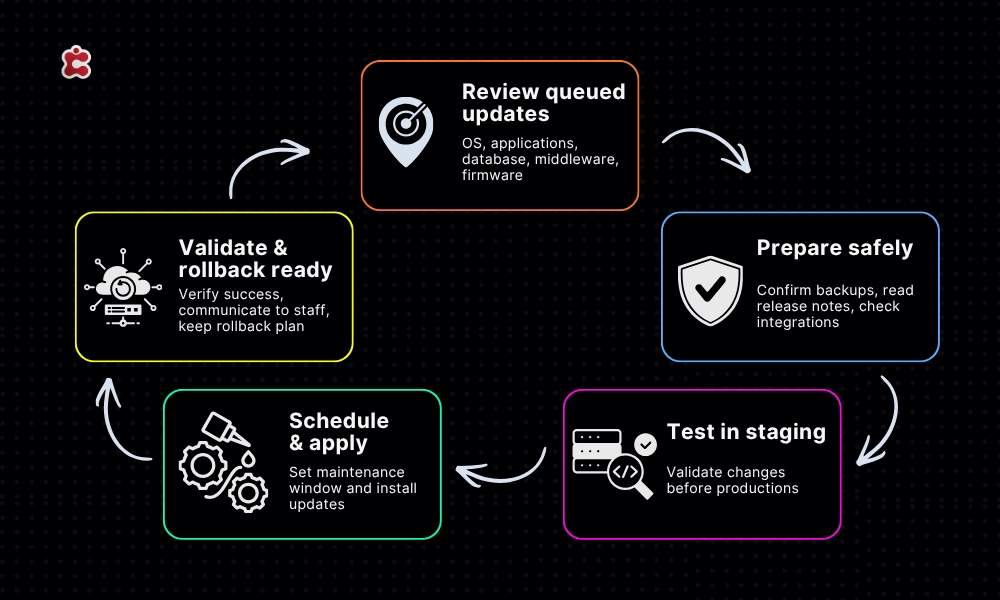
Applying updates during term time is risky. A failed update during registration week or mid-semester exams is a crisis. Summer is the window to apply everything that’s been sitting in the queue.
What to cover:
- Operating system updates on servers and admin machines
- Security patches first priority; unpatched vulnerabilities are the most common breach entry point
- Application updates for your SIS, LMS, and core platforms
- Database and middleware updates
- Firmware updates on networking equipment, printers, and other infrastructure
Before you update anything:
- Confirm backups are current (see item 4)
- Check vendor release notes for breaking changes especially for integrations depending on specific API versions
- Test updates in a staging environment before applying to production
- Schedule a rollback plan for each major update
- Communicate the maintenance window to any staff working remotely over summer
For cloud-based platforms like Classter, major updates are handled by the vendor. It’s still worth reviewing the Classter product changelog to understand what’s changed, particularly if your team has built custom integrations or workflows around specific features.
6. Review Integrations and API Connections
Every integration between your systems is a potential point of failure and most schools accumulate integrations faster than they retire them. A connection set up three years ago for a pilot project might still be running, pulling data, and failing silently
What to audit:
- List every active integration: what systems are connected, what data flows between them, and in which direction
- Check API keys and authentication tokens any expired, rotated, or incorrectly shared?
- Look for integrations using deprecated API versions these will fail without warning when support ends
- Test each integration end-to-end: does data actually arrive correctly at the destination?
- Remove or formally decommission any integrations that are no longer needed
Classter’s Integrations & API page documents supported integrations and the API framework for custom connections. If your school has built custom integrations on top of Classter’s API, summer is the time to verify they’re using current endpoints, authentication methods, and data schemas before a September registration surge finds the broken ones for you.
7. Document Everything
This is the item that always comes last and always gets skipped. Don’t skip it.
Documentation is what separates a one-person IT operation from a resilient one. If your main IT lead is ill in September, can anyone else recover the system, reset access, or troubleshoot the integration that’s throwing errors? In most schools, the honest answer is no because the knowledge lives in one person’s head.
What to document:
- System architecture: what platforms are in use, how they’re connected, and where data lives
- User access matrix: who has what level of access to which systems, and why
- Recovery procedures: step-by-step instructions for restoring from backup
- Integration map: as produced in item 6
- Update history: what was patched, when, and what changed
- Known issues and workarounds: the undocumented fixes every IT environment accumulates
- Vendor contacts: support channels, contract renewal dates, and escalation paths
This doesn’t need to be elaborate. A well-structured shared document or wiki page is sufficient. The goal is that someone else or future you, six months from now can understand the environment without having to reverse-engineer it.
When You Need More Than a Checklist
For schools with limited IT resource, or those going through a significant platform change, working through this list alone can be difficult. The audit items in particular benefit from an external perspective: it’s hard to spot the gaps in your own access controls or compliance posture when you’ve been working inside them for years.
Classter offers a dedicated Audit service designed specifically for educational institutions. It covers system configuration, data quality, access controls, and integration health essentially a professional version of this checklist, with experienced eyes across your specific setup. For schools preparing for a new academic year or a platform implementation, it’s worth considering as a structured starting point.
The Summer IT Priority Order
Not everything on this list carries equal weight. If time is short, work through it in this order:
- User access audit: active accounts for leavers are an immediate security risk
- Backup testing: you can’t recover without this
- Security patches: unpatched vulnerabilities are the most common breach vector
- GDPR/FERPA review: compliance obligations don’t pause for summer
- Data quality audit: foundational for everything that runs on student data
- Integration review: prevent silent failures before September
- Documentation: essential but survivable if September arrives before you finish
The schools that arrive at September with clean access lists, tested backups, and documented systems aren’t the ones with the biggest IT budgets. They’re the ones that treat the summer window as what it actually is: the only sustained maintenance window the academic calendar provides.
Use it.
FAQ’s
For a single-site school with one or two IT staff, working through all seven items realistically takes four to six weeks if done properly not just ticked off. The access audit and data quality check tend to take the longest because they require cross-referencing multiple systems. Starting in the first week of July gives you enough runway to finish before August gets busy with back-to-school preparation.
Yes. Cloud hosting reduces the risk of physical hardware failure, but it doesn’t eliminate the need to verify that data can actually be recovered in the form and timeframe your school needs. A backup job completing successfully is not the same as a successful restore. Test the recovery process, confirm the time it takes, and document it especially for any data held locally outside your cloud platform.
Retaining data longer than necessary is the most common and most overlooked issue. Former students, ex-staff, and old applicant records frequently stay in systems long after the legal retention period has passed. A summer review of your retention schedules and actually deleting what should have been deleted closes a compliance gap that most schools are carrying without realising it.
Start by listing every integration that exists, not every one you know about. Check API logs, ask department heads what third-party tools they use, and review any scheduled tasks or data syncs running in the background. You will almost certainly find connections that nobody actively monitors and at least one that is failing silently. Document what you find before you start decommissioning anything.
Yes, precisely because fewer people are actively using the systems, the impact of a failed update or required rollback is contained. The key is to communicate the maintenance window to anyone working remotely, confirm backups are current before touching anything, and test in a staging environment first. A failed update in July is a manageable problem. The same failure during registration week in September is not.