



One higher education leader, describing what it’s like to move student records off a decades-old student information system, compared it to open-heart surgery. Another compared it to a divorce. Neither was exaggerating for effect. They were describing what happens when a system that touches admissions, grades, billing, transcripts, and compliance reporting has to be swapped out while the institution keeps running.
That’s the tension every registrar, CIO, and CFO eventually runs into. The legacy SIS is slow, hard to report from, and increasingly expensive to maintain, but replacing it is one of the highest-risk technology decisions a school will make this decade. Get the questions right before signing a contract, and the transition is disruptive but manageable. Skip them, and the institution joins a well-documented pattern of budget overruns, missed go-live dates, and staff quietly rebuilding spreadsheets around a system that was supposed to eliminate them.
Why This Decision Is Under More Scrutiny Right Now
Budgets are tighter, boards are asking harder questions about ROI, and the SIS market itself is shifting. Ellucian’s acquisition of Anthology’s SIS and ERP business, completed at the end of 2025, moved more than 260 institutions onto a new ownership structure overnight, a reminder that even “stable” legacy vendors can change under a school without warning. At the same time, cloud-native SIS platforms have become the default expectation rather than the exception, and institutions still running on-premises systems are increasingly the outliers, not the norm.
The cost of getting the decision wrong is well documented outside education too. Research on ERP-style implementations, the same category of project as an SIS replacement, puts budget overruns at roughly 50% of projects, with underestimated staffing, scope expansion, and technical or data issues as the leading causes. None of that is unique to schools. But schools carry an added constraint: the system can’t go down mid-semester, and the data involved is a student’s academic record, not a sales pipeline.
Migration: What Actually Happens to Ten or Twenty Years of Student Data?
Every legacy SIS conversation eventually turns into a data conversation. Transcripts, grade histories, financial aid records, disciplinary notes, and course completions accumulated over years, often across multiple prior systems, all need to be extracted, cleaned, mapped to a new data model, and validated before a single student logs in to the new platform.
The honest answer from institutions that have done this: data quality problems surface late, not early. Systems ten or more years old routinely reveal duplicate records, inconsistent field formats, and orphaned data that nobody remembers creating. Poor data quality is consistently cited as the leading cause of migration delays and go-live slippage, not the new software itself.
Questions to ask before signing anything:
- What happens to data if the migration needs to be paused or rolled back?
- Who is responsible for data cleansing: the vendor, the institution, or a shared timeline?
- What is the plan for historical transcripts that predate digital records?
- Is there a parallel-run period where both systems operate simultaneously, and for how long?
Integrations: Will Everything Else Still Talk to the New System?
An SIS rarely stands alone. It typically needs to exchange data with an LMS, a payment gateway, a library system, an HR platform, and often state or accreditation reporting tools. Replacing the SIS without a clear integration plan just moves the fragmentation problem somewhere else.
This is where interoperability standards matter more than most procurement teams initially expect. Open standards like OneRoster and LTI, maintained by the 1EdTech consortium (formerly IMS Global), exist specifically so that rostering and grade data can move between systems without custom, brittle point-to-point connections that break every time one vendor pushes an update. A district that has adopted these standards described OneRoster as the connective layer binding together nearly 30 separate product integrations in under three years, illustrating what’s possible when a new platform is built around open standards rather than proprietary exports.
Before replacing a legacy SIS, ask:
- Does the new platform support open standards (OneRoster, LTI, or equivalent), or does every integration require custom development?
- What integrations exist out of the box versus what needs to be built and maintained internally?
- Who owns integration maintenance after go-live: the vendor, an internal team, or a third party?
- Has the vendor’s integrations and API documentation been reviewed by IT before the contract is signed, not after?
Implementation Risk: Who Owns the Project When It Slips?
Timelines slip. That’s not a worst-case scenario, it’s the median outcome. A combined financials-and-HR-style implementation is commonly quoted by vendors at 12 to 24 months, and that’s the vendor’s own estimate, before an institution’s change management and staff training layer on top. Separately, research into enterprise software rollouts found that budget overruns hit roughly half of projects, with underestimated staffing (38%), expanding scope (35%), and unresolved technical issues (34%) as the three most common causes.
None of this is a reason to avoid replacing a legacy SIS. It’s a reason to interrogate the implementation plan with the same rigor as the product demo. As one EDUCAUSE Review analysis of legacy system replacement put it plainly, replacing a legacy student information system is complex and expensive, and the tradeoffs deserve to be weighed deliberately rather than assumed away by a sales deck.
Ask the vendor and your own project sponsor:
- What percentage of this vendor’s implementations, for institutions your size, finish on the originally quoted timeline?
- Who is the single accountable owner of the project: inside the institution, not just at the vendor?
- What does the rollback or contingency plan look like if a phase fails testing?
- Has a readiness or systems audit been done before committing to a go-live date?
Scalability: Will This Platform Still Fit in Five Years?
A platform that’s right for a 1,500-student academy is rarely right for a growing school district, and a system built for one campus doesn’t always extend cleanly to multiple campuses, new programs, or a shift toward hybrid and online delivery. Scalability questions get skipped in procurement because the current need is usually well defined, and the future need is not.
Before committing, ask:
- Does licensing and pricing scale predictably with enrollment growth, or does cost jump sharply at certain thresholds?
- Can the platform support new program types (executive education, short courses, multi-campus structures) without a separate system?
- Is the platform’s underlying architecture true multi-tenant cloud (SaaS), or a hosted version of an on-premises product with a subscription wrapped around it? The distinction affects update cycles, uptime, and long-term flexibility significantly.
- What is the vendor’s product roadmap for the next 18–24 months, and how much of it is already shipped versus promised?
Long-Term Cost: What’s Missing From the First Number You See?
The quoted license or subscription fee is rarely the real cost of ownership. Industry-wide, the majority of enterprise software deployments require customization beyond out-of-the-box configuration, and each customization adds cost at every future upgrade cycle. Layer on data migration services, integration development, staff training, and the internal hours spent managing the project, and the “real” first-year cost is commonly several times the license fee alone.
A useful exercise before signing: build a five-year total cost of ownership model, not a first-year budget line. Include:
| Cost category | Often underestimated because |
| Data migration & cleansing | Discovered mid-project once legacy data is actually examined |
| Custom integrations | Quoted per-connector, but connectors multiply over time |
| Staff training & change management | Treated as a one-time event instead of an ongoing need |
| Customization maintenance | Each customization must be re-tested at every upgrade |
| Parallel-run period | Running two systems simultaneously costs more than either alone |
| Post-launch support tier | Base support often excludes the response time schools actually need |
Bringing the Data Together, Not Just Replacing the Software
The schools that get the most out of a new SIS aren’t the ones that simply moved records from one database to another. They’re the ones that used the transition to unify attendance, grades, billing, admissions, and engagement data that had been sitting in separate silos for years. That unification is what actually improves decision-making and reduces the manual reconciliation work that ate up staff time under the old system.
This is the design principle behind Classter’s approach: a single Student Information System built on a centralized data core, rather than a collection of modules bolted together after the fact, supported by a dedicated migration service that handles data extraction, cleansing, and parallel-run planning as a defined phase of the project, not an afterthought discovered halfway through.
The Bottom Line
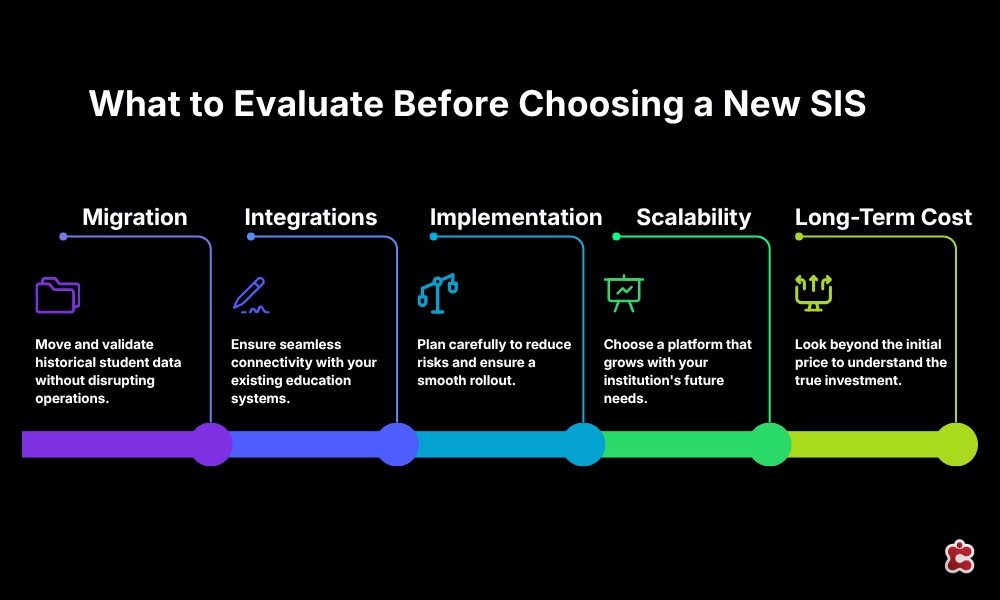
Replacing a legacy SIS is rarely wrong as a decision; most institutions eventually outgrow what got them here. What determines whether it succeeds is whether migration, integrations, implementation risk, scalability, and total cost were interrogated honestly before the contract was signed, not discovered as surprises six months into the project. A platform demo answers what the system can do today. The questions above answer what it will cost, in time and money, to get there, and to stay there for the next five years.
See how Classter’s migration and implementation approach works for institutions moving off a legacy SIS. Book a demo
FAQ’s
It varies widely by data complexity and number of integrations, but combined system implementations are commonly quoted at 12 to 24 months by vendors, before internal change management is added. Institutions should treat any timeline shorter than that with healthy skepticism unless the scope is genuinely narrow.
Most institutions migrate active and recent records fully, while archiving older historical data in a read-only format rather than fully re-mapping it into the new system’s live data model. This significantly reduces migration cost and risk without losing access to older transcripts.
Customization maintenance. Systems configured beyond out-of-the-box settings typically require re-testing every customization at each upgrade cycle, a recurring cost that rarely appears in the initial vendor quote.
Yes, with a parallel-run period where both systems operate simultaneously and a go-live date scheduled during a lower-activity window, such as between semesters rather than mid-term. This adds cost but substantially reduces disruption risk.
Ask specifically whether the platform supports open standards like OneRoster or LTI versus custom-built connectors for each integration. Request a reference customer running a similar integration stack, not just a feature list.