



A registrar’s office signs off on a new school management system after a great demo. The features check every box: attendance, grading, billing, reporting, parent communication, all in one place. Six months later, half the staff are still keeping a shadow spreadsheet “just in case,” the finance team has stopped trusting the automated fee calculations, and the helpdesk ticket queue has quietly become the busiest channel in the building.
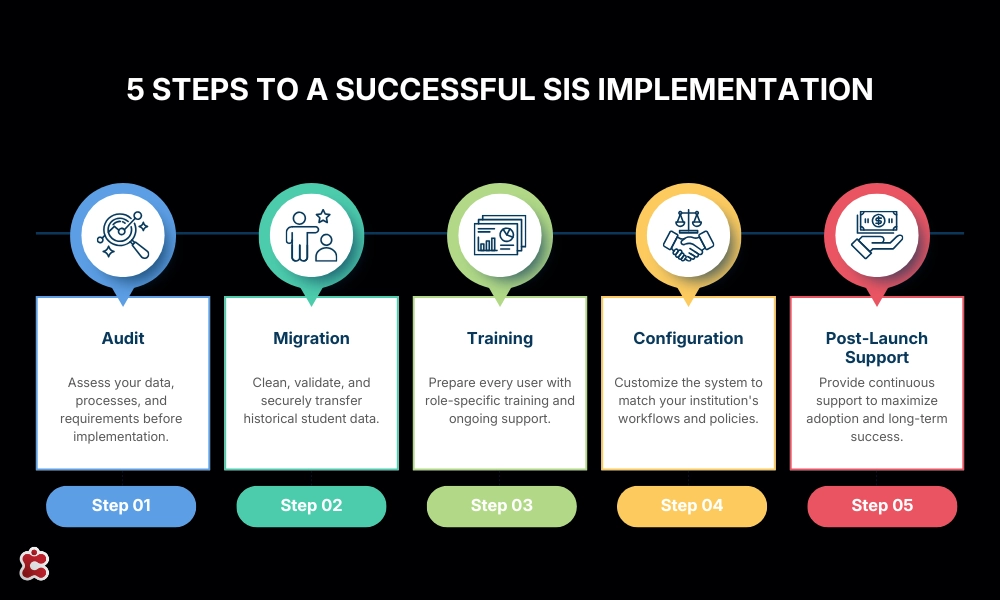
Nobody in that scenario picked the wrong software. What went missing was everything around it: an honest audit of what the school actually needed, a migration that handled years of inconsistent records with care, training that matched how different staff actually use the system, configuration that reflected the school’s real grading and billing rules instead of the vendor’s defaults, and a support team that stayed present past the first busy week.
This is the part of a school management system project that almost never shows up in a sales deck, and it’s the part that decides almost everything.
Software Is the Easy Half of the Decision
It’s worth being blunt about why this gets underweighted during procurement. A product demo is designed to be impressive in an hour. It shows clean sample data, a curated workflow, and a presenter who knows exactly which buttons to click. None of that tells a school anything about what happens when their actual attendance records, their actual grading scales across three departments, and their actual staff turnover collide with a new system in September.
Industry data on enterprise software broadly backs this up: projects fail far more often because of data, training, and change management problems than because the underlying software was the wrong choice. Common implementation mistakes across student information system rollouts consistently trace back to the same handful of causes: underestimating how long data migration actually takes, underestimating training needs, and underestimating the change management required to get staff to actually use the new system rather than quietly working around it.
None of that shows up on a features comparison chart. It shows up in the first semester after go-live, which is exactly when it’s most expensive to fix.
The Audit: Before You Configure Anything, Know What You’re Actually Configuring
Every implementation project has an early moment where it’s tempting to skip straight to setup. The contract is signed, the team is excited, and configuring the new system feels like real progress. An audit feels like a delay.
It isn’t. An audit is the process of finding out, honestly, what the institution currently has: which records live in the outgoing system versus in spreadsheets nobody officially sanctioned, which departmental “requirements” are genuine business rules versus long-standing habits nobody has revisited in years, and which existing workflows are worth preserving versus quietly retiring. Skipping this step doesn’t make those questions disappear. It just delays them until they surface mid-migration or mid-configuration, at a point where changing course costs far more time and goodwill.
A good audit typically covers:
- Data inventory. Where does every category of student, academic, and financial data currently live, and in what format?
- Process mapping. What does registration, grading, billing, and reporting actually look like today, step by step, not on paper but in practice?
- Stakeholder requirements. What do registrars, teachers, finance staff, and IT actually need from the new system, gathered directly rather than assumed?
- Integration landscape. What other systems, LMS, payment gateway, communications tools, does the new platform need to work alongside?
- Compliance obligations. What reporting formats, retention rules, or accreditation requirements does the new system need to support from day one?
Skipping or rushing this phase is one of the most consistently cited causes of SIS projects running over budget and over schedule, because problems that should have been caught in week one get caught in month four instead, after configuration decisions have already been built on top of a false picture of what the institution actually needed.
Migration: Where Timelines Actually Slip
If there’s one phase that consistently takes longer than everyone expects, it’s data migration, and the reason is almost always the same: legacy systems contain more inconsistency than anyone remembers putting into them. Duplicate student records, inconsistent field formats, years-old data entered by staff who have long since left, grading histories that used a different scale than the one currently in use, all of it surfaces once someone actually looks closely at the data rather than assuming it’s clean because the old system never complained.
The institutions that handle this well treat data quality as a first-class project deliverable, not an afterthought squeezed in before go-live. That typically means:
- Cleaning and de-duplicating records before migration begins, not during it
- Validating cleaned data with the departments that actually own it, since IT alone often can’t tell whether a record looks wrong or just unfamiliar
- Running a pilot migration on a subset of records to catch structural issues before committing the full dataset
- Planning a parallel-run period where both the old and new systems operate side by side, so a migration issue doesn’t become a live operational crisis
Institutions that delay this kind of data planning consistently run into go-live delays or, worse, operational issues that only appear after launch, once staff are relying on records that were migrated without proper validation. A grade that migrated with the wrong scale, or a fee balance that migrated without its payment history, doesn’t announce itself. It just quietly produces wrong answers until someone downstream notices, usually a parent, a student, or an auditor.
Training: The Difference Between “Live” and Actually Used
A system can be fully configured, fully migrated, and technically live, and still fail, if the people using it every day don’t trust it or don’t know how to work with it. This is consistently the most underestimated piece of any implementation, and the data on it is unambiguous: one-off training sessions frequently fail to move user adoption to the level an institution actually needs, regardless of how well-designed the software is. Training that happens once, in a single session, before anyone has real data in the system, rarely survives contact with the first busy week of actual use.
What tends to work better is role-specific, staged training rather than a single generic walkthrough:
- Administrators and registrars need depth: how the system handles configuration, reporting, and edge cases, since they’ll be the ones other staff turn to with questions.
- Teachers and academic staff need training built around their daily tasks: grade entry, attendance, and the handful of reports they’ll actually pull, not a tour of every module.
- Finance and admissions staff need training scoped to billing rules, payment plans, and application workflows specific to how the institution actually runs those processes.
- Support staff and IT need enough system-level understanding to triage the first wave of user questions without escalating everything to the vendor.
Training that’s staged, so a second or third session happens a few weeks after go-live, once staff have real questions from real use, consistently produces better long-term adoption than a single pre-launch session, because the questions people have before they’ve touched live data are rarely the questions that actually matter once they have.
Configuration: Why Default Settings Quietly Undermine Everything
Every school management system ships with sensible default settings. Those defaults are also, almost by definition, generic. They don’t know that this particular school rounds grades a specific way, runs a payment plan structure unique to its finance office, or has a grading scale that shifted for one department three years ago and never got reconciled with the others.
A recurring pattern across implementation post-mortems is systems configured around default settings rather than the institution’s actual processes, on the assumption that the defaults are close enough and can be adjusted later. In practice, configuration decisions made early tend to cascade: a grading scale set up incorrectly at the start doesn’t just affect grading, it affects academic standing calculations, transcript generation, and every report built downstream. Fixing it after go-live means unwinding months of records built on the wrong foundation, not just flipping a setting.
The institutions that get configuration right tend to follow a similar sequence: start with the highest-impact workflows, grading, attendance, and billing, and get those precisely right before layering on advanced customization, rather than trying to configure everything simultaneously. They also test configuration with real staff performing real tasks, sometimes called user acceptance testing, before go-live, rather than assuming a configuration that looks correct on a test record will hold up once real students, real grades, and real edge cases start flowing through it.
This is also where integration decisions belong. A student information system that connects cleanly to a school’s LMS, payment gateway, and communication tools through documented, open integrations tends to hold up far better over time than one stitched together with brittle, custom point-to-point connections built under deadline pressure. K-12 IT teams describing what a real system transition looks like consistently frame planning, migration, training, and post-implementation support as sequential, deliberate phases, not parallel afterthoughts squeezed in around each other, precisely because configuration choices made early determine how much rework is needed later.
Post-Launch Support: The Weeks That Actually Decide the Outcome
Go-live feels like the finish line. It isn’t. It’s roughly the midpoint of an implementation, because the weeks immediately following launch are when real usage, at real volume, surfaces every edge case no demo, no test migration, and no training session fully anticipated. A student with an unusual enrollment history. A fee structure that interacts with a discount code in a way nobody tested. A report that a department head needs on the fifteenth of the month, discovered only because the fifteenth of the month has now arrived.
What separates institutions that stabilize quickly from institutions that quietly regress toward old habits is almost always the presence, or absence, of responsive support during this window. Administrators consistently describe timely, responsive support as a critical factor in a launch’s success, not a nice-to-have layered on top of the real implementation work. A support team that has already moved on to the next client the week after go-live leaves staff to solve their own edge cases, and the fastest available solution to an unsolved edge case is almost always the old spreadsheet everyone swore they’d stopped using.
Good post-launch support tends to include:
- A defined escalation path so staff know exactly who to contact and how quickly to expect a response
- Extended availability during the first full term, not just the first week, since many issues only surface once a full billing cycle or grading period has run through the system
- A living knowledge base that gets updated based on the actual questions staff are asking, not a static manual written before go-live
- Scheduled check-ins during the first term, rather than a purely reactive model where support only shows up when something breaks
What to Ask an Implementation Partner Before Signing
Comparing implementation support across vendors is harder than comparing feature lists, because most of what matters happens after the contract is signed. A useful way to make it concrete is to ask specific questions before committing, rather than assuming implementation support means the same thing from every vendor.
| Ask this | Why it matters |
| Who conducts the audit, and does it happen before or after signing? | Determines whether requirements are gathered honestly or assumed |
| What does the data migration plan look like, step by step? | Reveals whether data quality is treated as a real deliverable |
| Is training a single event or a staged program across weeks? | Predicts whether adoption will hold past the first month |
| Who configures the system, the vendor, the school, or both together? | Affects whether configuration matches real workflows or generic defaults |
| What does support look like in week one versus month three? | Shows whether support tapers off right when real issues surface |
| Is there a named point of contact, or a general ticket queue? | Determines how quickly staff can get unstuck during a busy period |
The Cumulative Cost of Skipping Any One Piece
It’s tempting to treat audit, migration, training, configuration, and support as separate line items that can each be trimmed a little to save time or budget. In practice, they’re sequential dependencies. A rushed audit produces a configuration built on wrong assumptions. A rushed migration produces training sessions where staff are learning on unreliable data. Thin training produces a support queue overwhelmed with questions that a better-paced rollout would have prevented. Each shortcut doesn’t just create its own problem, it makes every subsequent phase harder and more expensive.
This is why Classter treats audits, migration, training, and ongoing support as connected phases of a single implementation process, not optional add-ons priced and scheduled separately after the core contract is signed. A Student Information System built on a centralized data model still depends on all four of these being done well, since even the strongest platform can’t compensate for data that was never properly cleaned or staff who were never properly trained on it.
The Bottom Line
The software a school ends up choosing matters. But the decision that actually determines whether a school management system succeeds or quietly gets abandoned within a year is rarely about the software at all. It’s about whether the audit was honest, the migration was careful, the training matched how people actually work, the configuration reflected real institutional rules instead of generic defaults, and the support stayed present long enough to matter. Evaluate a vendor’s implementation approach with the same rigor as its feature list, and the software decision gets a lot easier to get right.
See how Classter’s implementation team handles audit, migration, training, and support as one connected process, not separate line items. Book a demo
FAQ’s
Most institutions need meaningfully more support during their first full academic term than vendors typically quote upfront, since real usage patterns, and the edge cases that come with them, only emerge once every department is actively using the system through a complete billing and grading cycle.
It saves time upfront, but the savings are usually an illusion. Requirements and data issues that should surface during an audit tend to surface mid-migration or mid-configuration instead, at a point where fixing them costs significantly more in time and rework.
Ongoing. A single onboarding session rarely gets adoption to where an institution needs it, because the questions staff have before touching live data are different from the questions they have once they’re using the system daily. Staged, role-specific training consistently produces better long-term results than a single session.
Reports and academic standing calculations that don’t match what staff expect are usually the first symptom, since grading and billing configuration errors cascade into everything built downstream of them, often silently, until someone notices a discrepancy.
Ask specific, sequential questions rather than requesting a general description: who runs the audit and when, what the migration plan looks like step by step, whether training is staged across weeks or delivered once, and what support looks like in month three, not just week one.