


If you run a language school, coding bootcamp, arts academy, or sports programme, summer is your most commercially significant season and your most operationally demanding one. In the space of eight weeks, you might run four or five separate courses, each with its own intake window, its own fee structure, its own instructor, its own room, and its own cohort of learners ranging in age, level, and prior experience.
Most academies manage this with some combination of spreadsheets, WhatsApp threads, and institutional memory. It works, more or less, until it doesn’t. And when it stops working a double-booked room, a student who paid but was never enrolled, an instructor who appears on two timetables simultaneously it stops working loudly, in front of the parents and learners you most need to impress.
This post is the practical fix. It is written for the director or operations manager who already knows the chaos is real and wants a concrete framework for running summer courses in a way that scales, repeats, and does not depend on heroic individual effort to hold together.
Throughout, we use a running scenario: a language school running four summer intensive courses simultaneously Arabic, French, Spanish, and English and how a well-configured platform manages all four without a single spreadsheet in sight.
The Scenario: Four Courses, One Summer, Zero Spreadsheets
Meet X Academy. It’s a mid-sized language school running its fourth summer intensive programme. This year, for the first time, it is offering four concurrent language intensives. Here is what it is managing simultaneously.
| Arabic Intensive | French Intensive | Spanish Intensive | English Intensive | |
| Duration | 3 weeks | 4 weeks | 3 weeks | 4 weeks |
| Cohort size | 18 students | 24 students | 20 students | 30 students |
| Age range | 14–18 | 16–25 | 14–22 | 12–18 |
| Levels offered | Beginner, Intermediate | Beginner, Advanced | All levels | Beginner, Intermediate, Advanced |
| Fee structure | €400 flat | €560 flat / instalment | €513 flat | €440 flat / instalment |
| Instructor | 1 dedicated | 2 (level split) | 1 dedicated | 3 (level split) |
| Start date | 7 July | 7 July | 21 July | 7 July |
Four courses. Ninety-two students across two to three levels each. Seven instructors. Overlapping start dates. Mixed fee structures. Ages ranging from 12 to 25. And a two-person admin team responsible for making it all run.
This is not an unusual scenario for a language school or short-course academy at summer peak. It is, however, a scenario that exposes every weakness in a manual, spreadsheet-based operation. We will return to X Academy throughout this post to show what managing this well actually looks like in practice.
What Makes Summer Short-Course Enrollment Uniquely Difficult
Short-course enrollment is not just a compressed version of term-time school enrollment. It has its own distinct characteristics that create operational challenges a standard school management system is often not designed to handle.
Speed: Applications open and close in days, not weeks. A learner who enquires on Monday may expect to be enrolled, invoiced, and confirmed by Wednesday. The gap between enquiry and enrollment decision that a school can take weeks to close needs to happen in hours at an academy. Any workflow that involves manual steps, email chains, or waiting for someone to update a spreadsheet is too slow.
Volume and concurrency: Running four courses simultaneously is not four times the work of running one it is significantly more, because the coordination overhead compounds. Rooms, instructors, and timeslots all need to be managed across courses at the same time. A change in one course has knock-on effects on others. Without a system that manages concurrency explicitly, the risk of conflict rises with every course you add.
Multiple cohorts within each course: Many short courses are not single groups. A French intensive might run beginner and advanced tracks concurrently, with the same instructor covering both or different instructors assigned to each level. Each track is effectively its own cohort: its own timetable, its own enrollment list, its own billing. Managing this without a system that supports sub-cohort structure means manual duplication of every administrative step.
Mixed ages and safeguarding requirements: A summer course that admits both 14-year-olds and 25-year-olds has different requirements than one with a uniform adult cohort. Parental consent forms, emergency contact collection, and communications that are directed to parents rather than learners all add administrative layers that need to be handled systematically, not on an ad hoc basis.
No institutional memory between summers: Unlike a school with a stable annual cycle, many academies start from close to scratch each summer. Staff who were involved last year may not be available this year. The process knowledge that made last summer work lived in someone’s head or their personal spreadsheet. A repeatable, system-based workflow solves this problem structurally rather than relying on continuity of personnel.
The Five Operational Breakdowns and What They Actually Cost
The consequences of managing a multi-cohort summer programme manually tend to cluster around five recurring failure modes. Each is predictable. Each is preventable. And each has a real cost that goes beyond the inconvenience of the moment.
| Breakdown | How it happens without a system | The real cost |
| 1. Missed enrollments | Applications arrive by email, WhatsApp, and paper form. Someone’s spreadsheet misses a row. A student shows up on day one with no record. | Staff time to fix on the spot, embarrassed parents, reputational damage, and occasionally a full refund demand. |
| 2. Double-booked rooms | Two courses are manually scheduled in the same room at the same time. Nobody notices until both instructors arrive. | One course relocated mid-session, disrupted learning, instructor frustration, and a timetabling crisis that takes hours to unpick. |
| 3. Unpaid fees | Payment tracking lives in a separate spreadsheet. Students attend who have not paid. Chasing happens reactively, by phone, weeks late. | Cash flow gaps, admin time wasted on manual chasing, and awkward conversations with parents about outstanding balances. |
| 4. Instructor clashes | An instructor is assigned to two courses with overlapping times. The error surfaces the day before the course starts. | Emergency cover arrangements, quality compromise, and a staff morale problem that outlasts the summer. |
| 5. Parent confusion | No central place for course information, timetable changes, or updates. Parents call repeatedly asking the same questions. | Staff time absorbed by inbound queries that a self-service portal would eliminate. Parents who feel disorganised by association. |
The common thread across all five breakdowns is that they are system failures, not people failures. The admin team at X Academy is not making avoidable mistakes because they are careless. They are making avoidable mistakes because they are managing a genuinely complex operation with tools that were not designed for it.
Setting Up a Repeatable Enrollment Workflow That Works for Every Cohort
A repeatable enrollment workflow is one that can be configured once and applied consistently across every course you run, every summer, without rebuilding from scratch. It handles the full cycle from application to post-course follow-up, and it does so without manual intervention at each stage.
| # | Stage | What happens | In Classter |
| 1 | Application opens | Course-specific form published online. Applicant selects course, level, and preferred start date. Uploads any required documents (e.g. placement test results). | Custom application form per course in the Admissions module. Conditional fields based on course selection. Automatic confirmation sent on submission. |
| 2 | Eligibility check | Staff review application against course prerequisites and capacity. Place confirmed or waitlisted. | Application status updated in the platform. Automatic notification sent to applicant. Waitlist managed within the system. |
| 3 | Offer and payment | Offer letter issued. Fee invoice generated. Parent or learner completes payment or sets up instalment plan. | Offer issued from Classter. Billing module generates invoice automatically. Payment tracked against student record in real time. |
| 4 | Enrollment confirmed | Place secured. Student added to the correct cohort and level. | Enrollment status updated. Student appears in timetabling and communications automatically. No manual transfer required. |
| 5 | Pre-course communication | Welcome message sent. Course materials, timetable, and logistics shared with learner and parent. | Automated welcome notification sent. Documents published to student portal and parent portal. Mobile app push notification triggered. |
| 6 | Course delivery | Instructor delivers the course. Attendance recorded. Any mid-course changes (room, time, instructor) communicated immediately. | Attendance logged in Classter. Changes updated in the system and reflected in the portal and app instantly. |
| 7 | Course completion | Attendance record finalised. Certificate issued if applicable. Learner prompted about next course or re-enrollment. | Completion status recorded. Automated follow-up message sent via Academic CRM. Re-enrollment prompt triggered if configured. |
The workflow below is the one X Academy now uses for all four of its summer intensive courses. Each step is configured per course in Classter’s Admissions module, which is designed specifically for multi-cohort environments where each course or programme needs its own application form, eligibility criteria, and capacity limits.
Why per-course configuration matters
The critical feature here is that each course has its own application form, its own enrollment rules, and its own capacity limit but all of them are managed within the same platform. Classter’s Admissions module supports this natively. The Arabic Intensive form asks different questions to the English Intensive form. The French Intensive has a placement test upload requirement that the Spanish Intensive does not. Each cohort’s capacity is tracked independently, so when the Arabic Intensive reaches 18 students, new applicants are automatically waitlisted rather than accidentally over-enrolled.
At X Academy, this means the two-person admin team no longer manages four separate enrollment spreadsheets. They manage one platform with four course configurations. Every application goes into the right place automatically. Every status update received, under review, offered, enrolled, waitlisted triggers an automatic notification to the applicant. The team’s attention is freed for the exceptions, not consumed by the routine.
🌐 Classter is built for Academies & Training Centers
Unlike school management systems that have been extended to cover short courses as an afterthought, Classter has a dedicated Academies & Training Centers solution designed around the specific operational patterns of multi-cohort, short-cycle programmes. The platform handles everything from per-course application forms and age-appropriate consent workflows through to billing, timetabling, and parent communications within a single system.
Managing Billing and Payment Per Course, Per Student
Billing is where many short-course operations lose both money and goodwill. A student who attended four sessions before anyone noticed they had not paid is a cash flow problem and a management embarrassment. An invoice sent to the wrong parent, in the wrong amount, for the wrong course, is a trust problem that takes longer to repair than the fee is worth.
The billing complexity at a summer academy is real. Different courses have different fees. Some offer sibling discounts. Some offer instalment plans for longer programmes. Some require a deposit at booking and the balance on the first day. None of this is difficult to manage with the right system. All of it is a source of errors without one.
How Classter handles per-course billing
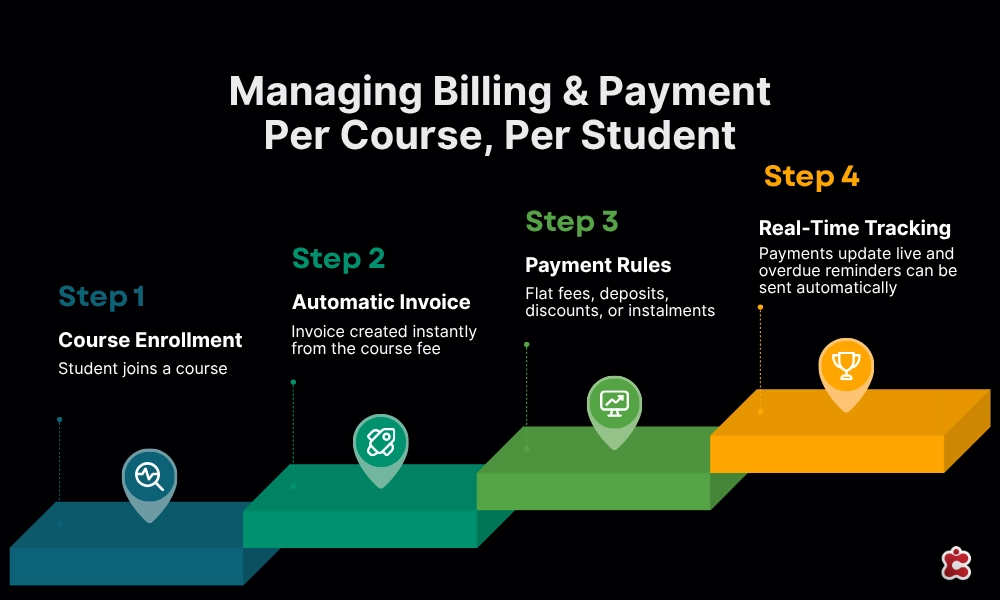
Classter’s Billing & Payments module is connected directly to the enrollment workflow. When a student is enrolled in a course, an invoice is generated automatically based on that course’s fee configuration. There is no manual step between enrollment confirmation and invoice creation. There is no risk of a student being enrolled but not invoiced, or invoiced at the wrong amount.
At X Academy, each of the four courses has its own fee configuration in the platform. The Arabic and Spanish Intensives use flat fees. The French and English Intensives offer an instalment option for families who prefer to split the payment. When a French Intensive student enrolls, the platform automatically creates an instalment schedule and sends payment reminders at each due date without anyone on the admin team needing to track it manually.
Payment status is visible against each student record in real time. When a payment is received, the record updates immediately. When a payment is overdue, the system flags it and can trigger an automated reminder. The admin team at Lingua Academy no longer maintains a separate payment tracking spreadsheet, because the platform is the tracking system.
Practical billing configuration for short courses
When setting up billing for a multi-course summer programme, the configuration decisions that matter most are:
- Fee structure per course. Set each course’s fee independently. Include any early-bird rates or sibling discounts as configurable options rather than manual adjustments.
- Deposit and balance split. If your courses require a deposit at booking and the balance before or on day one, configure this as a payment schedule rather than managing two separate invoices manually.
- Instalment plans. For longer programmes, instalment plans reduce the barrier to enrollment and improve cash flow predictability. Configure the schedule, the due dates, and the reminder cadence in the platform rather than tracking them in a spreadsheet.
Overdue escalation. Decide in advance what happens when a payment is overdue. Automated reminders at defined intervals are more effective and less time-consuming than ad hoc phone calls.
Timetabling and Resource Allocation Across Concurrent Courses
Timetabling four concurrent courses with seven instructors, multiple levels, and shared rooms is the most logistically complex part of running a summer programme. It is also the area where manual management most reliably produces errors not because anyone is careless, but because the number of variables involved exceeds what a spreadsheet handles gracefully.
The concurrency problem
Consider what X Academy is coordinating for its four-course summer: seven instructors with different availability, some covering multiple levels within one course; eight or nine class groups across four courses; a limited number of suitable rooms; course start dates that are staggered across three weeks; and a daily schedule that needs to avoid putting two groups from the same course in the same room at the same time while also ensuring instructor timetables do not overlap.
A spreadsheet approach to this requires someone to hold the entire constraint set in their head while making scheduling decisions. Errors are not a sign of incompetence. They are an inevitable consequence of the complexity. A conflict-aware timetabling system removes the human error surface entirely.
How Classter handles multi-cohort timetabling
Classter’s Academics & LMS module manages timetabling across concurrent courses with conflict detection built in. When an instructor is assigned to a session, the system checks for overlaps against their existing schedule. When a room is allocated, the system checks for concurrent bookings. Conflicts are flagged before they are confirmed, not discovered on the morning they cause a problem.
At X Academy, the timetabling setup works like this. Each of the four intensive courses is configured as its own programme in the platform, with its own schedule and its own cohort. Instructors are assigned to sessions within each programme. The platform enforces the constraint that no instructor can appear in two places at the same time. Rooms are allocated within the same constraint framework.
When the Spanish Intensive start date shifts from 21 July to 14 July mid-planning as it did this year, because of instructor availability the platform recalculates the affected schedules and flags any new conflicts immediately. What would have been a day of spreadsheet rework took twenty minutes to resolve in the platform.
Resource allocation principles for summer programmes
- Build the instructor schedule before the room schedule. Instructor constraints are harder to resolve than room constraints.
- Configure buffer time between sessions in shared rooms to allow for setup and transition.
- For multi-level courses, decide in advance whether levels share a timetable structure or have independent schedules, and configure accordingly.
- Publish timetables to the student and parent portals as soon as they are finalised. Last-minute timetable communication is a significant source of parent frustration.
Keeping Learners and Parents Informed Throughout
In a short-course environment, parent and learner communication is more time-compressed than in a standard school context. A timetable change that a school might communicate a week in advance needs to reach families within hours at a summer academy. A payment reminder that goes out two weeks early at a school needs to go out three days early when the course only runs for three weeks.
The communication tools that work for this environment are real-time, mobile-first, and require minimal staff effort to operate. Email alone is not sufficient. A parent who misses an email on a Thursday evening and arrives on Friday morning with a confused child is a problem that a mobile push notification would have prevented.
The parent portal: self-service information that reduces inbound queries
Classter’s parent portal gives parents access to their child’s enrollment status, timetable, course documents, attendance record, and payment status at any time, from any device. For the admin team at X Academy, this single feature has reduced inbound “what time does class start” and “have you received our payment” queries by a significant margin. The information is there. Parents who check it do not need to call.
The portal is particularly valuable for parents of younger learners who are managing the logistics of drop-off and pick-up. When the timetable is updated in the platform, it updates in the portal immediately. Parents do not receive a separate notification and then check a separate document. They check the portal once and have everything they need.
The mobile app: real-time updates for a summer audience
Classter’s Mobile App is the communication channel that fits summer behaviour. Families on holiday, managing multiple children, or simply not at a computer during the day will open a push notification in a way they will not open an email at a specific time. The app delivers timetable updates, payment reminders, course communications, and any urgent messages directly to the parent’s phone.
At X Academy, the mobile app is used for three specific communication moments: the pre-course welcome message with timetable and logistics details, any mid-course changes that need to reach parents immediately, and the end-of-course completion notification with information about next steps. These three messages are configured in advance and sent automatically. No staff member drafts or sends them manually.
Automated communications that run without staff intervention
The communications that consume the most staff time in a manual operation are the ones that are entirely predictable: enrollment confirmations, payment reminders, timetable notifications, welcome messages, and course completion acknowledgements. Every one of these can be automated in a well-configured platform.
The practical benefit is not just time saving. It is consistency. Every Arabic Intensive enrollee receives the same welcome message at the same point in their enrollment journey. Every parent of a French Intensive student receives the same payment reminder three days before the due date. The experience is standardised across the programme, which is what professional programme management looks like from the outside.
Ready to Run Your Summer Courses Without the Chaos?
X Academy is not a hypothetical. It is what summer programme management looks like when the operational infrastructure matches the ambition of the programme. Four concurrent courses. Ninety-two students. Two administrators. And a summer that ran without a single double-booking, missed payment, or instructor clash.
Classter is built specifically for academies and training centres not a school system retrofitted to cover short courses, but a platform designed around the way short-course operations actually work. Multi-cohort enrollment, per-course billing, conflict-aware timetabling, and real-time parent communication, all in one system.
See what Classter looks like for your academy at the Academies & Training Centers solution page, or book a demo with the team before your summer intake opens.
FAQ’s
It’s actually where the return is highest. A two-person admin team managing four concurrent courses manually is the exact scenario where automation makes the most immediate difference. The platform doesn’t replace your team it removes the repetitive tasks that consume them, so their capacity goes toward exceptions and relationships rather than chasing spreadsheets and sending reminders by hand.
No. When a course reaches its configured capacity, new applicants are automatically added to a waitlist and notified accordingly. If a place becomes available, the system can prompt the next person in line. No one on the admin team needs to monitor capacity in real time or make manual waitlist decisions.
Yes. Age-appropriate consent workflows, parental contact requirements, and communication routing whether messages go to the learner directly or to a parent can all be configured per course based on the age range of that cohort. A course admitting 14 to 18-year-olds is set up differently from one admitting adults, and the platform enforces those differences without requiring manual checks.
Withdrawal and refund calculations are configured as part of your billing setup specifying, for example, that a student who withdraws after week one receives a 50% refund. When a withdrawal is recorded in the platform, the refund calculation applies automatically based on those rules. The finance team doesn’t need to calculate it manually or issue a corrected invoice by hand.
Course templates, fee structures, application form configurations, communication schedules, and timetable frameworks can all be saved and reused. The first summer requires the most setup work. From the second year on, you’re refining an existing configuration rather than starting from zero which is exactly how summer programme management should work.