



Most content on school digital transformation falls into one of two traps. Either it is so abstract that it offers no actionable guidance whatsoever broad exhortations to “embrace technology” and “put learners first.” Or it is thinly disguised product marketing dressed up as strategic advice.
This post is neither. It is a working framework, designed for school leaders and educational technology decision-makers who want to use the relative quiet of the summer break to do serious planning work. The goal is to leave summer with a roadmap that is specific to your institution, grounded in honest assessment, and realistic about what technology can and cannot do.
You do not need a consultant to work through this. You do need to be honest, structured, and willing to challenge assumptions that may have calcified over years of incremental technology decisions.
Let’s start with the most important question most schools never ask.
Step 1: Stop and Ask What Problem You Are Actually Solving
Digital transformation is not a goal. It is a means. Schools that approach it as a destination “we need to become more digital” tend to spend money on technology that does not change outcomes. Schools that approach it as a tool for solving specific, named problems tend to see genuine return on their investment.
Before you open a single vendor brochure or attend a single product demo, spend time with your leadership team answering these questions honestly.
The diagnostic questions every school should start with
- Where does your team currently spend the most time on manual, repetitive administrative work?
- Which processes break down most often, and what does that cost you in staff time, errors, or parent/student trust?
- Where are you losing prospective students in the admissions funnel, and do you have the data to know why?
- How many separate systems does your staff log into on a given day, and how many of those systems share data automatically?
- What does your compliance and reporting burden look like, and how much of it is currently handled through manual exports and spreadsheets?
- Where do parents and students most frequently express frustration with how they receive information or access services?
The answers to these questions are your actual brief. They define what your digital transformation needs to achieve. Everything that follows the platform evaluation, the vendor conversations, the implementation plan should trace back to these answers.
If your leadership team cannot agree on the top three problems your digital investment needs to solve, you are not ready to evaluate vendors. Go back to this step first.
Step 2: Audit Your Current Technology Stack Honestly
Most schools carry more technology debt than they realise. Years of individual purchasing decisions a new MIS here, an LMS there, a parent communication app added when the previous one became unpopular leave institutions running fragmented stacks that create as many problems as they solve.
A technology audit is the exercise of mapping what you actually have against what you actually need. It is often uncomfortable. It frequently surfaces expensive licences for tools that are barely used, integration gaps that are generating errors no one has formally flagged, and training deficits that mean staff are working around system capabilities rather than through them.
How to run a technology audit
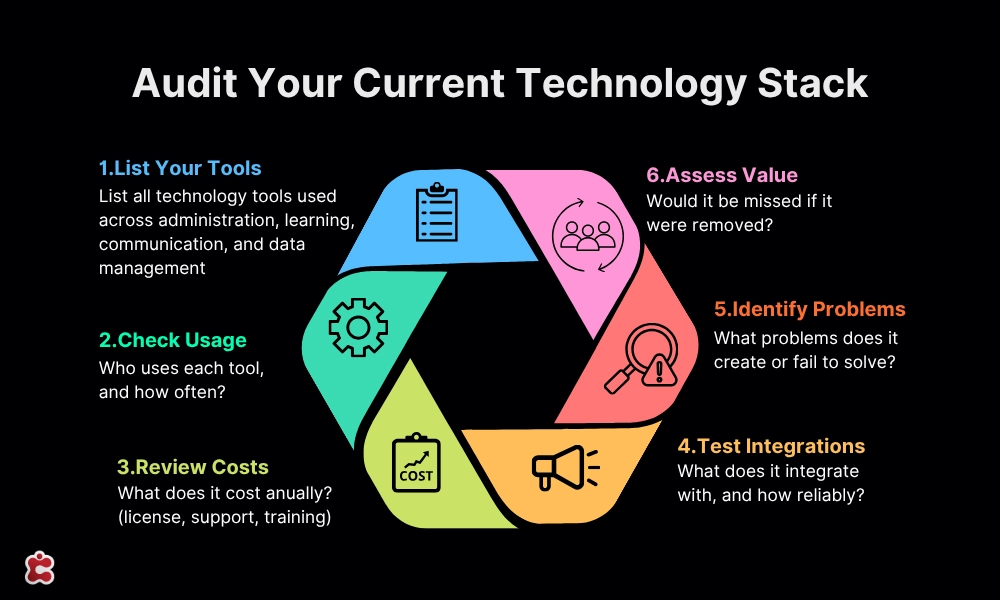
Start by listing every technology tool your institution currently uses for administration, communication, learning delivery, and data management. For each one, document:
- What it is and what it is supposed to do
- Who uses it, and how often
- What it costs annually (licence, support, training)
- What it integrates with, and how reliably
- What problems it creates or fails to solve
- Whether it would be missed if it were removed
This exercise almost always produces two categories of insight. First, it identifies tools that are genuinely working and should be retained or built upon. Second, it surfaces tools that are redundant, underused, or actively creating friction and that are consuming budget that could fund better solutions.
The audit is also where you identify integration gaps. If your student information system and your billing platform do not share data, someone is manually reconciling them. If your admissions tool and your communications platform are disconnected, information falls through the gap. These gaps are not just inefficiencies. They are risks.
💼 Want professional help with your audit?
Classter offers a dedicated Audits service for schools that want an expert assessment of their current technology landscape. Rather than conducting the audit internally where political considerations and familiarity bias can distort the findings an external audit gives you an independent view of where your stack is working and where it isn’t.
Step 3: Understand What a Genuinely Integrated Platform Looks Like
Once you have mapped your current stack and its gaps, you need a clear picture of what you are aiming for. This is where most educational technology planning goes wrong: leaders evaluate tools in isolation rather than evaluating how tools work together.
The goal of a digital transformation roadmap is not to have the best individual tools in each category. It is to have a coherent system where data flows cleanly between functions, staff work in a unified environment, and reporting is possible across the institution without manual data wrangling.
The fragmented stack problem
A fragmented stack is one where different functions are handled by different tools that were not designed to work together. This is the default state of most institutions that have grown their technology organically. It looks something like this: a legacy MIS for student records, a separate LMS for learning delivery, a third-party admissions tool, a standalone parent portal, an external CRM that was connected to the SIS via a custom API that breaks twice a year, and a finance system that shares no data with any of the above.
Each of these tools may work adequately in isolation. Together, they create a system where staff spend significant time transferring data between platforms, where reporting requires pulling exports from multiple sources, and where the institution never has a single accurate view of its students.
What an integrated platform provides
A genuinely integrated school management platform handles all major administrative and academic functions within a single system, with a shared data layer. Changes in one module are immediately reflected in others. A student who completes enrollment appears in the timetabling system without manual import. A payment recorded in billing updates the student record. A communication sent through the platform is logged against the student profile.
Classter is one of the clearest examples of what this looks like in practice. It covers student information management (SIS), school management (SMS), learning management (LMS), academic CRM, ERP functions, and billing within a single platform. The full module architecture is designed so that institutions can start with the modules they need immediately and activate additional capabilities as their maturity grows without changing platforms or migrating data.
The table below contrasts a typical fragmented stack against what an integrated platform delivers across the same functions.
| Function | Fragmented Stack | Classter (Unified) |
| Student Information | Standalone SIS (separate licence, separate login) | Core SIS — built in |
| Admissions & Enrollment | Point solution or spreadsheet | Admissions module — integrated |
| Learning Management | Third-party LMS (separate contract) | LMS — built in |
| Parent & Student Comms | Email tools, separate portal vendor | Portals + Mobile App — built in |
| CRM / Prospecting | External CRM not connected to SIS | Academic CRM — integrated |
| Billing & Payments | Finance system with no student data link | Billing module — integrated |
| Reporting & Analytics | Manual exports, spreadsheet dashboards | Unified data, cross-module reporting |
| Integrations | Custom APIs, frequent breakages | Single platform, no stitching required |
The point is not that every school should immediately consolidate everything into one platform. It is that every school should understand the cost in time, errors, and missed insight of running functions in disconnected systems, and factor that cost into their investment decisions.
Step 4: Build Your Readiness Assessment
With your audit complete and a clear picture of what integrated looks like, the next step is to assess your institution’s current readiness across each major dimension of digital maturity. This is the foundation of your roadmap.
The assessment below gives you a structured starting point. Score your current state against your target state on a 1–5 scale for each area, and use the gap to determine priority.
| Assessment Area | Current State (1–5) | Target State (1–5) | Priority (High / Med / Low) |
| Student data management | |||
| Admissions & enrollment workflow | |||
| Parent & student communication | |||
| Learning management & curriculum delivery | |||
| Finance & billing integration | |||
| Reporting & compliance | |||
| Staff digital literacy | |||
| Data security & GDPR/compliance posture | |||
| Mobile accessibility for families | |||
| Integration between existing systems |
This assessment should not be completed by a single person. The most useful version involves input from school leadership, heads of department, IT, and ideally a sample of the administrative staff who use your systems daily.
Their experience of where friction exists is more reliable than a leader’s perception of how things are working.
How to use the assessment
Once complete, your readiness assessment gives you three things. First, it tells you where the largest gaps are the areas where the distance between current and target state is greatest. Second, it tells you which gaps are most strategically significant given your diagnostic questions from Step 1. Third, it gives you a documented baseline against which to measure progress, which is essential for any technology investment to be evaluated fairly.
Areas with large gaps and high strategic significance are your Phase 1 priorities. Areas with large gaps but lower strategic significance may be addressed in later phases. Areas with small gaps may require optimisation rather than replacement.
Step 5: Build Your 24-Month Roadmap
A roadmap is not a procurement plan. It is a sequenced set of decisions and activities, mapped against time, that moves your institution from its current state to its target state in a managed way. It accounts for the reality that technology implementations require staff capacity, training time, and organisational adjustment none of which happen instantly.
The five-phase framework
| Phase | Timing | Focus | Key Activities |
| Phase 0 | Summer (now) | Assessment & planning | Audit current stack, map gaps, define success criteria, select platform, build business case |
| Phase 1 | Months 1–6 | Foundation | Core platform implementation, data migration, staff onboarding, pilot with one cohort or department |
| Phase 2 | Months 7–12 | Consolidation | Full rollout, retire legacy systems, establish reporting baselines, gather stakeholder feedback |
| Phase 3 | Months 13–18 | Optimisation | Activate advanced modules (CRM, billing integration, analytics), refine workflows based on real data |
| Phase 4 | Months 19–24 | Maturity | Cross-module reporting, predictive analytics, strategic review, plan next investment cycle |
Principles for sequencing
The temptation in technology planning is to try to do everything at once. Resist it. The institutions that see the strongest outcomes from digital transformation are those that sequence deliberately: getting the foundation right before activating advanced capabilities, and ensuring staff are genuinely confident in the core platform before adding complexity.
A few sequencing principles that hold across most school contexts:
- Data first. Your student information system is the foundation on which everything else depends. If your core student data is inaccurate, fragmented, or poorly structured, no amount of additional tooling will fix the problems downstream. Data quality and migration should be treated as a first-order priority.
- Staff capability before system complexity. A sophisticated platform used poorly delivers worse outcomes than a simpler one used well. Phase 1 should include meaningful investment in staff training and change management, not just technical implementation.
- Measure before you optimise. Establish baseline metrics in Phase 1 and Phase 2 before making decisions about what to optimise in Phase 3. Schools that skip this step find themselves in Phase 3 unable to demonstrate whether anything has improved.
- Budget for ongoing cost, not just implementation. Licence fees, support costs, training for new staff, and periodic upgrades are not one-off items. Your roadmap should include a realistic ongoing cost model, not just capital expenditure.
🛠️ Planning a platform migration?
If your roadmap involves moving from a legacy system to a new platform, the migration phase carries the highest risk of any point in the project. Data mapping, historical record transfer, parallel running, and cutover planning all require careful coordination. Classter’s Migration service supports institutions through this process with a structured methodology that reduces the risk of data loss, staff disruption, and timeline overrun.
Step 6: Avoid the Mistakes That Derail School Digital Transformation
The field of educational technology is littered with projects that were well-intentioned, adequately funded, and still failed to deliver. Understanding why is as important as knowing what to do.
Mistake 1: Buying point solutions without a platform strategy
The most common and costly mistake in school EdTech investment is purchasing individual tools to solve individual problems without a coherent platform strategy. Each purchase seems rational in isolation. Collectively, they produce the fragmented stack described in Step 3: multiple vendor relationships, integration debt, rising total cost of ownership, and a system that becomes harder to manage with every addition.
The alternative is not necessarily to replace everything immediately. It is to have a clear view of where you want to land architecturally and to make each purchasing decision with that destination in mind. If a new tool cannot integrate cleanly with your core platform, that is a cost that belongs in the evaluation, not an afterthought.
Classter’s modular architecture is designed specifically to address this problem. Rather than purchasing separate solutions for admissions, student information, LMS, CRM, and billing, institutions activate the modules they need within a single platform. Each module shares the same data layer, which means integration is not a project it is the default.
Mistake 2: Underestimating the change management requirement
Technology implementations that fail rarely fail because the software did not work. They fail because the organisation was not ready to change how it works. Staff who are not trained, not consulted, or not given adequate time to adjust to new systems will work around them often reverting to the manual processes the technology was supposed to replace.
Change management is not a soft add-on to an implementation project. It is a core workstream. Build it into your roadmap with the same seriousness as technical delivery.
Mistake 3: Letting the vendor define your requirements
When schools come to vendor conversations without a clear set of requirements derived from their own diagnostic work, vendors fill the gap with their own framing. Demonstrations focus on features rather than problems. Evaluations become feature comparisons rather than fit assessments. The result is often a platform selected for its breadth of capability rather than its relevance to the specific things the school actually needs to fix.
Your diagnostic questions from Step 1 and your readiness assessment from Step 4 are your protection against this. Walk into every vendor conversation with a written list of the problems you need to solve and the outcomes you need to achieve. Evaluate everything against that list.
Mistake 4: Treating go-live as the finish line
Implementation is not transformation. A platform that goes live on time and on budget but is used at 30% of its capability six months later has not delivered a digital transformation. It has delivered an expensive system that staff have learned to work around.
Build a post-implementation review process into your roadmap from the start. Set adoption metrics. Review them at three, six, and twelve months. Treat underutilisation as a problem to be solved, not a sign that the technology was the wrong choice.
Mistake 5: Ignoring data governance
Every integrated platform creates new data flows and new data responsibilities. GDPR compliance, data retention policies, access controls, and data accuracy protocols are not topics that can be deferred until after implementation. Schools that go live on a new platform without having addressed these questions often find themselves in compliance difficulty within the first year.
Data governance should be a named workstream in your Phase 1 planning, with clear ownership and clear policies in place before go-live.
Step 7: Evaluating Vendors A Framework That Protects You
Once your requirements are defined, your assessment is complete, and your roadmap is drafted, you are ready to evaluate vendors. This is the step most schools reach first and should reach last.
The questions that separate strong vendors from weak ones
- Can you demonstrate how your platform handles our specific use cases, not a generic demo?
- What does data migration from our current system actually involve, and what is your methodology?
- What does your onboarding and training programme look like for administrative staff?
- How do you handle system updates and how much notice do schools receive before changes that affect workflows?
- What does your support model look like after go-live? Who do we contact when something breaks?
- Can we speak to three schools of similar size and type that have been live on your platform for at least two years?
- What does your product roadmap look like for the next 24 months?
- How do you handle the modules or capabilities we need in the future that we are not activating on day one?
References matter more than demos. A vendor who cannot provide references from comparable institutions, or who provides references but none are willing to discuss specific implementation challenges, is a vendor worth approaching with caution.
On pricing and total cost of ownership
Vendor pricing conversations require discipline. Headline licence costs are rarely the whole story. Ask for a total cost of ownership model that includes implementation fees, data migration, annual licence, support tier, training for new staff, and the cost of any integrations you will need. Compare this against the cost of your current fragmented stack including the hidden cost of staff time spent on manual processes to get a genuine comparison.
Not sure where your school stands? Book a free consultation this summer.
Building a digital transformation roadmap is more valuable when you have an experienced team to pressure-test it. Classter’s consultants work with schools at every stage of digital maturity from the early assessment phase through to full platform implementation and beyond.
If you are unsure where your current stack is working, where it is failing, or what a realistic 12–24 month roadmap looks like for an institution of your type and size, this is exactly the kind of conversation worth having before September.
Book a free consultation with Classter’s team this summer. Come with your questions. Leave with a clearer picture of your path forward.
FAQ’s
A procurement plan answers “what should we buy.” A roadmap answers “what are we trying to achieve, in what order, and how will we know if it’s working.” The roadmap comes first. Procurement decisions follow from it. Schools that go straight to vendor evaluation without a roadmap tend to buy tools that solve the wrong problems or duplicate capabilities they already have.
You can do it internally if you approach it honestly. The risk of doing it alone is familiarity bias it’s difficult to spot the gaps in your own stack when you’ve been working inside it for years. An internal process works well for the diagnostic and assessment phases. External input becomes most valuable when evaluating vendors and stress-testing your sequencing assumptions before committing to a platform.
Eighteen to twenty-four months is a realistic timeline for moving from audit to a fully operational integrated platform not because implementation is slow, but because staff adoption, data migration, and organisational adjustment take time that cannot be compressed. Schools that try to do everything in six months typically achieve go-live but not transformation. The five-phase framework in this post is designed around what actually works, not what looks good in a board presentation.
It rarely does, and it rarely needs to. A modular platform approach lets institutions activate what they need immediately and add capabilities over time without changing systems or re-migrating data. The key is choosing a platform with the architecture to grow into, not just the features you need today. The total cost of replacing a platform in three years because it couldn’t scale is almost always higher than investing in the right foundation the first time.
Ground the business case in the cost of the current situation, not the promise of the new one. Quantify staff time spent on manual processes, the cost of billing errors, the risk exposure from compliance gaps, and the competitive disadvantage of poor parent and student experience. Decision-makers who say no to a technology investment are rarely saying no to technology they’re saying no to an unclear return. Make the return concrete and the conversation changes.