



Every school that has experienced a chaotic first day of term can trace most of the chaos back to the same root cause: data that nobody checked in time. The student whose enrollment was never confirmed sitting in a classroom with no record in the system. The parent whose phone number changed over summer and cannot be reached when their child does not arrive. The class that has no teacher because a timetabling gap was never caught. The finance team fielding calls about invoices for families who paid weeks ago but whose payment was never reconciled.
None of these are unusual. All of them are preventable. The schools that start term smoothly are not the ones with perfect data they are the ones who ran the right reports at the right time and acted on what those reports told them.
This guide gives you the definitive pre-term reporting checklist: eight reports, what each one surfaces, how to act on what you find, and how to build the whole thing into a repeatable calendar so you never start August without knowing exactly where your data stands.
Keep this guide. Print it if you still print things. Come back to it every year.
Why Running Reports Before Term Is Non-Negotiable
The cost of missing or inaccurate data is not evenly distributed across the school year. It concentrates at transitions: at the start of term, when the system is put under load for the first time after a long break, and when the consequences of any gap in the data surface in front of parents, students, and staff simultaneously.
The specific costs of day-one data blindspots
- A student who arrives with no confirmed enrollment record creates an immediate administrative crisis. Resolving it takes staff time away from the hundred other things that need attention on the first morning of term.
- A parent whose contact details are out of date cannot be reached in an emergency. In a safeguarding context, this is not just inconvenient it is a compliance risk.
- An unresolved timetabling gap means a class arrives with no teacher. The cover arrangements that follow disrupt not just that class but every class that loses a teacher to provide cover.
- Outstanding fee balances that were not followed up before term create awkward first-day conversations between the finance team and parents who expected the issue to have been resolved over summer.
- Staff who do not have the correct system access rights on day one cannot record attendance, access student records, or use the tools they need to do their jobs. The knock-on effects last days, not hours.
The time to fix all of these problems is before term starts, not after. A report run in late July that flags a timetabling gap gives the school three weeks to resolve it. The same gap discovered on the first morning of September has to be resolved in the next thirty minutes.
Pre-term reporting is not an administrative overhead. It is risk management. The hour spent running these reports and acting on what they surface is worth more than any other hour in the school calendar.
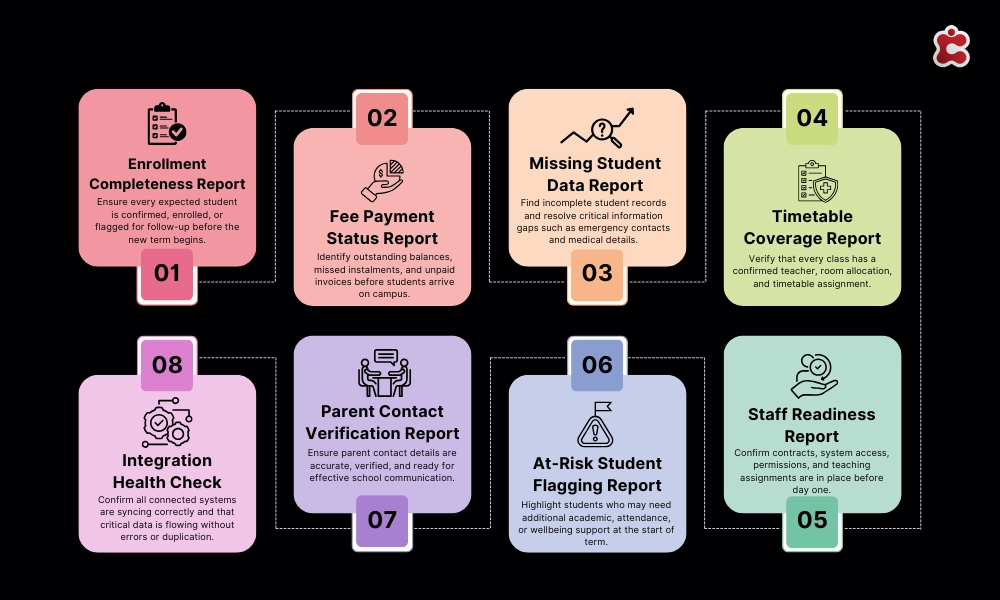
The 8 Essential Pre-Term Reports Your Complete Checklist
The checklist below covers the eight reports that should be non-negotiable in every school’s pre-term routine. Each is mapped to the specific Classter feature that generates it, so if you are a Classter user, you know exactly where to go. If you are not, the categories still define what you need to be able to pull from whatever system you are using.
| # | Report | What it tells you | Classter feature |
| 1 | Enrollment Completeness | Who is confirmed, who is pending, who has dropped off the radar | Admissions module dashboards |
| 2 | Fee Payment Status | Which families owe fees before students arrive on day one | Billing & Payments reports |
| 3 | Missing Student Data | Blank or incomplete fields in key student profile areas | Core module data validation tools |
| 4 | Timetable Coverage | Classes that have no assigned teacher or unresolved scheduling gaps | Academics & LMS scheduling view |
| 5 | Staff Readiness | Unsigned contracts, missing access rights, unassigned module roles | HR module and role-based access setup |
| 6 | At-Risk Student Flagging | Students who ended last year with low grades or poor attendance | SIS analytics and grade/attendance history |
| 7 | Parent Contact Verification | Outdated or missing email addresses and phone numbers | Core module contact management |
| 8 | Integration Health Check | Whether all connected systems are syncing correctly | Integrations & API status dashboard |
What follows is a detailed breakdown of each report: what it tells you, what to look for, and how to interpret what you find.
Report 1: Enrollment Completeness Report
Purpose: to know, with certainty, which students are confirmed for the coming term and which are not.
An enrollment completeness report gives you a real-time view of every student expected for the coming term, segmented by status: confirmed, pending, conditionally enrolled, or withdrawn. It is the foundational document on which every other pre-term check depends. If your enrollment data is inaccurate, every report that follows it will be too.
What to look for
- Any student whose enrollment status is pending within four weeks of term. Each one needs a direct follow-up.
- Students who were enrolled last year but have no status record for the coming year. These may be withdrawals that were never formally recorded, or administrative gaps that need resolution.
- New joiners who have an offer on record but have not completed the final enrollment step.
In Classter, this report is generated directly from the Admissions module dashboard, which gives a live view of enrollment status across the full cohort, filterable by year group, programme, or intake date. No export required.
Report 2: Fee Payment Status Report
Purpose: to identify outstanding fee balances before students arrive, so that follow-up happens before term rather than on day one.
A fee payment status report shows which families have paid in full, which have an agreed payment plan in place and are on track, which have an outstanding balance with no plan, and which have not engaged with invoicing at all. The last two categories are the ones that need action.
What to look for
- Families with an outstanding balance and no payment plan recorded.
- Families on an instalment plan who have missed a payment due before term.
- Invoices that were issued but show no payment activity at all these may indicate a delivery problem rather than a non-payment decision.
Classter’s Billing & Payments module generates this report directly from live payment data. Because billing is integrated with the student record, the report shows payment status against the enrolled student, not just against an invoice number. You can see at a glance which enrolled students have an unresolved financial situation.
Report 3: Missing Student Data Report
Purpose: to identify blank or incomplete fields in student records before those gaps cause problems on day one.
Every student record contains fields that are operationally critical and fields that are administratively useful. A missing preferred name is inconvenient. A missing emergency contact is a safeguarding issue. A missing medical alert is potentially dangerous. The missing student data report distinguishes between these categories and surfaces the critical gaps for immediate action.
What to look for
- Missing emergency contact information for any student.
- Missing or incomplete medical information, including allergy alerts and medication requirements.
- Missing consent records for activities, photography, or data processing where these are required.
- Blank fields in year-group or programme assignment that will affect timetabling.
Classter’s Core module data validation tools run against defined field requirements and flag records that do not meet the completeness criteria you configure. The report is filterable by field type, so you can pull a list of all students with missing emergency contacts independently of those with missing dietary preferences.
Report 4: Timetable Coverage Report
Purpose: to confirm that every class on the published timetable has a confirmed teacher assignment and a confirmed room allocation.
Timetable coverage is the pre-term report that most directly affects what happens on day one. A class without a teacher is an immediate operational crisis. A room double-booking is a logistical problem that does not reveal itself until both groups arrive. Both are preventable with a coverage report run with enough lead time to resolve what it flags.
What to look for
- Any class session with no teacher assigned.
- Any teacher who appears on the timetable during a period when they are recorded as unavailable.
- Any room that is allocated to two sessions at the same time.
- Any class group that is missing from the timetable entirely.
Classter’s Academics & LMS module provides a scheduling view that flags conflicts and gaps automatically. Teacher assignments, room allocations, and cohort assignments are all visible in a single interface, and the system highlights clashes before they are confirmed rather than after they cause a problem.
Report 5: Staff Readiness Report
Purpose: to confirm that every member of staff who will be on site on day one has a signed contract, the correct system access rights, and the right module assignments in your school management system.
Staff readiness is the pre-term report that is most often overlooked and most disruptive when its findings are discovered on day one. A teacher who cannot log into the attendance system on the first morning of term creates a problem that takes hours to resolve and requires IT support at the worst possible moment.
What to look for
- Any staff member whose contract is not countersigned before term.
- New staff who have not been assigned system access credentials.
- Existing staff whose role has changed and whose access rights have not been updated to reflect their new responsibilities.
- Teaching staff who have not been assigned to the classes they are timetabled to teach within the system.
In Classter, the HR module tracks contract status and system access configuration. Role-based access setup ensures that staff have the permissions their role requires and that former staff whose roles have ended do not retain access they should not have. Running this report before term is also a data security practice, not just an operational one.
Report 6: At-Risk Student Flagging Report
Purpose: to identify students who ended last year with indicators that suggest they may need additional support, intervention, or monitoring at the start of the new term.
An at-risk flagging report is not a prediction. It is a prompt. A student who ended the previous year with below-threshold grades or significantly poor attendance may have had circumstances that have since changed. The report does not decide what to do. It ensures that the relevant staff know who to look out for, and that support arrangements are in place before the student arrives rather than three weeks into term.
What to look for
- Students whose end-of-year grades fell below defined thresholds in core subjects.
- Students whose attendance in the final term fell below the school’s intervention threshold.
- Students who were on an active support plan at the end of last year that has not been reviewed or renewed.
- Students with a significant pattern of unexplained absences in the previous year.
Classter’s SIS analytics and grade history view allow administrators to filter students by grade performance and attendance record across previous terms. The at-risk flag can be set automatically based on configurable thresholds, so the report surfaces the relevant students without requiring manual review of every individual record.
Report 7: Parent Contact Verification Report
Purpose: to identify families whose contact information is outdated, incomplete, or unverified before term begins.
Parent contact data degrades faster than most schools expect. Families move. Phone numbers change. Email addresses become inactive. A contact record that was accurate in October may be unreachable by September. The parent contact verification report surfaces the records most likely to generate a failed communication in the first week of term.
What to look for
- Email addresses that have generated delivery failures in previous communications.
- Phone numbers recorded in a format that suggests they are outdated or incorrect.
- Records where no contact has been logged against the parent record for more than twelve months.
- Students for whom only one contact method is recorded and it is unverified.
Classter’s Core module contact management tracks communication history against parent records. The verification report can be run directly and the output used to trigger a targeted data-update request through the parent portal, asking families to confirm or correct their details before term starts. The request goes out through the system. Staff do not need to make individual calls.
Report 8: Integration Health Check
Purpose: to verify that all systems connected to your school management platform are syncing correctly and that no data is being lost or duplicated at the point of integration.
Integration failures are the pre-term risk that is most invisible until it causes a serious problem. A sync that is failing silently between your SIS and your finance system means that payment records in one system do not reflect what is happening in the other. A broken connection between your attendance system and your safeguarding tool means that absence flags are not being raised automatically. These failures do not announce themselves they surface weeks later as unexplained discrepancies.
What to look for
- Any integration that has not completed a successful sync within the expected interval.
- Any API connection reporting an authentication error or expired credential.
- Data discrepancies between systems that should be showing identical records for example, a student count that differs between your SIS and your LMS.
- Any integration that was added or modified during the summer that has not been tested against live data.
Classter’s Integrations & API status dashboard provides a real-time view of all connected system statuses, last successful sync times, and any flagged errors. Because Classter centralises the majority of school data functions within a single platform rather than requiring a patchwork of separate integrations the surface area for integration failures is significantly smaller than in a fragmented stack. But for any external connections that are in place, this dashboard is the single place to check them all.
How to Act on What Each Report Tells You
Running the reports is the first half of the process. Acting on what they surface is the half that actually prevents day-one chaos. The table below maps each report to its recommended action path and the threshold at which an issue should be escalated beyond the standard resolution process.
| Report | If it flags an issue | Escalate if |
| Enrollment Completeness | Contact pending students directly. Set a re-confirmation deadline. Move no-responses to waitlist after the deadline passes. | More than 5% of expected cohort is unconfirmed within two weeks of term. |
| Fee Payment Status | Send automated payment reminders via the billing module. Flag overdue accounts for a personal follow-up call from the bursar. | Outstanding fees exceed a defined threshold, or a student with a substantial balance is due to arrive with no payment plan in place. |
| Missing Student Data | Send targeted data-completion requests to the relevant families. Prioritise medical, emergency contact, and consent fields above all others. | Critical safeguarding fields (emergency contact, medical information) are blank for any student. |
| Timetable Coverage | Identify the gap: is it a missing teacher assignment, a room conflict, or a scheduling error? Resolve each gap type through the timetabling module. | Any class is without a confirmed teacher assignment within one week of term. |
| Staff Readiness | Chase outstanding contracts through HR. Assign missing system access rights. Confirm module assignments for all teaching and admin staff. | Any staff member who will be on site on day one does not have confirmed system access. |
| At-Risk Flagging | Notify the relevant form tutor or year head. Schedule a pre-term check-in. Flag for the SENCO if additional support is indicated. | A student flagged as at-risk has no intervention plan in place before the start of term. |
| Parent Contact Verification | Send a contact-details verification request via the parent portal. Give families a deadline to confirm or update their information. | Emergency contact information is missing or unverified for any student. |
| Integration Health Check | Identify the failing sync, check API credentials and data mapping, and resolve before go-live. Contact your platform support team if the issue is not resolvable internally. | Any integration that affects attendance recording, finance, or safeguarding systems is not syncing correctly within 72 hours of term. |
Building a Pre-Term Reporting Calendar
The reports in this checklist are most valuable when they are run at the right time early enough that the issues they surface can be resolved before term, and often enough that a clean bill of health in July does not hide problems that emerge in August.
The calendar below structures the reporting cycle across the six weeks before term. It is designed to be assigned to named owners rather than left as a general responsibility, and to be repeated in the same form every year so that the process becomes institutional knowledge rather than individual expertise.
| When | Timing | Reports to run | Owner |
| First run | 6 weeks before term | Enrollment Completeness, Fee Payment Status, Missing Student Data, Parent Contact Verification | Admissions / Data Manager |
| Second run | 3 weeks before term | All 8 reports. Resolve issues flagged in first run. Re-run enrollment and fee reports to check progress. | Admin lead + Department Heads |
| Third run | 1 week before term | Timetable Coverage, Staff Readiness, Integration Health Check, At-Risk Student Flagging | Timetabling lead + IT / SIS Manager |
| Final check | 48 hours before term | Integration Health Check, Staff Access Rights, any unresolved flags from the third run | IT / SIS Manager |
| Post day-one review | End of first week | Re-run Missing Data and Parent Contact reports. Capture any gaps that surfaced on day one. | Data Manager / Admin lead |
Making it repeatable
The value of a pre-term reporting calendar compounds over time. The first year you run it, you will find issues you did not know existed. The second year, you will find fewer of the same issues because the first year’s fixes will have held. By the third year, the calendar will feel like routine which is exactly what it should feel like.
The schools that start September most smoothly are not the ones with the best data by accident. They are the ones that built a process for checking it, assigned ownership for acting on it, and ran that process consistently enough that it became part of how the institution prepares for a new year.
The checklist in this guide is the process. The calendar is the structure. What remains is the decision to treat pre-term data management as seriously as it deserves.
Not sure your system is ready for September? Get a professional pre-term health check.
Running these eight reports is significantly easier when your school’s data is centralised in a platform designed for it. But even with the right tools, the findings of a pre-term reporting cycle are only as useful as the process built around them.
Classter’s Audits service gives schools a professional assessment of their data readiness, system configuration, and reporting setup before term begins carried out by a team that knows what a well-prepared institution looks like from the inside.
If you want an expert set of eyes on your pre-term data posture before the first bell rings, visit the Classter Audits service page to find out what a pre-term system health check involves and how to book one before the summer ends.
FAQ’s
Six weeks before term for the first run covering enrollment completeness, fee payment status, missing student data, and parent contact verification. Three weeks out you run all eight. One week out you focus on timetable coverage, staff readiness, and integration health. The further out you start, the more time you have to actually fix what gets flagged rather than just discovering it.
Prioritise by risk, not by volume. Missing emergency contact information for any student is a safeguarding issue it gets fixed first regardless of how many other flags there are. Outstanding fee balances and timetabling gaps come next. Parent contact verification and data formatting issues can be addressed in the first week of term without causing a crisis. The escalation thresholds in the action table tell you what cannot wait.
Yes. The eight report categories define what every school needs to be able to pull from whatever system it’s running. The Classter references tell you where to find each report in that platform specifically. If you’re using a different SIS or school management system, the question to ask is whether your platform can generate each of these reports natively or whether you’re pulling manual exports and reconciling them in a spreadsheet, which is itself a sign that your reporting infrastructure needs attention.
Yes. Integrations break silently. An API credential can expire over summer without anyone noticing. A system update on one platform can break a connection that was working fine in June. By the time the failure surfaces in a live student record discrepancy or a missed safeguarding alert, it’s already caused a problem. The integration health check takes minutes to run and protects against failures that would take days to unpick.
Assign named owners to each run in the calendar and document the process in writing not just which reports to run, but where to find them, what thresholds trigger escalation, and who to contact when something can’t be resolved at the operational level. The goal is for the process to belong to the institution, not to the individual who set it up. A well-documented reporting calendar survives staff turnover. An undocumented one doesn’t.