


Search for “best admissions software” and you’ll find plenty of lists. Look closely and most of them are written by vendors, often with their own product in first place. They’re useful for building a shortlist, but they can’t tell you which system fits your institution.
A better approach is to start from your own admissions process and ask every vendor the same questions. Here are the twelve that separate software that genuinely helps from software that only looks good in a demo.
Before you start: map your own process
Spend an hour writing down how admissions works today, from first enquiry to first day. Note your intakes and deadlines, the programmes people apply to, the documents you collect, how decisions are made, what applicants pay and when, and where things currently go wrong. You’ll use this map to judge every answer you get.
The applicant experience
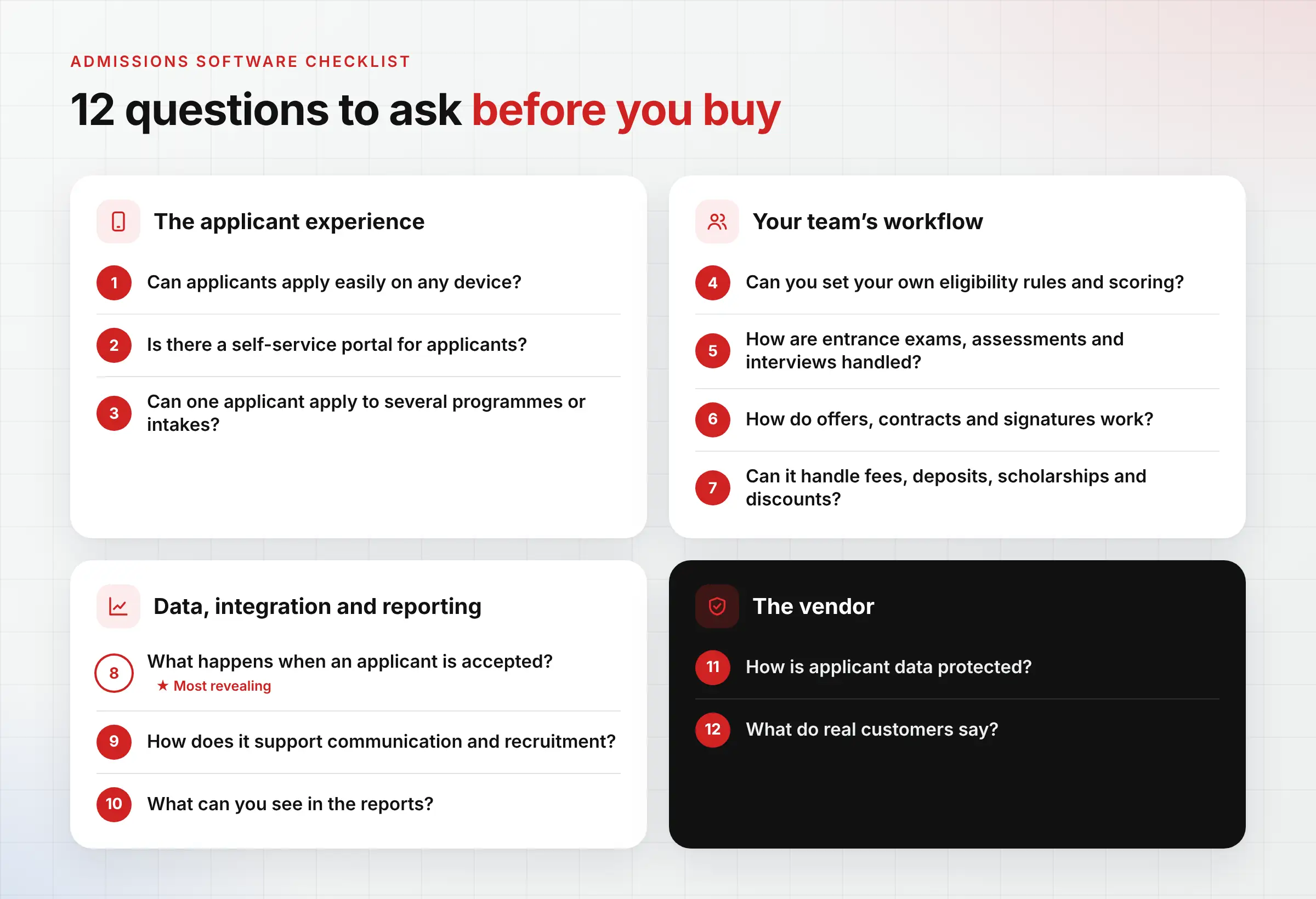
1. Can applicants apply easily on any device?
Most applicants start on a phone. Ask to see the application form on a mobile, not just a laptop, and check whether you can tailor forms by programme without asking the vendor to do it for you.
Why it matters: Every unnecessary field or broken mobile page loses applicants before you ever hear from them.
2. Is there a self-service portal for applicants?
Applicants should be able to upload documents, sign consents, pay fees and see exactly where their application stands without emailing your team.
Why it matters: Every “just checking on my application” email is time your staff could spend on decisions.
3. Can one applicant apply to several programmes or intakes?
Many applicants apply to more than one programme, and many institutions run several intakes a year. Check that this works with one applicant record, not duplicate profiles.
Why it matters: Duplicates create errors in reporting and confusion for applicants.
Your team’s workflow
4. Can you set your own eligibility rules and scoring?
Look for configurable entry criteria that score applicants automatically and flag edge cases for a person to review, rather than making every decision manually or every decision automatically.
Why it matters: Automation should speed up the clear cases and leave the judgement calls to your team.
5. How are entrance exams, assessments and interviews handled?
Ask whether you can schedule assessments, record results and feed scores straight into the admissions decision, or whether that lives in separate spreadsheets.
Why it matters: Results kept outside the system are easy to lose and hard to audit.
6. How do offers, contracts and signatures work?
Check that you can issue conditional offers, track acceptances and send contracts for e-signature automatically once a place is confirmed.
Why it matters: The gap between “offer sent” and “contract signed” is where many applicants quietly drop out.
7. Can it handle fees, deposits, scholarships and discounts?
Application fees, deposits, sibling discounts, early-bird offers and scholarships should apply automatically, with refunds and waivers recorded against the applicant, using a payment provider that works in your country.
Why it matters: Manual fee calculations are slow and one of the most common sources of disputes.
Data, integration and reporting
8. What happens when an applicant is accepted?
This is the most revealing question on the list. In a well-connected system, an accepted applicant becomes a student automatically, with their record, accounts and course access created without anyone re-typing their details.
Why it matters: Re-entering data into the student system is where errors creep in and where admissions and registry teams lose days every intake.
9. How does it support communication and recruitment?
Ask how you can send messages to applicants by email or SMS, manage open days and events, and connect to the marketing or CRM tools your team already uses.
Why it matters: Admissions is a relationship. Disconnected messages make you look disorganised to the families you’re trying to win.
10. What can you see in the reports?
You should be able to see conversion at each stage, where applicants drop off, which programmes are oversubscribed and which campaigns actually produce enrolments, without exporting to a spreadsheet first.
Why it matters: Without stage-by-stage numbers you can’t tell whether a problem is marketing, process or follow-up.
The vendor
11. How is applicant data protected?
Applicant files can include ID documents, transcripts and sometimes health or financial information. Ask where data is stored, which certifications the vendor holds, such as ISO 27001, and how they meet GDPR or your local data protection rules.
Why it matters: You remain responsible for applicant data even when a vendor hosts it.
12. What do real customers say?
Ask for references from institutions like yours, and read verified reviews on independent sites, such as Capterra’s reviews of Classter. Pay particular attention to what reviewers say about ease of use and support, because those are the things a demo can’t show you.
Why it matters: Independent reviews show you what day-to-day life with the system is really like, from the people who use it every day.
Red flags to watch for
- Every customisation needs a paid change request from the vendor.
- The demo never shows the applicant’s side, only the admin screens.
- Accepted applicants have to be exported and imported into the student system.
- Reporting means “we can send you a CSV”.
- Pricing depends on modules you’ll only discover you need after signing.
Turn the questions into a scorecard
Give each question a weight based on your process map, score every shortlisted vendor from 1 to 5, and ask each one to demonstrate their answers using a real applicant scenario from your institution. The highest score on your own scenario is a far better guide than any top-ten list.
How Classter answers these questions
Classter’s Admissions module covers the full journey from enquiry to enrolment: customisable online forms, an applicant portal for documents, consents and progress tracking, eligibility rules with human review for edge cases, entrance exams, conditional offers with e-signed contracts, and automatic scholarships, discounts and application fees through Stripe, Viva or local payment providers.
When an applicant is accepted, Classter creates their student record, Microsoft 365 account and LMS access automatically, so nobody types their details twice. Live dashboards show conversion by stage, drop-off points and campaign performance, with export to Power BI.
For communication, Classter’s Academic CRM adds events management, mass email and SMS messaging and announcements, and connects to HubSpot for teams that run their marketing there.
The bottom line
The best admissions software isn’t the one at the top of a list. It’s the one that fits how your institution recruits, decides and enrols, and that hands every new student to the rest of your systems without a single re-typed record. Ask the twelve questions, score the answers against your own process, and the right choice usually becomes obvious.
Want to see how Classter answers all twelve?
Book a demo and bring your hardest admissions scenario.
FAQ’s
Admissions software manages the journey from a student’s first enquiry to their first day. It covers online application forms, document collection, eligibility checks, entrance exams, offers and contracts, application fees and communication with applicants. The best systems also turn accepted applicants into enrolled students automatically.
Ask what happens when an applicant is accepted. In a well-connected system, the applicant becomes a student automatically, with their record, accounts and course access created without anyone re-typing their details. If the vendor’s answer involves exports and imports, expect errors and extra work every intake.
Start by mapping your own admissions process, from first enquiry to first day. Then:
1. Weight the 12 questions according to what matters most to your institution.
2. Score each shortlisted vendor from 1 to 5 on each question.
3. Ask each vendor to demonstrate their answers using a real applicant scenario from your institution.
Watch out for these:
-every customisation needs a paid change request
-the demo only shows admin screens, never the applicant’s side
-accepted applicants have to be exported into the student system
-reporting means receiving a CSV file
-pricing depends on modules you only discover you need after signing
Classter’s Admissions module covers the full journey from enquiry to enrolment. It includes customisable online forms, an applicant portal, eligibility rules with human review for edge cases, entrance exams, conditional offers with e-signed contracts, and automatic scholarships, discounts and application fees. When an applicant is accepted, Classter automatically creates their student record, Microsoft 365 account and LMS access.