


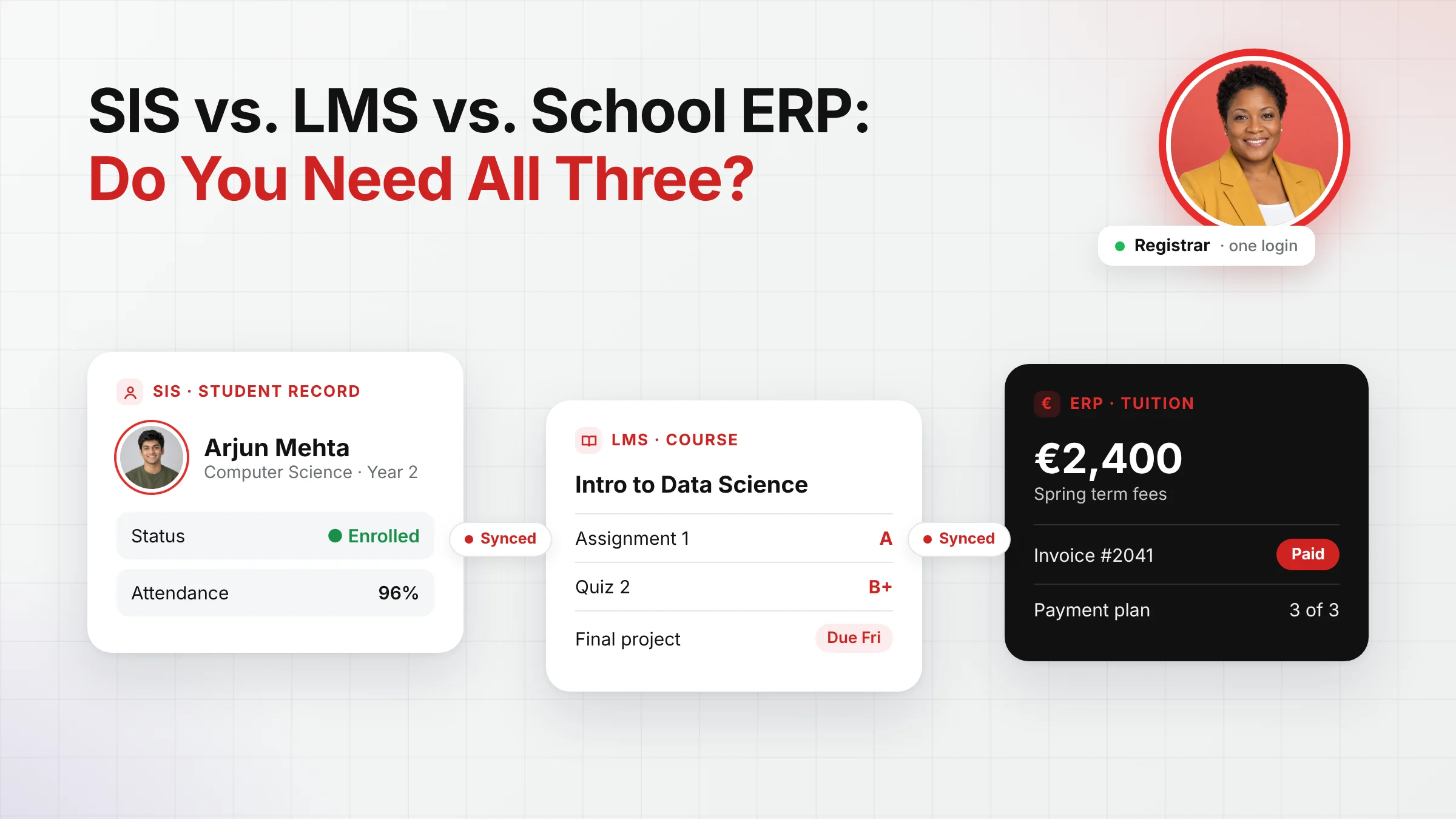
Shop for school software and you run straight into an alphabet soup: SIS, LMS, ERP, sometimes CRM and MIS as well. Vendors use the terms loosely, products overlap, and it’s easy to end up paying for three systems that each hold a slightly different version of the same student.
This guide explains what each type of system actually does, where they overlap, and how to decide whether you need three separate tools or one platform that covers all three jobs.
What is an SIS?
A student information system (SIS) is the official record of every student. It holds who they are, what they’re enrolled in, when they attend, how they’re assessed and what qualifications they’ve earned. If an auditor, a parent or a ministry asks a question about a student, the answer should come from the SIS.
Typical SIS functions include:
- Admissions and enrolment
- Student and family profiles
- Attendance and behaviour records
- Timetables and class lists
- Grades, report cards and transcripts
- Portals for parents, students and staff
In short, the SIS is the system of record. Everything else depends on it being right.
What is an LMS?
A learning management system (LMS) is where teaching and learning happen day to day. Teachers publish lessons and materials, set assignments and quizzes, and give feedback. Students submit work, join online classes and track what’s due.
Typical LMS functions include:
- Course pages and learning materials
- Assignments, submissions and quizzes
- Coursework gradebooks and feedback
- Discussion forums and announcements
- Online and blended classes
Where the SIS records that a student is enrolled in Year 10 Biology, the LMS is where they actually do Year 10 Biology.all three. That matters even more now that AI features are arriving in school software, because AI is often where processing quietly leaves the region.
What is a school ERP?
An enterprise resource planning (ERP) system runs the business side of an institution: money, people and resources. For schools and universities, that means everything from tuition fees to payroll.
Typical school ERP functions include:
- Tuition fees, billing and payment plans
- Invoicing, receipts and debt follow-up
- Budgeting and financial reporting
- HR, staff records and payroll
- Procurement, inventory and facilities
One caution: some vendors use “school ERP” to mean an all-in-one platform that includes SIS and LMS features too. When comparing products, ask exactly which functions are included rather than relying on the label.
SIS vs. LMS vs. ERP at a glance
| SIS | LMS | School ERP | |
| Main job | Keeps the official record of every student | Delivers teaching and coursework | Runs the business side of the institution |
| Main users | Registrars, admin staff, school leaders, parents | Teachers and students | Finance, HR and operations teams |
| Key data | Enrolment, attendance, grades, timetables, transcripts | Course content, assignments, quizzes, submissions | Fees, invoices, payroll, budgets, purchasing |
| Typical question it answers | “Is this student enrolled, and how are they doing?” | “What do students need to do this week?” | “Who has paid, and are we on budget?” |
Where they overlap, and why that’s the real problem
On paper, the three systems do separate jobs. In practice, they all depend on the same core data: who the students are and what they’re enrolled in.
- Enrolment drives everything. A student enrolled in the SIS needs to appear in the right LMS courses and generate the right fees in the ERP.
- Grades travel. Coursework marked in the LMS often needs to reach the SIS for report cards and transcripts.
- Money and records are linked. A withdrawal recorded in the SIS should stop invoices in the ERP and remove access in the LMS.
When these live in three separate systems from three vendors, someone has to keep them in sync. That usually means nightly integrations, CSV exports, manual double entry, or all three. The costs add up quietly:
- Duplicate records and mismatched names or class lists
- Delays between a change in one system and the others
- Several logins for staff, students and parents
- Three contracts, three support desks and three renewal cycles
- More companies holding student data, which means more to check under GDPR
This hidden cost is why the real question isn’t “Which of the three do we need?” but “How many systems do we want to run them in?” te, security policies and compliance status in the Classter Trust Center at trust.classter.com, which makes the first conversation with a data protection officer a short one.
Do you need all three?
Almost every institution needs all three functions. You need to keep student records, deliver teaching and manage money. What you don’t necessarily need is three separate systems.
A practical way to decide:
- You’re choosing software from scratch, or replacing several old tools. An all-in-one platform is usually the simplest and cheapest option over time, because the data only lives in one place.
- Your teachers are committed to an existing LMS. Keep it, and choose an SIS and ERP that run on one platform and integrate cleanly with your LMS.
- You’re a large institution with specialist finance systems. Unify the student-facing side first (SIS and LMS), and connect finance through a well-documented integration.
If you keep separate systems, insist on open standards
If your setup will include more than one vendor, make interoperability a requirement, not a nice-to-have. Standards such as 1EdTech’s OneRoster exist specifically to move class rosters and grades between student systems and learning platforms securely, without custom code for every connection.
Before you sign, ask each vendor:
- Which data syncs automatically between systems, and how often?
- Which open standards do you support?
- Who fixes a sync when it breaks: you, the other vendor, or us?
- Is there an open API, and is it documented?
- What does the integration cost, now and at renewal?
How Classter brings it together
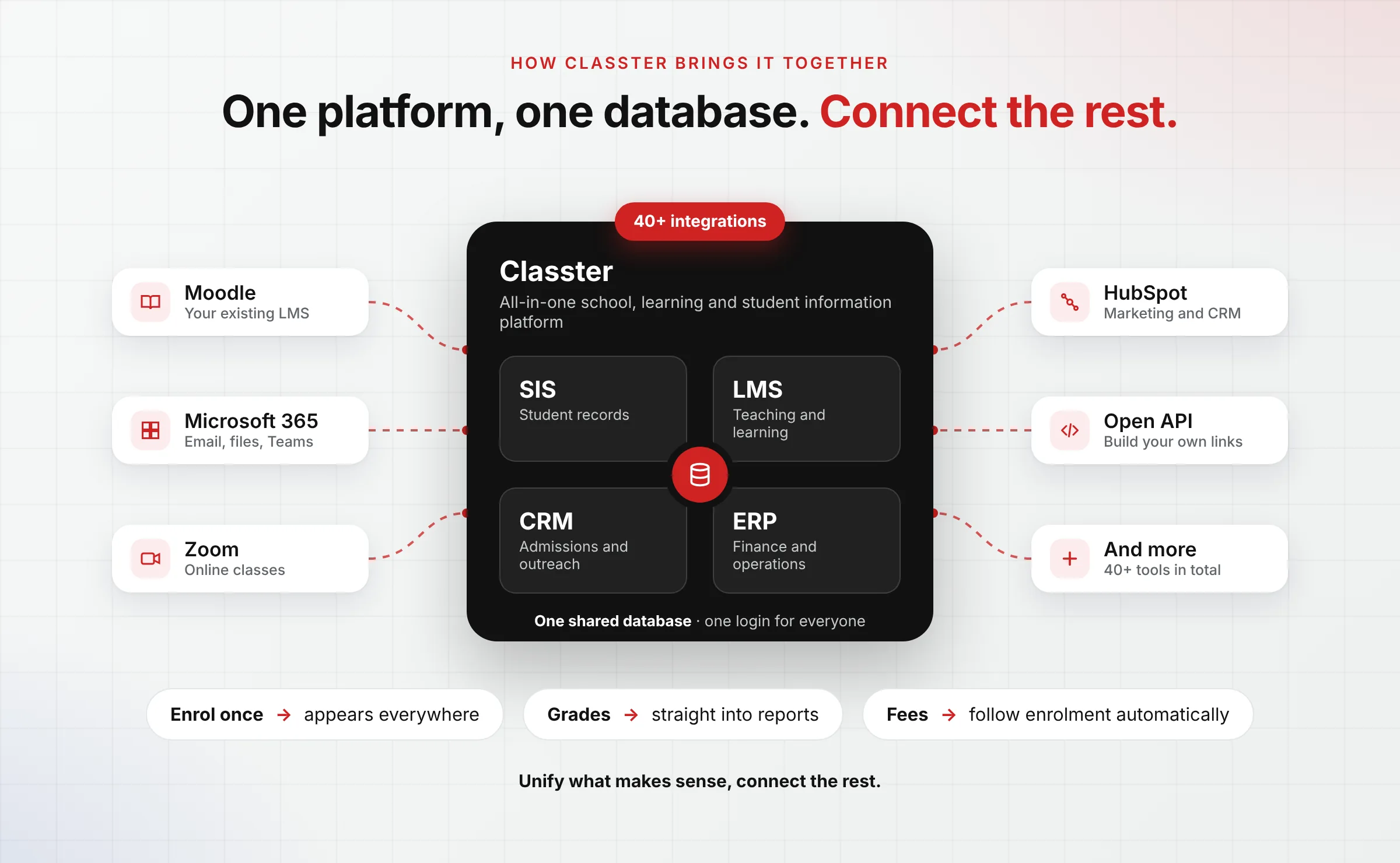
Classter was built to remove the need to choose. A student information system, a learning management system, an academic CRM and an ERP for educational institutions all run on one platform with one database. A student enrolled once appears everywhere they need to, grades flow straight into reports, and fees follow enrolment automatically.
For institutions that want to keep tools they already use, Classter integrates with more than 40 platforms, including Moodle, Microsoft 365 and Zoom, and offers an open API. You can unify what makes sense and connect the rest.
The bottom line
SIS, LMS and ERP describe three different jobs: keeping the record, delivering the learning and running the institution. Every school needs all three. The decision that really matters is whether those jobs share one source of truth or depend on syncs between separate systems. Fewer systems usually means fewer errors, fewer logins and a much simpler conversation about student data.
Want to see what SIS, LMS and ERP look like on one platform?
Book a demo with our team.
FAQ’s
A student information system (SIS) is the official record of every student: enrolment, attendance, grades, timetables and transcripts. A learning management system (LMS) is where teaching and learning happen day to day: course materials, assignments, quizzes and feedback. The SIS records that a student is enrolled in a course, and the LMS is where they actually do the coursework.
A school ERP (enterprise resource planning system) runs the business side of a school or university: tuition fees, billing and payment plans, invoicing, budgeting, HR, payroll, procurement and facilities. Some vendors also use “school ERP” for an all-in-one platform that includes SIS and LMS features, so always ask exactly which functions are included.
Almost every institution needs all three functions: keeping student records, delivering teaching and managing money. They don’t necessarily need three separate systems. An all-in-one platform covers all three with a single database, which avoids duplicate data and broken syncs between systems.
The three systems depend on the same core data, so someone has to keep them in sync. That usually leads to:
-duplicate or mismatched student records
-delays between systems
-several logins for staff, students and parents
-three contracts and three support desks
-more companies holding student data, which means more to check under GDPR
Yes. If your teachers are committed to an LMS they already use, keep it, and choose an SIS and ERP that run on one platform and integrate cleanly with it. Make sure the vendors support open standards such as 1EdTech’s OneRoster, so class rosters and grades move between systems automatically.
Classter runs a student information system, a learning management system, an academic CRM and an ERP for educational institutions on one platform with one database. A student enrolled once appears everywhere they need to be, grades flow straight into reports, and fees follow enrolment automatically. Classter also integrates with more than 40 platforms, including Moodle, Microsoft 365 and Zoom, and offers an open API.