


“Should our school use AI?” has stopped being a useful question. Every school already uses some form of it, from spam filters to timetabling engines, and the real debate in 2026 is narrower and more practical: where should AI be allowed to act, and who should it be acting for?
Policymakers have started answering that question, and a clear pattern is emerging. AI that faces students directly is getting more restrictions. AI that helps staff run the school is not. Understanding why that line exists, and where it gets blurry, is now part of every school leader’s job.
Regulators are drawing the line in public
The most visible example came in September, when New York City announced a one-year moratorium on student-facing generative AI for its youngest learners, up to eighth grade, for the 2026–27 school year. Earlier in the year, the city’s guidance had already ruled out using AI to make decisions about grading, discipline and special education plans.
New York is not an outlier. By spring 2026, policy trackers were following well over a hundred AI-in-education bills across more than thirty US states, and several states now require every district to adopt a formal AI policy. The tone of the conversation has shifted too: district leaders increasingly describe AI governance as an ongoing leadership responsibility rather than a one-off policy document.
Europe is heading in the same direction through law rather than local policy. Under the EU AI Act, AI used to decide admissions, evaluate learning outcomes, place students at a level of education or monitor students during tests counts as “high-risk.” The deadline for those obligations has moved to 2 December 2027, but the direction of travel is settled. AI governance is now a regular topic in sector publications such as Education Week, and a clear governance framework will soon be expected rather than optional.
Two very different kinds of AI
Lumping every AI tool under one label hides the distinction regulators actually care about. In practice, school AI falls into two broad groups.
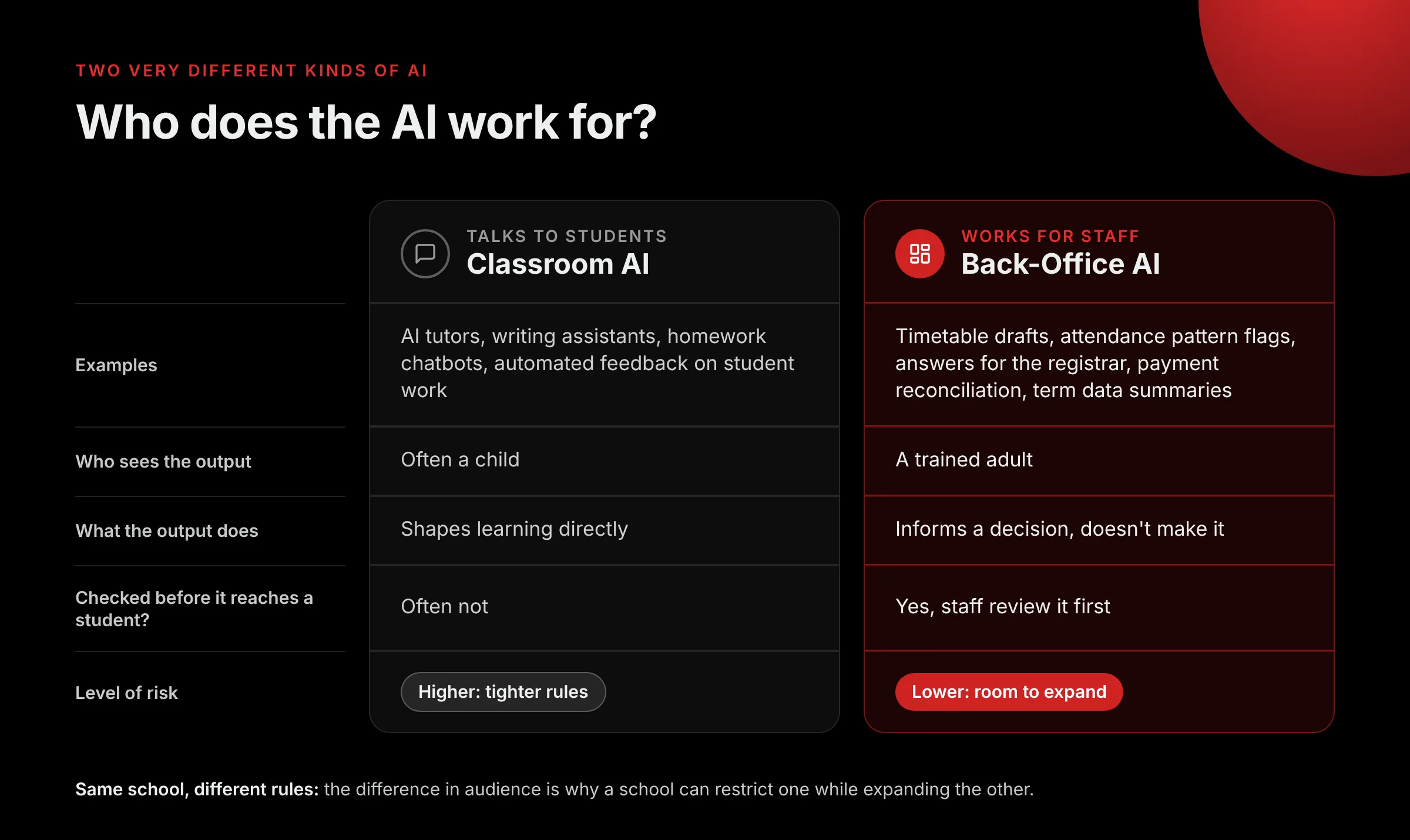
Classroom AI talks to students. It includes AI tutors, writing assistants, chatbots that answer homework questions and tools that generate feedback on student work. The person receiving the output is often a child, the output shapes learning directly, and nobody may review it before the student sees it.
Back-office AI works for staff. It drafts timetables, flags unusual attendance patterns, answers a registrar’s question about a setting, reconciles payments or summarises a term’s data for a leadership meeting. The person receiving the output is a trained adult, the output informs a decision rather than making it, and the work can be checked before anything reaches a student or parent.
That difference in audience is why the two groups carry such different levels of risk, and why the same school can reasonably restrict one while expanding the other.
Why back-office AI is a different risk
Four things make administrative AI easier to govern than student-facing AI.
- A professional reviews the output. A timetable suggestion or an attendance flag lands with someone who knows the school and can reject it.
- The AI informs; people decide. Good administrative tools surface options and patterns. The decision, and the accountability for it, stays with staff.
- The data stays where it already lives. AI built into your school management system works on records the school already holds, under permissions the school already controls, rather than sending student information to a separate consumer app.
Results are measurable. Hours saved on scheduling or errors caught in billing are easy to check. Learning gains from an AI tutor are much harder to prove.
Where the line gets blurry
It would be convenient if “back office” always meant “low risk,” but it doesn’t. Some of the most sensitive uses of AI in education are technically administrative.
Admissions scoring, automated placement into ability groups, AI-generated grades and exam proctoring all happen away from the classroom, yet they shape a student’s path directly. They are exactly the uses that the EU AI Act classes as high-risk and that New York kept away from AI decision-making.
The useful test isn’t whether a tool sits in the classroom or the office. It’s whether the AI makes or effectively makes a decision about an individual student. Flagging a pattern for a counsellor to look into is support. Automatically rejecting an applicant or lowering a grade is a decision, and it deserves the strictest scrutiny wherever it happens.
What responsible back-office AI looks like in practice
Classter’s approach to AI is built around that test: help staff see more and do less manual work, while keeping people in charge of anything that affects a student.
Take Epicurus, Classter’s AI assistant. It is designed to answer staff questions about how the platform works and how their own institution is set up, the kind of question that would otherwise go to a colleague or a support ticket. It works for the people running the school; it doesn’t talk to students or make decisions about them.
Attendance is another good example. AI Attendance Insights looks across attendance records to surface patterns that a single percentage hides, such as repeated absences on the same day or in the same subject. The output is a prompt for a teacher or pastoral lead to follow up, not an automated judgement about the student.
The same principle applies to exam scheduling. Building a clash-free exam timetable across rooms, invigilators and students sitting multiple papers is a constraint problem that AI handles well, and the result is reviewed by the exams team before anyone sees it.
Five questions to ask before switching on any AI tool
Whether you are evaluating a new product or reviewing what you already use, these questions sort low-risk tools from the ones that need a closer look.
- Who sees the output first? A trained staff member, or a student or parent?
- Does it make a decision about an individual student? If yes, treat it as high-risk regardless of where it sits.
- Can a person review, change or override every result? If not, ask the vendor why.
- Where does the data go? Does it stay inside your existing system and permissions, or is it copied to a third party?
- Can you explain it to a parent in one sentence? If you can’t describe what the tool does and why it is safe, your governance isn’t finished.
The bottom line
The debate over AI in schools is often framed as for or against. The more useful framing is who the AI works for. Restrictions on student-facing AI are likely to keep tightening, and schools should welcome the clarity. Meanwhile, AI that removes administrative workload, under human oversight and inside systems the school already trusts, is one of the clearest wins available to education leaders right now.
Want to see how Classter uses AI to support your staff while keeping them in control?
Book a demo with our team
FAQ’s
Classroom AI works directly with students, for example AI tutors, writing assistants and homework chatbots. Back-office AI works for staff. It helps with tasks such as building timetables, spotting attendance patterns, answering admin questions and reconciling payments. The key difference is who receives the output: a child or a trained adult.
Because its output often reaches a child directly, shapes learning, and may not be reviewed by anyone first. That’s why New York City paused student-facing generative AI for students from pre-K through eighth grade for the 2026–27 school year. Back-office AI is easier to govern, because a member of staff reviews the output before it affects anyone.
No. Some administrative uses directly affect a student’s future. Examples include scoring admissions applications, placing students in ability groups, generating grades and proctoring exams. The EU AI Act classes these as high-risk. A useful test is whether the AI makes, or effectively makes, a decision about an individual student. If it does, it needs the strictest checks, wherever it sits.
The EU AI Act treats AI used in education as high-risk when it’s used to decide admissions, evaluate learning outcomes, place students at a level of education or monitor students during tests. The deadline for those high-risk obligations has moved to 2 December 2027. Schools that use AI for any of these purposes should start building their AI governance now.
Classter’s AI is designed to support staff while keeping people in charge of anything that affects a student. Epicurus, Classter’s AI assistant, answers staff questions about the platform and their institution’s setup. AI Attendance Insights flags attendance patterns for teachers to follow up. AI exam scheduling builds clash-free timetables that the exams team reviews before they’re published.